AI Shopify Store Manager
Your Shopify store on one page: sales and profit, every product page scored and fixed, traffic and SEO from Google, your theme and articles. Do it yourself, or let your AI agent run it.Start free

What it does
Sales and profit
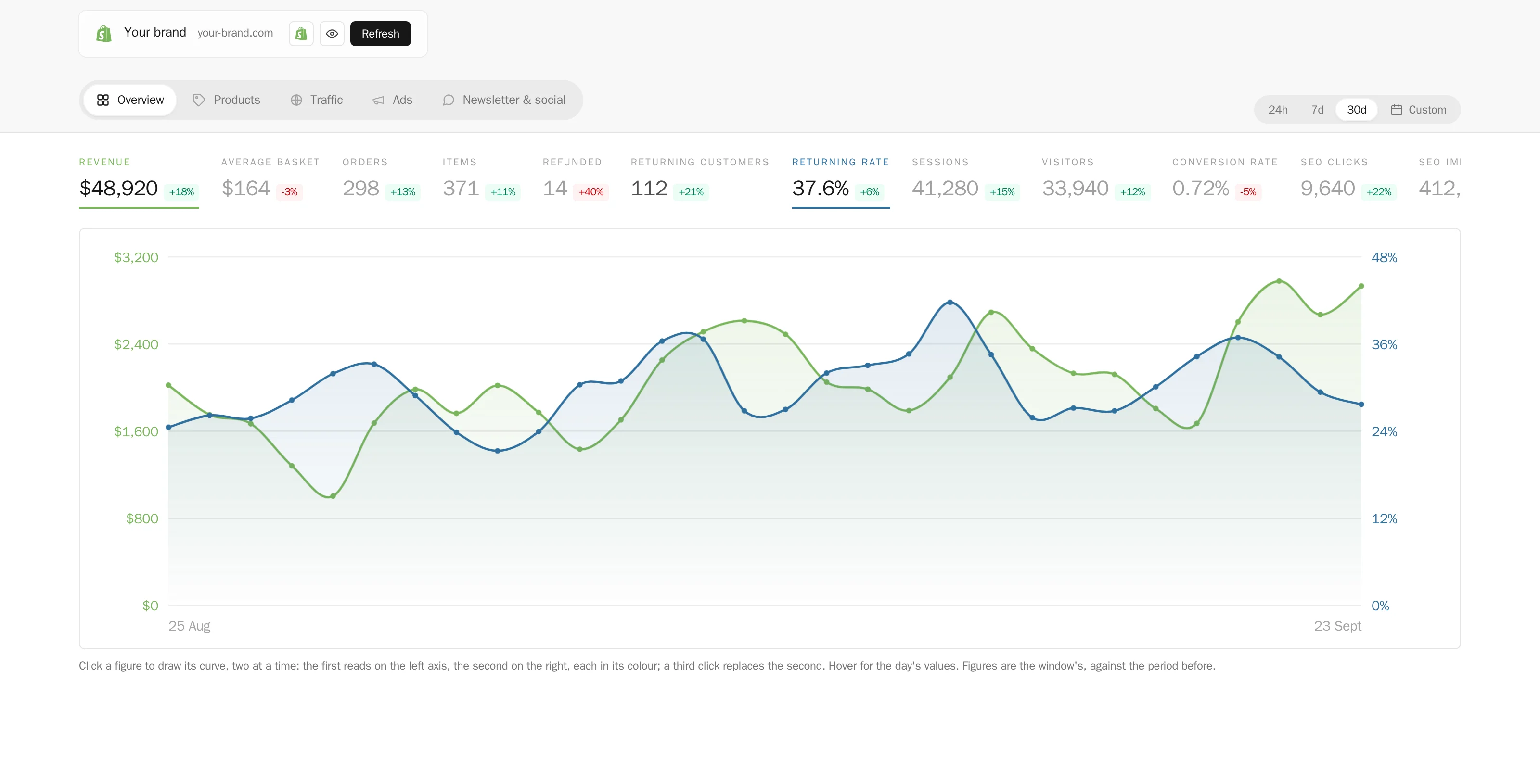
Revenue, orders and returning customers on the dates you choose, against the period before, and your real margin once the profit and loss is set up.
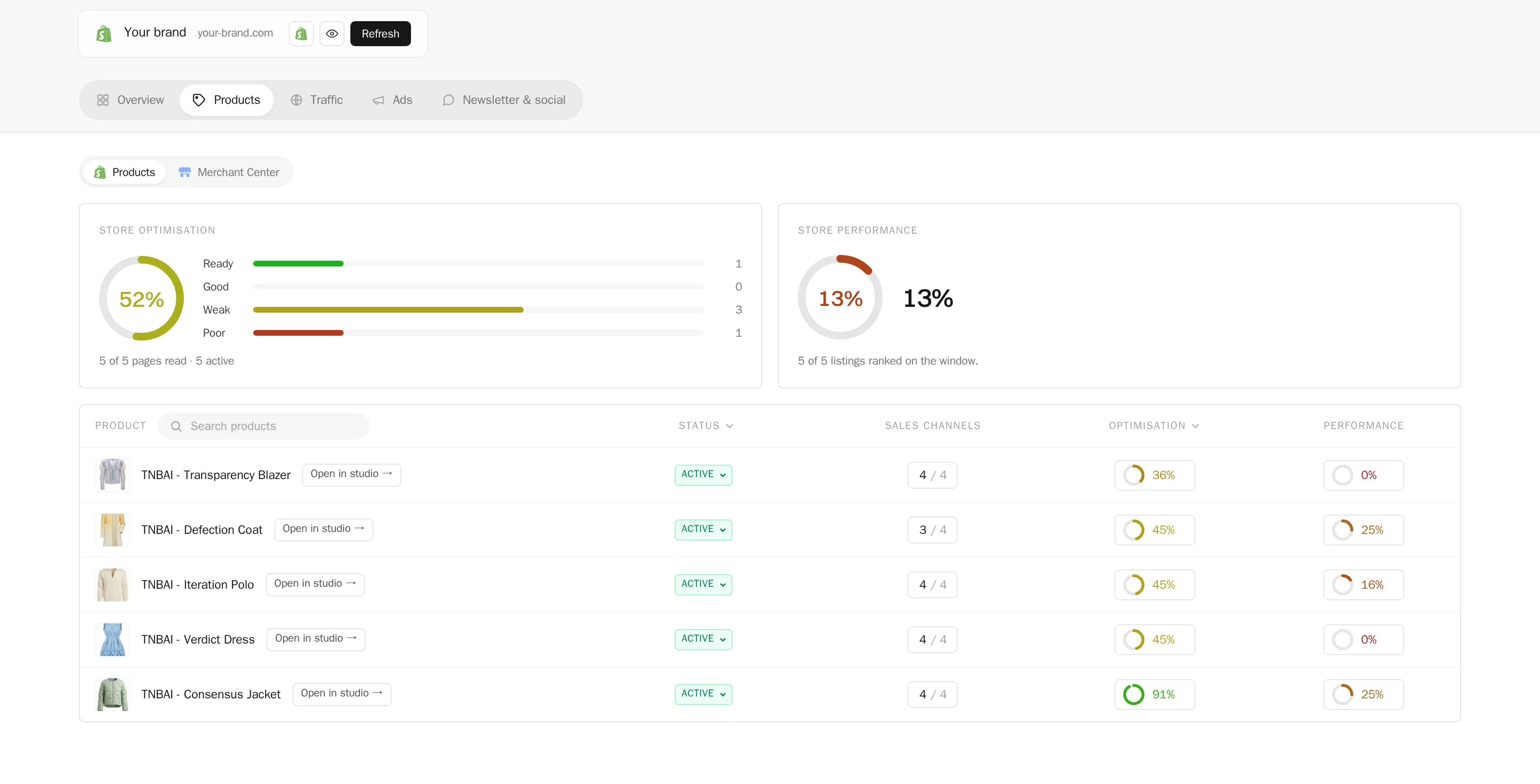
Every product page scored
Each listing scored on what makes it sell, the missing photos and videos added from your studio, texts rewritten, categories and sales channels set.
Traffic and SEO
Your Google Analytics sessions and sources, your Search Console queries and indexing, your Google Shopping listings and their missing attributes fixed.
Blog posts and pages
Articles and store pages written in your brand’s voice, illustrated with your creations, saved to your Shopify blog.
Your home page and theme
The pictures of your home page, pages and articles changed from your creations, and the theme’s texts rewritten.
Stock and costs
Days of stock per product and cost per item, so the margin you read is the one you make.
Visuals for every listing
The studio makes what the page lacks: your products on models, new scenes, video, sent to the product in one click.
Your agent can run it
Ask in a sentence, or give it a weekly job: it reads the store, fixes the pages and writes the articles, or prepares and waits for your yes.
Every source on one page
Every product page scored
Integrations
Which plan does what
| What | Plan |
|---|---|
| Read your store, its traffic and SEO | Every account |
| Write articles and pages; change product pages, stock, costs and the theme | Pro and up |
| Profit and loss | Pro and up |
| An AI agent | Every account · your plan sets its monthly spend |
SEO and traffic
Products and sales
Who it is for
Shopify Manager is made for fashion brands that sell on Shopify and want to see the whole store without opening five dashboards. A founder checks in a minute whether the month made money. The person in charge of the catalogue sees which product pages lack a photo, a video or a description, and fixes them from the same page. A brand without a marketing team hands the weekly work to its AI agent and only says yes or no.
How it works
- 1Connect your store. Open your Profile, tab Connectors, and press Connect on the Shopify card. Add Google Search Console, Google Analytics and Merchant Center with one Google sign-in.
- 2Read the Overview. Revenue, orders, average basket, items, refunds and returning customers on the dates you choose, each against the period before or the same dates a year earlier. Click a figure to draw its curve, a second one to compare them.
- 3Open the Profit & loss. Month by month: net sales, cost of goods, ad spend, shipping, payment fees and your own costs, down to profit and margin.
- 4Go through Products. Each product carries an optimisation score and a performance rank. Open one to add the missing photos and videos from your Studio, rewrite its texts, and set its categories and sales channels.
- 5Check Traffic. Sessions and sources from Google Analytics, queries and indexing from Search Console, your Google Shopping listings and their missing attributes.
- 6Keep the store fresh. Change the pictures of your home page from your creations, write articles and pages in your brand's voice, and save them to your Shopify blog.
Send a creation to your store’s files
New on 10 November 2026. In the window of any creation, the Store tab has a Send to store files button under the Shopify card. The image or the video goes to Content › Files in your Shopify admin without being attached to a product, ready for a theme section, a page, an email or a collection banner. The button reads “Sending to your files…” while Shopify processes the file, then turns green with a link to your Files page. Sending the same creation again makes a new copy.
What you can ask your AI agent
- “Which products sold best this week, and which ones have no model photo?”
- “Make a model photo for every product without one and file it under the product.”
- “Every Monday, write one article about my new arrivals and wait for my yes.”
- “Send this campaign picture to my store files.”
The agent reads the store as the page shows it, on the same dates, and acts with your rights. Anything that goes live, deletes or spends money waits for your approval, unless you decide otherwise.
What it does not do
It does not touch your orders, your customers or your payments, and it does not change prices. Stock held at several locations is changed in Shopify itself. The profit and loss gives a sound idea of whether a month made money: it is not an accounting statement.
FAQ
What is an AI Shopify store manager?+
A tool that reads your Shopify store as a whole and acts on it, with an AI agent that can do the work for you. In The New Black AI it is Shopify Manager: sales and profit, every product page scored and improved, traffic and SEO from Google, your home page, articles and pages, and the visuals they need from the studio.
Can an AI agent run my Shopify store?+
Much of it, yes. The agent works with your rights on the store and the Google accounts you connected. You set how much it does alone: it can act directly, or prepare the work — a product page, an article, a fix — and wait for your yes.
What does it connect to?+
Shopify through The New Black AI’s own app, and Google Search Console, Google Analytics and Merchant Center through one Google sign-in. Each connects in one click, and the connection is shared with your team.
Which plan do I need?+
Reading your store is open to every account. Acting on it — articles and pages, product pages, stock and costs, the theme — comes with Pro; the profit and loss with Pro. Every account has its AI agent.
Does it replace Shopify’s own AI tools?+
It works beside them, from outside your admin: it reads your store with the access you grant our Shopify app, adds what a store alone does not hold — Search Console, Analytics, Merchant Center — and makes the photos and videos your pages need.
And my ads and social posts?+
They have their own tools: Ads for your Meta, Google, Pinterest and X campaigns, Social Media for the week’s posts and each network’s analytics. Neither needs a Shopify store.
Is my store data safe?+
Shopify Manager sees only the accounts you connect, with the access each one grants, and only within your account and team. You can disconnect any source at any time from your profile, and what the agent does is recorded.
How do I send an image to my Shopify files without attaching it to a product?+
Open the creation, go to the Store tab and press Send to store files. The image or video lands in Content › Files of your Shopify admin, and a link to it appears once Shopify has processed it.
How far back can I read my sales?+
The last 30 days without a plan, and the whole history with any plan. Shopify first gives the last 60 days of orders; one click on Enable all data opens the full order history.
What does the profit and loss count?+
Net Shopify sales, the cost of goods from each variant's cost per item, your Meta, Google, Pinterest and X ad spend, shipping, payment fees and your own monthly costs, down to profit and margin for each month.
What does it not touch?+
Orders, customers, payments and prices. It reads them where needed to give you figures, and changes none of them.