Fashion Reel Templates & AI Motion Design
Ten Motion Design templates made for fashion reels: your photos or clips go into the slots, your words into the text fields, and the studio renders a 10-second animated video in 9:16, 4:5, 1:1 or 16:9. Each template opens already filled with an example, so you see the result before you change anything. One credit per video, on every plan.
Updated 30 September 2026
- 1Pick a template
- 2Replace the photos and the words
- 3Choose the format and render
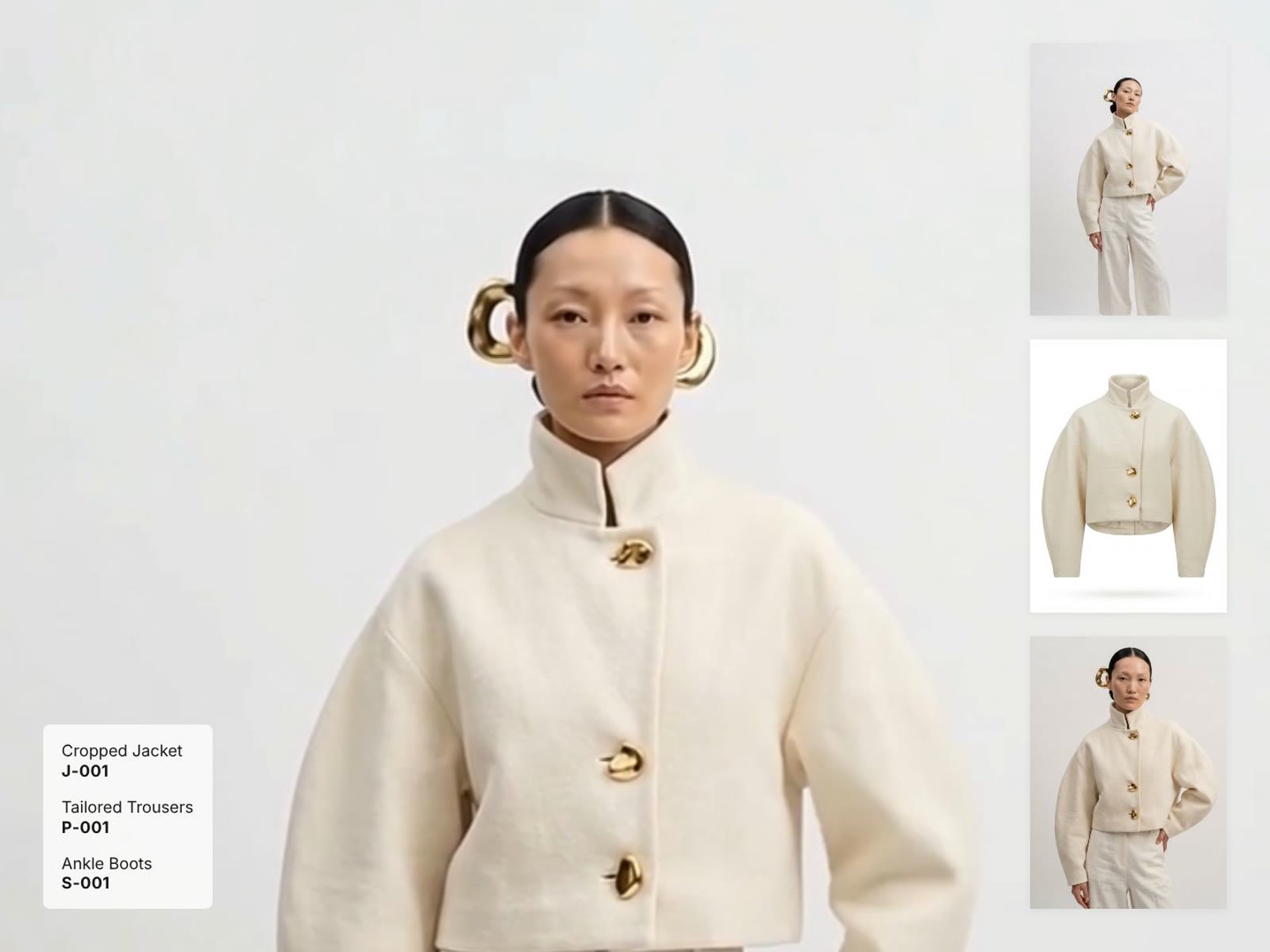
{{video:https://cloud.thenewblack.ai/storage/v1/object/public/assets/features/motion-look-film/preview-9x16.mp4|Look Film, a Motion Design template for fashion reels on The New Black AI}}
How it works
Pick a template
In the studio, open Video and filter the workflows by Motion Design. View template shows all ten side by side and the one you pick large, in 9:16; Use opens it.
Replace the photos and the words
Each slot takes a photo or a video from your studio, or a file you upload. Headlines, taglines, tags, colours and buttons are fields you edit; no logo or brand is imposed.
Choose the format and render
9:16 for Reels, TikTok and Stories, 4:5 or 1:1 for the feed, 16:9 for YouTube and your site. One credit, ten seconds.
The ten templates
| Template | What moves | Slots |
|---|---|---|
| Look Film | The look in motion full frame, three shots in a column beside it, the pieces listed below | 4 |
| Collection Panorama | Six looks standing in a row, the camera travelling along them | 6, cut-out |
| Split Reel | Two halves wiping through your pictures while the headline rises letter by letter | 4 |
| Style Post | One picture framed like a camera, a speech bubble, a headline rising word by word | 1 |
| Colour Drop | A big word, then each look slides in on its own colour | 4, cut-out |
| Phone Promo | The look playing in a phone, three product cards, a sale badge and a button | 4 |
| Cut Montage | Hard cuts in the rhythm of a campaign film, opened and closed by a word | 6 |
| Paper Collage | Prints taped on paper, then trading places like a moodboard being reworked | 8 |
| Lineup | One look at a time on a white page, then the whole line steps in | 6, cut-out |
| Character Select | Garments and looks rolling like a slot machine, then a line asks to choose | 6, cut-out |
Cut-out templates want pictures on a transparent background: make them with Remove Background or, for a clip, Remove Video Background set to Transparent.
{{video:https://cloud.thenewblack.ai/storage/v1/object/public/assets/features/motion-colour-drop/preview-9x16.mp4|Colour Drop, a Motion Design template for a range in several colourways}}
Or describe your own
The free Motion Design mode starts from a brief instead of a template: describe the animation, add up to four photos or clips, choose 5, 10 or 15 seconds, and the studio composes the film. Four credits. The whole method is in AI reel generator for fashion brands.
Why it matters
A fashion brand posts every week and rarely has a motion designer. The pictures already exist, from the studio or the last shoot; what is missing is the ten seconds that make them move in the rhythm of a feed. A template does that for one credit, and the result goes straight to your social agenda or into an ad.
Frequently asked questions
How much does a Motion Design video cost?+
One credit for a template video, four credits for a free Motion Design video from your brief.
Which formats can I export?+
9:16 for Reels, TikTok and Stories, 4:5 and 1:1 for the feed, and 16:9, for every template.
Can I use videos in the slots, not only photos?+
Yes. Every slot takes a photo or a video from your studio or your computer.
Can I change the text and the colours?+
Yes. Headlines, lines, tags, badges and colours are fields you edit; nothing about your brand is imposed.
Which plan do I need?+
None in particular: the templates are open to every plan, at one credit a video.
What is a cut-out template?+
A template that places your looks on its own background: Collection Panorama, Colour Drop, Lineup and Character Select. Give them photos or clips with a transparent background.
Try it yourself
Everything on this page was made in the studio. Your first designs are minutes away.
Open the studioRelated features
- Create an AI Video of a Fashion Model Turning AroundTurn a front and a back photo into a smooth AI turnaround video with Model 360: the model turns on the spot or the camera orbits, every detail of the outfit kept from every side.
- Create AI Generated Model VideosTurn a clothing photo into an AI model video: create the model, then bring the still to life with realistic motion, no photoshoot needed.
- Animate a Sketch with AI VideoAnimate a fashion sketch with AI: upload a drawing and get a short video where the illustration itself moves, for presentations and moodboards.
- AI Jewelry Video GeneratorTurn a jewelry photo into a video with AI: sparkle, macro detail and slow rotation from a single image, no product film shoot needed.
- AI Sunglasses VideoTurn a sunglasses photo into a video with AI: face turns, lens reflections and light play from a single image or a text description.
- AI Shoes and Sneakers VideoTurn a shoe or sneaker image into a video with AI: on foot movement, sole flex and turning angles from one photo or a text description.
- AI Bag Video GeneratorTurn a bag photo into a video with AI: carried movement, swaying hardware and true scale from one image, no product film shoot.
- Create Video from Text or Image: AI Fashion VideoTurn a still into a clip, or make the clip from words alone: start image, optional end image, format, 5 to 30 seconds, generated audio, 720p in Standard and 1080p in Pro. From 11 credits.
- AI Clothing Fashion Video GeneratorTurn any fashion image into a video in seconds: upload your visual, pick a duration, and get AI clothing videos for e-commerce and social.
- Edit a Video with AIChange a video with a sentence, in your own words: the light, the setting, the mood, a garment. The instruction goes to the model as written; the clip keeps its length and its sound.