SVG Clothing Sketch AI Generator
The SVG clothing sketch generator produces fashion flats as true vector files. Where a normal image is pixels, an SVG is paths: every seam, dart, and hem of the sketch is a line you can select, move, and restyle in Adobe Illustrator or any vector tool. The AI does the drawing in seconds; the vector format means the drawing is never final until you say so.
- 1Generate a clothing sketch
- 2Convert it to an SVG vector
- 3Finish it in your design software
This demo was recorded in our previous interface — an updated video of the new studio is on its way.
How it works
Generate a clothing sketch
Create a flat sketch of the garment in the studio. This is the raster starting point: the drawing itself, with its construction lines and details.
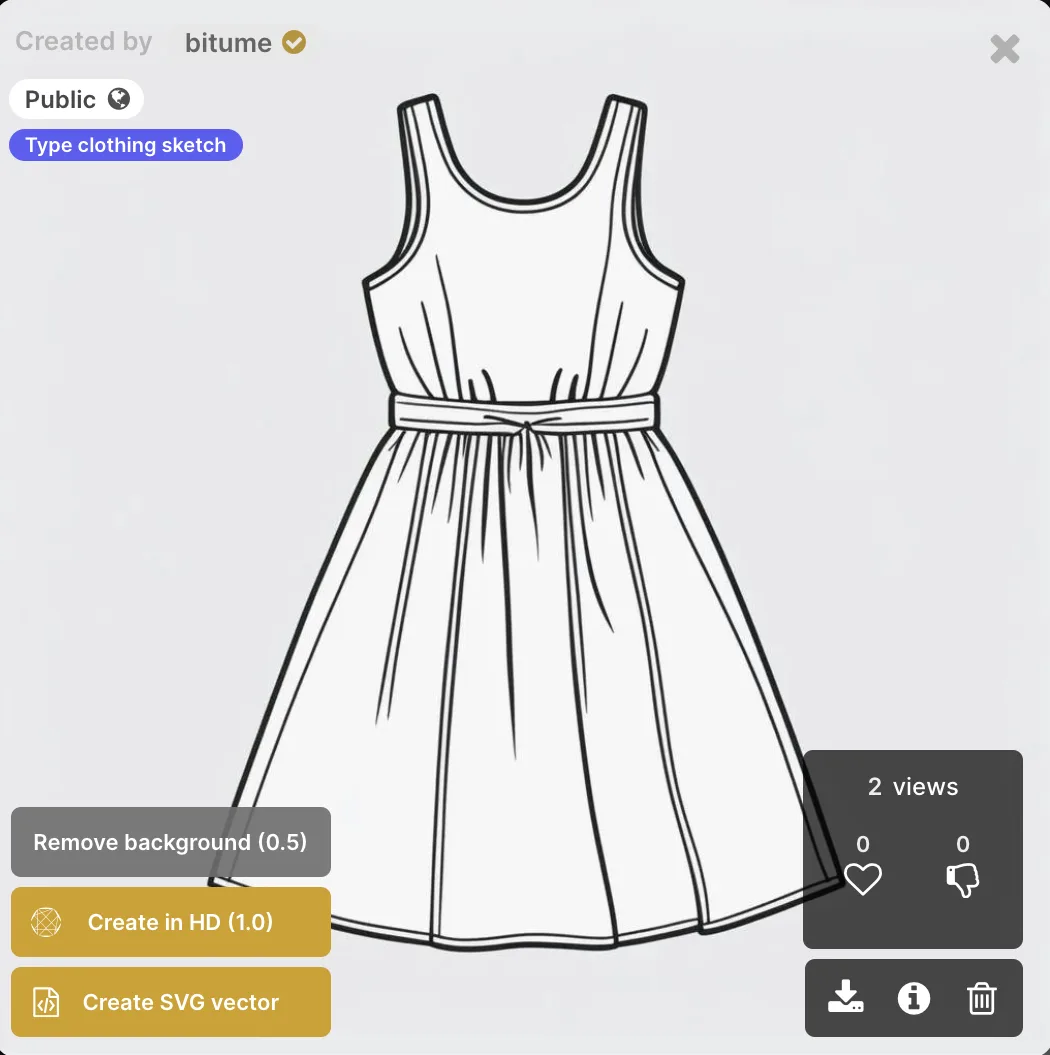
Convert it to an SVG vector
One click turns the sketch into a scalable vector graphic. The result keeps the drawing but rebuilds it as editable paths, ready to download.
Finish it in your design software
Open the SVG in Illustrator and work at the path level: adjust a neckline, lengthen a hem, change a line weight. The AI gives you the base in a fraction of the time a manual flat takes; you keep full control of the finish.
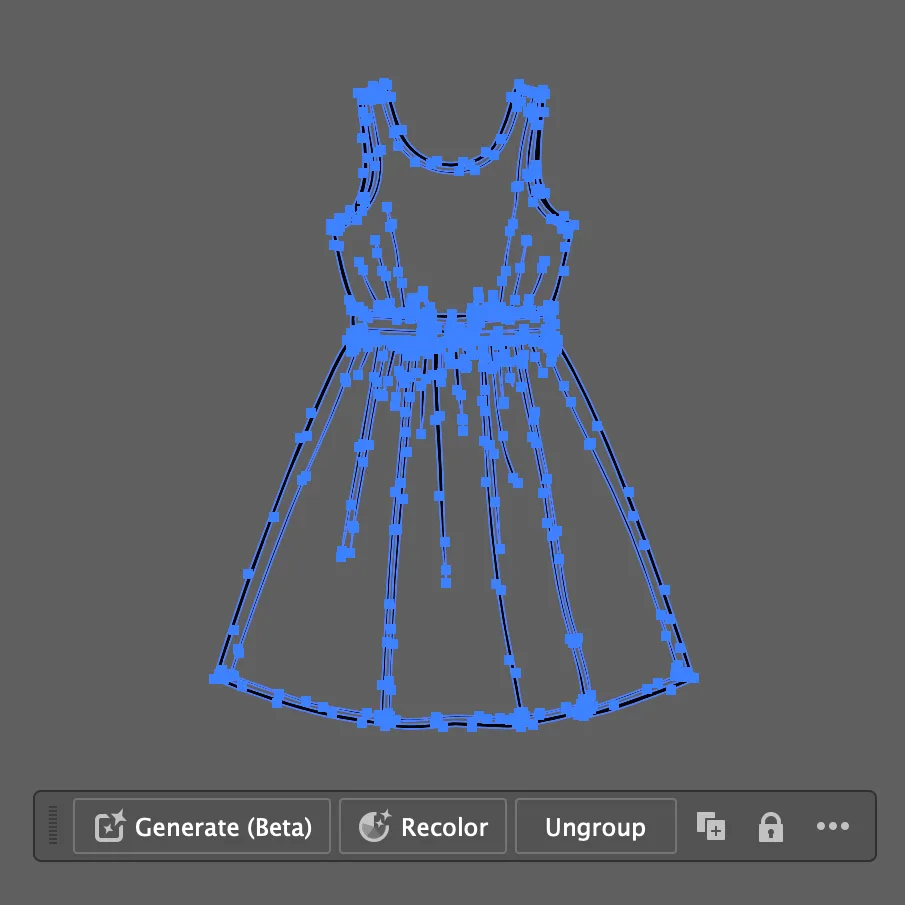
Why vectors matter in a tech pack
Tech packs get printed, scaled, and annotated, and raster sketches degrade at every step. An SVG stays sharp at any size and stays editable through every revision, which is why production teams ask for vector flats. In the studio, this closes the chain: describe a garment in the AI flat sketch generator, or draw the flat from a photo, convert to SVG, and place it in the tech pack. Open the tech pack studio to make your first vector sketch.
Frequently asked questions
What is the advantage of SVG over PNG here?+
A PNG is a finished picture; an SVG is the drawing's actual lines. SVG scales to any size without losing sharpness and opens in vector software as editable paths, so revising a detail means moving a line, not regenerating the sketch. For tech packs that go through rounds of changes, that difference is the whole workflow.
Which tools can open the files?+
Any vector editor that reads SVG, with Adobe Illustrator as the common case. Designers move from the AI generated base to a polished, detailed flat without leaving their usual toolchain.
Where does the SVG come from, text or an image?+
From a sketch created in the studio: generate the flat first, then convert it to SVG. The flat itself can be generated from a text description or drawn from a photo, whichever starting point you have.
How does this save time in practice?+
The base sketch, the slow part of drawing flats by hand, is produced in a fraction of the manual time, and the editing that remains happens on clean vector paths. The gain lands exactly where it counts: more iterations on the design, less time redrawing linework.
Try it yourself
Everything on this page was made in the studio. Your first designs are minutes away.
Open the studioRelated features
- AI Fashion Video from Reference ImagesPut your model, your garment and a place into one video: add up to three reference pictures, describe the scene, and get a 5 to 15 second fashion clip in 9:16, 1:1 or 16:9.
- Fashion Reel Templates & AI Motion DesignEighteen Motion Design templates for fashion reels: drop your photos or clips, edit the words, render a 10-second video in 9:16, 4:5, 1:1 or 16:9. One credit, every plan.
- AI Clothes Maker, Design Clothes Online: The New Black AIDesign clothes online with an AI clothes maker: describe the piece, see it worn in seconds, iterate, then send a tech pack to your factory. 1 credit per design.
- AI Image Generator for Fashion: Create or Edit Any ImageWrite what you want and get the image, or upload up to three references and describe the change: the free-prompt tool that creates or edits any fashion visual, in any format.
- Create Similar Outfits with AIUpload an outfit image and get close variations of it: same spirit, same silhouette, new pieces. The fast way to build a capsule around one look that works.
- AI Image Vectorizer for Fashion: Logo, Print and Artwork to SVGTurn a logo, a print or an illustration into a real SVG: colour shapes that scale to any size, ready for screen printing, embroidery, labels and Illustrator. 1 credit.
- Generate AI Fashion in Bulk for Your CatalogGenerate a whole catalog in one run: upload up to 30 product photos, pick a workflow, write one brief for the batch, and get AI models, try-ons or videos for every item at once.
- Create an AI Video of a Fashion Model Turning AroundTurn a front and a back photo into a smooth AI turnaround video with Model 360: the model turns on the spot or the camera orbits, every detail of the outfit kept from every side.
- AI Fashion Design for Kids, Toddlers and BabiesDesign kids fashion with AI: pick the age, from toddler to teenager, describe the outfit and get original children's clothing concepts.
- Extend an Image to a New Ratio with AIChange the aspect ratio of any photo with AI. Pick a new format such as 1:1, 9:16 or 16:9 and the AI extends the scene to fill it, instead of cropping what is already there.