Turn an Image into a Flat 2D Sketch
This feature turns any clothing photo into a clean flat sketch, and it does it in seconds instead of the hours the same drawing takes by hand. The AI reads the structure of the garment and its details, then redraws them as a production ready sketch, the piece every fashion tech pack is built around. Product development moves faster, the specification is accurate, and the conversation with your manufacturer gets easier and more professional.
Updated 3 October 2026
- 1Upload a clothing image
- 2Click on create a sketch
- 3Turn your sketch into SVG format
How it works
Upload a clothing image
The photo should be as clear as possible. A flat product shot works, and so does a model wearing the piece: the AI focuses on the main garment.
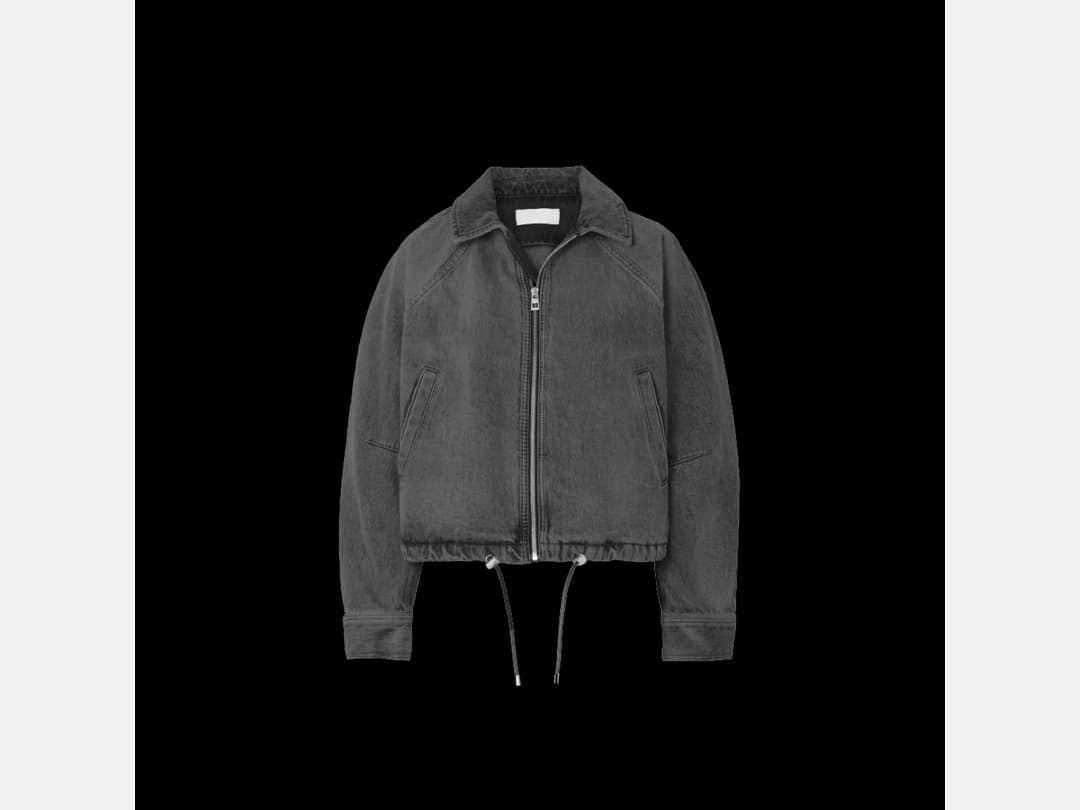
Click on create a sketch
The AI draws a close version of your clothing image as a flat sketch: seams, closures, pockets, collar. You will sometimes notice small differences from the original, which is normal.
Turn your sketch into SVG format
Every sketch can be converted to SVG. That gives you a vector file you can open in Illustrator and edit line by line, so changing a detail does not mean starting the drawing again.
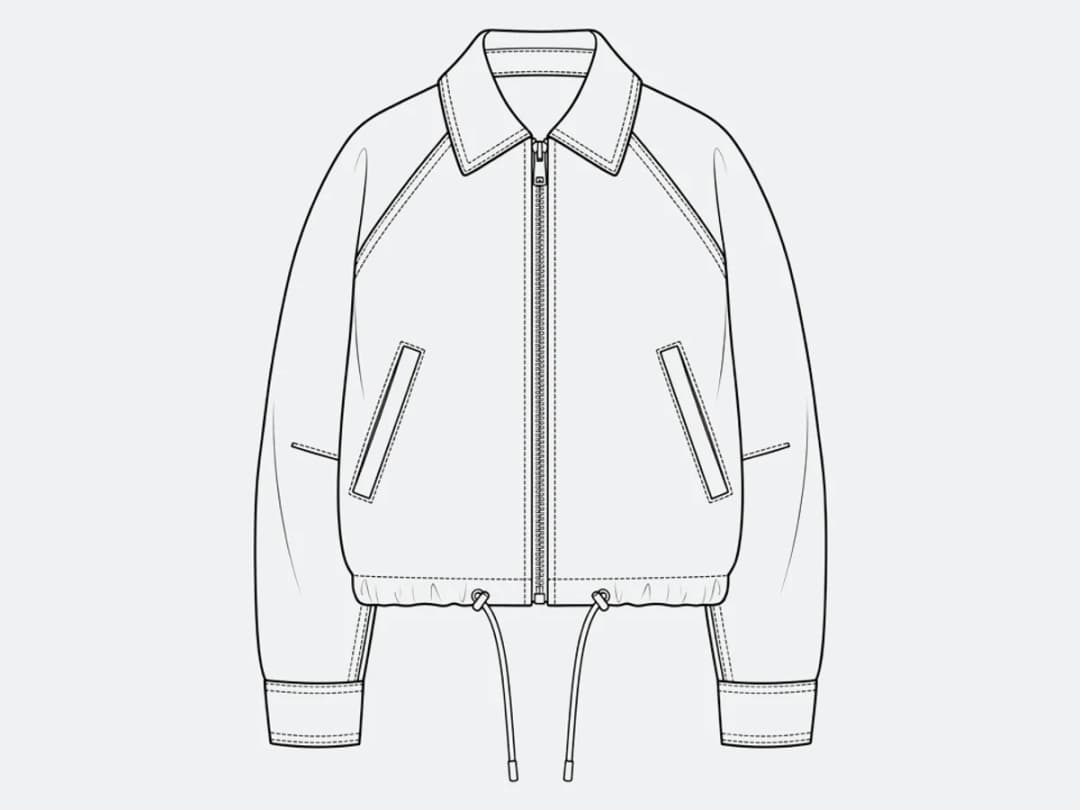
What is a flat sketch, and why does a tech pack need one?
A flat sketch, also called a technical flat or simply a flat, is the garment drawn as if laid on a table, in line only: no shading, no model, no styling, no atmosphere. Front and back, seams, darts, topstitching, pocket placement, closures, the collar shape. It is deliberately unbeautiful, because its job is not to sell the piece but to describe it without ambiguity.
Every tech pack is built on one. The measurements, the bill of materials and the construction notes all point at the drawing, and a factory reads the flat before it reads anything else. This is why a photograph is not a substitute: a photograph shows one garment in one light on one body, and a flat shows the decisions. Two people can disagree about a photo; a flat is what stops them.
Drawn by hand in Illustrator, a decent flat is an hour of work for a simple piece and a good deal more for anything with structure. Which is why, in most studios, flats are the bottleneck between a design being approved and a tech pack being sendable.
How much a sketch costs, and how fast it comes back
One credit on Standard, three on Pro, per attempt. Measured on our own platform in August 2026, an image comes back in about fifteen seconds, so a rail of twenty pieces becomes twenty drawings in the time it takes to photograph them.
That changes what flats are for. When each one costs an hour, they are drawn once, at the end, for the pieces that survived. When each one costs a credit, they can be drawn early, for everything, which is when they are actually most useful: a flat drawn at the concept stage is what makes the concept discussable.
What the AI reads, and where you should look twice
It reads structure well: silhouette, seam lines, closures, collars, cuffs, pockets, the placement of visible hardware. Those are the elements a flat exists to communicate, and they are the ones that come back closest to the source.
Three things need your eye afterwards. Anything hidden in the photograph cannot be drawn. A back the camera never saw is inferred, so shoot or upload both views if the back matters. Prints and textures are simplified towards line work, which is correct for a flat but means the fabric story has to be carried by the tech pack rather than by the drawing. And proportion follows the photograph: a garment shot on a body at an angle produces a flat with that angle baked in, so a laid-flat product shot gives a squarer, more usable drawing than a runway frame.
Frequently asked questions
What photos can be turned into a flat sketch?+
A flat product shot works, and so does a model wearing the piece: the AI focuses on the main garment. The clearer the photo, the better it reads the structure, the seams, the closures, the pockets, and the collar it will redraw.
Will the sketch match my garment exactly?+
Closely, though you will sometimes notice small differences from the original, which is normal. The AI draws a close version of the garment as a flat sketch rather than tracing the photo pixel by pixel.
Why export to SVG?+
Because a sketch you can edit is worth more than one you can only look at. Every sketch converts to SVG, a vector file you can open in Illustrator and edit line by line, so changing a detail does not mean starting the drawing again.
How does this fit into a tech pack?+
The flat sketch is the piece every fashion tech pack is built around, and these drop straight into the AI tech pack generator when the specification comes next. That is what makes the conversation with your manufacturer faster and more professional.
Where do my sketches live, and can I use them in production?+
Sketches land in your studio grid, organised in projects next to everything else the studio does with a product photo. The tool runs in the browser with nothing to install, and free credits at signup cover your first sketches.
Can I get the front and the back in one pass?+
Pair this with the front-and-back workflow: generate both views of the garment first, then run each through the sketch. A factory reads a tech pack front and back, and two flats drawn from the same garment stay consistent because they come from the same source image.
Does it work for accessories, bags, shoes, hats?+
Yes, anything with a construction worth documenting. A bag's panels and hardware, a shoe's upper lines, a cap's seams all translate into flats the same way garments do, and land in the same tech-pack flow.
Can I run Image to Sketch on many photos at once?+
Yes, with bulk generation on the Pro, Business and Enterprise plans: upload up to 30 photos, choose Image to Sketch, set the sketch style once for the whole batch, and every photo comes back processed. Each photo costs the same credits as a single run.
Try it yourself
Everything on this page was made in the studio. Your first designs are minutes away.
Open the studioRelated features
- AI Fashion Video from Reference ImagesPut your model, your garment and a place into one video: add up to three reference pictures, describe the scene, and get a 5 to 15 second fashion clip in 9:16, 1:1 or 16:9.
- Fashion Reel Templates & AI Motion DesignEighteen Motion Design templates for fashion reels: drop your photos or clips, edit the words, render a 10-second video in 9:16, 4:5, 1:1 or 16:9. One credit, every plan.
- AI Clothes Maker, Design Clothes Online: The New Black AIDesign clothes online with an AI clothes maker: describe the piece, see it worn in seconds, iterate, then send a tech pack to your factory. 1 credit per design.
- AI Image Generator for Fashion: Create or Edit Any ImageWrite what you want and get the image, or upload up to three references and describe the change: the free-prompt tool that creates or edits any fashion visual, in any format.
- Create Similar Outfits with AIUpload an outfit image and get close variations of it: same spirit, same silhouette, new pieces. The fast way to build a capsule around one look that works.
- AI Image Vectorizer for Fashion: Logo, Print and Artwork to SVGTurn a logo, a print or an illustration into a real SVG: colour shapes that scale to any size, ready for screen printing, embroidery, labels and Illustrator. 1 credit.
- Create an AI Video of a Fashion Model Turning AroundTurn a front and a back photo into a smooth AI turnaround video with Model 360: the model turns on the spot or the camera orbits, every detail of the outfit kept from every side.
- AI Fashion Design for Kids, Toddlers and BabiesDesign kids fashion with AI: pick the age, from toddler to teenager, describe the outfit and get original children's clothing concepts.
- Extend an Image to a New Ratio with AIChange the aspect ratio of any photo with AI. Pick a new format such as 1:1, 9:16 or 16:9 and the AI extends the scene to fill it, instead of cropping what is already there.
- Free AI Color Analysis: Find Your Personal Color PaletteUpload a natural light selfie and the AI reads your undertones, contrast and brightness to give you your seasonal color palette, free.