Change Clothes Colors with AI
Change clothing colors instantly with the AI color changer. Recolor a dress, swap the color of a shirt, or shift the hues across a whole outfit, and the result stays realistic. Name the garment area you want to recolor, pick your new color or enter a HEX code, and the AI does the rest. It works for personal styling and for professional shoots, for individuals and for brands.
Updated 3 October 2026
- 1Upload a photo, or start from an AI image
- 2Name the part and pick the new color
- 3Keep going
How it works
Upload a photo, or start from an AI image
Any fashion clothing photo works. Upload your own, or pick one you already generated in the studio.
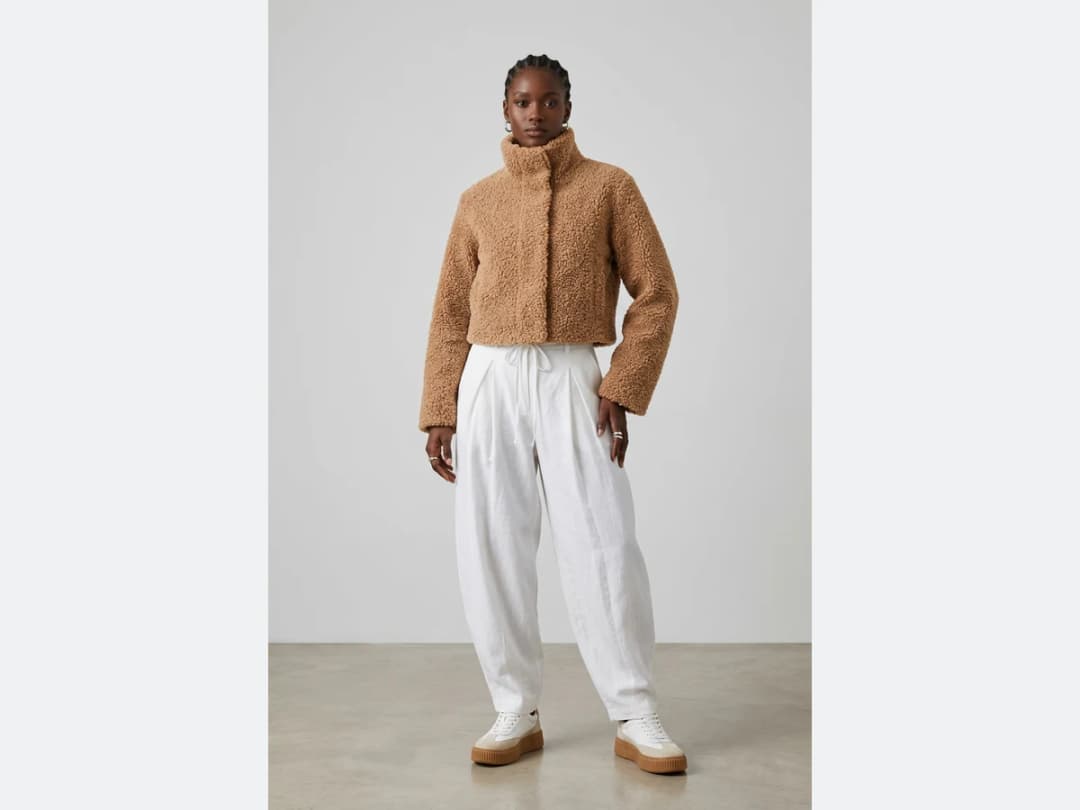
Name the part and pick the new color
Say which piece of clothing should change, then choose your color with the picker or type the HEX code directly. Only the area you named is affected, so the rest of the image stays exactly as it was.
Keep going
Any element of a clothing image can be recolored, so nothing stops you at one version. Try a colorway, then another, and see the whole range before committing.
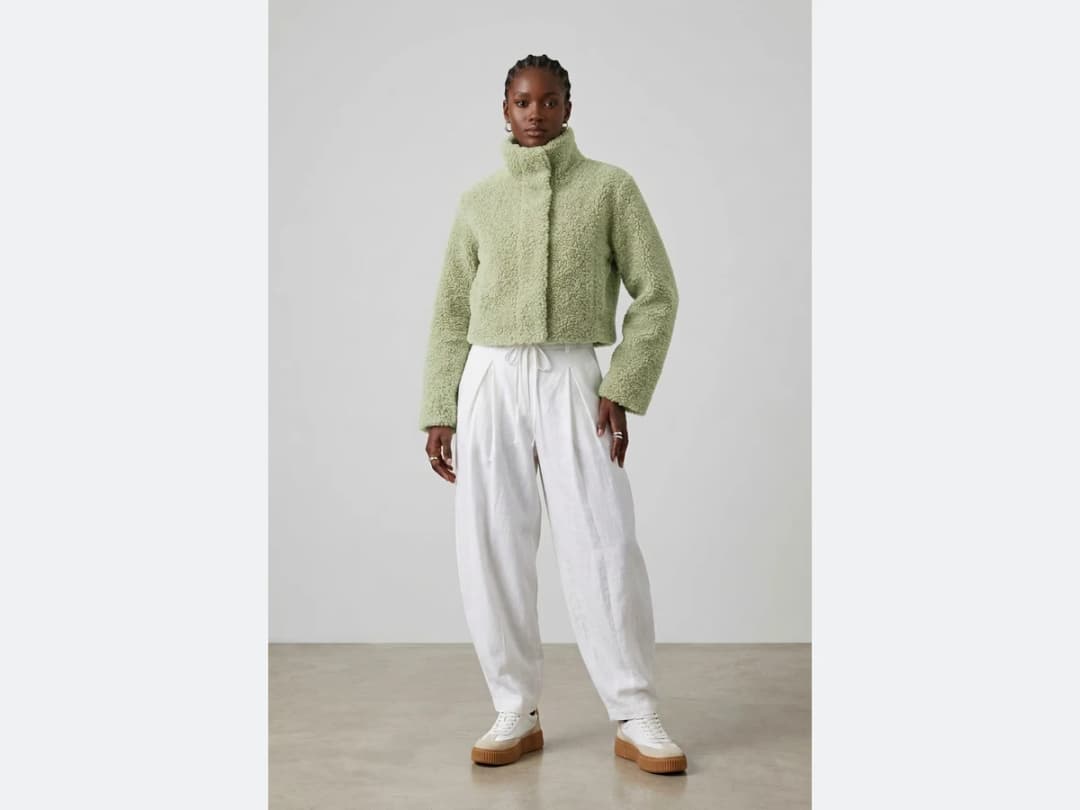
Can you change a shirt colour online for free?
You can change your first ones on the credits an account starts with, and after that a recolour costs one credit on Standard, three on Pro, or seven on Ultra. Nothing is charged for uploading a photo or for trying the picker. The meter runs when an image is generated, so five colourways of the same shirt cost five.
What separates this from the free recolouring tools is what happens to the shadows. A hue slider moves every pixel of a garment by the same amount, which turns a white shirt into a flat grey-blue rectangle and destroys the folds; here the garment is regenerated in the new colour, so the shadow in a sleeve crease stays darker than the light on the shoulder and the fabric still looks like fabric. That is why a HEX code is honoured as the colour of the cloth rather than as a paint bucket.
Dress colour change and shirt colour change: two examples
A dress. Upload the photo, name the part ("the dress"), and ask for the new colour: "dusty rose", "emerald green", or a hex code like #2E5E4E. The dress changes; the model, the light and the folds of the fabric stay.
A shirt. Same gesture: "the shirt" in navy, then in white, then in striped blue, each from the same photo. Three colourways for a product page cost three generations, 1 credit each on Standard.
To change the garment itself rather than its colour, a new cut or a new dress, use the AI clothes changer.
Naming the part is the whole skill
One instruction does most of the work: say which garment changes. "The jacket", "the trousers", "the dress", "the left sleeve". The named area is the only area regenerated, and everything else in the photograph is left alone. A description that says "make it green" without naming the piece invites the model to decide what "it" meant.
Two habits make results cleaner. Change one garment at a time when a look has several pieces, because a single instruction covering a jacket and a skirt often lands on the jacket alone. And prefer a HEX code to a colour name when the colour matters commercially: "sage" is a family, `#9CAF88` is a decision, and a brand palette lives in the second form.
Where a recolour struggles
Three cases are genuinely hard, and they are the same three for every tool of this kind.
Prints and patterns are the first: recolouring a striped shirt means deciding which stripe changes, and the model resolves that ambiguity by itself unless the description settles it. Very dark or very light originals are the second: there is little tonal information left in a black garment to carry into a new hue, so black to yellow is a harder ask than beige to yellow, and it may be quicker to generate the piece afresh. And highly reflective materials, patent leather, sequins, metallic thread, carry their colour in their reflections rather than in the surface, so the change reads as tinting.
The pace makes trial the cheapest diagnosis: measured on our own platform in August 2026, an image comes back in about fifteen seconds, so finding out is faster than reasoning about it.
Frequently asked questions
How do I tell the AI which garment to recolor?+
You name it. Say which piece of clothing should change, the sweater or the skirt for instance, and only that area is affected. The rest of the image, the model, the background, the other garments, stays exactly as it was.
Can I match an exact brand color?+
Yes. Pick the new color with the picker, or type the HEX code directly when you need a precise shade rather than an approximate one. That is what makes the result usable for colorway decisions, not just experiments.
What photos does it work on?+
Any fashion clothing photo: one you upload, or one you already generated in the studio. It serves personal styling and professional shoots alike, for individuals and for brands.
Where do my recolored creations end up?+
In your studio grid, organised in projects, and reusable in the other workflows: put the new colorway on a model with try-on, animate it as a video, or sharpen it with the HD enhancer.
Can I use the results commercially?+
Yes, on any plan: everything you generate is yours to sell, print and publish. The color changer runs in the browser, nothing to install, and free credits at signup let you try a first recolor before committing.
What should I write for a dress colour change?+
Two short fields, no long prompt. In Garment to recolor, name the piece: "the dress", "the skirt of the dress", "the belt". In New color, pick the shade or paste its HEX code. Adding the finish in the garment field helps on tricky fabrics: "the satin dress" keeps the sheen, "the knitted dress" keeps the rib.
Can I recolor a whole catalogue at once?+
Yes, with bulk generation on the Pro, Business and Enterprise plans: upload up to 30 photos, choose Change a Color, name the garment and the colour once, and every photo comes back in the new shade. Each photo costs the same as a single recolour.
Can I recolor several garments in the same photo?+
One piece per pass, and that is a feature: naming a single garment is what keeps the rest of the image untouched. To recolor two pieces, run the result through again and name the second one, each pass holds everything else still.
Does the fabric texture survive the change?+
Yes, that is the tool's whole argument. The weave, the seams, the shadows and the way light sits in the folds are kept; only the hue moves. A ribbed knit stays visibly ribbed in its new color, which is what separates a colorway from a tint.
Try it yourself
Everything on this page was made in the studio. Your first designs are minutes away.
Open the studioRelated features
- AI Clothes Maker, Design Clothes Online: The New Black AIDesign clothes online with an AI clothes maker: describe the piece, see it worn in seconds, iterate, then send a tech pack to your factory. 1 credit per design.
- AI Fashion Design for Kids, Toddlers and BabiesDesign kids fashion with AI: pick the age, from toddler to teenager, describe the outfit and get original children's clothing concepts.
- Change Fabric or Print on a Fashion ImageSwap the fabric on a clothing photo with AI: upload the garment and a new textile, describe the piece, and see the print applied realistically.
- AI Perfume and Fragrance Design GeneratorDesign perfume bottles with AI: your brand name on the label, the glass, the cap and the mood, rendered as market ready fragrance visuals.
- AI Beauty Cream Product GeneratorDesign cream jars and skincare packaging with AI: the jar, the lid, the label and the texture of the formula itself, ready for your brand.
- Create Front and Back Fashion Designs with AIGenerate the front and back of a fashion design in one image with AI: matched details, proportions and style from a single prompt.
- Turn an Image into a Flat 2D SketchTurn any clothing photo into a clean flat sketch in seconds, then export it as SVG to edit in Illustrator and drop it into your tech pack.
- AI Sunglasses Design GeneratorDesign sunglasses with AI: lens shapes, frame lines and colors, rendered on a real face so the fit and attitude read at first glance.
- AI Jewelry Design GeneratorDesign rings, necklaces, bracelets and earrings with AI: pick the metal, the stones and the style, and get detailed jewelry concepts in seconds.
- Watch Designer AI: Design Your Own Watch OnlineWatch designer AI: describe the case, the dial and the strap, and get realistic watch designs in seconds, to refine, render as product shots and put on a model. Free credits at signup.