Free AI Tech Pack Generator
A free AI tech pack generator is a tool that builds the document a factory needs to make your garment, and drafts it for you from photos or a sketch. Building the tech pack by hand is free: the sections, the canvas for the flat sketch, the size chart, the bill of materials and the PDF export cost nothing. The AI does the drafting when you ask it to: it reads photos of a garment and writes a first pack for one credit, plus one per sketch, and it reads a finished pack the way a factory would, for two credits.
Updated 27 October 2026
- 1Start the tech pack, four ways
- 2Draw the flat and place the measurements
- 3Fill the tables, read it back, export
How it works
Start the tech pack, four ways
Start new is a blank pack with the standard sections: header, description and construction, flat sketch, points of measure, bill of materials, notes. Start with AI reads photos of an existing garment, or your own flat sketches, and drafts the whole pack for you to correct. From sketches, add the front, the back or both: the AI writes the description, construction, trims, sizes and measurements, and places your sketches on the canvas. Only have the front? Tick « Also draw the back » and the AI draws it in the same style. Import continues a tech pack you already have, for two credits. Templates reuse a shape you liked, so every style of a collection reads the same to the factory.
Draw the flat and place the measurements
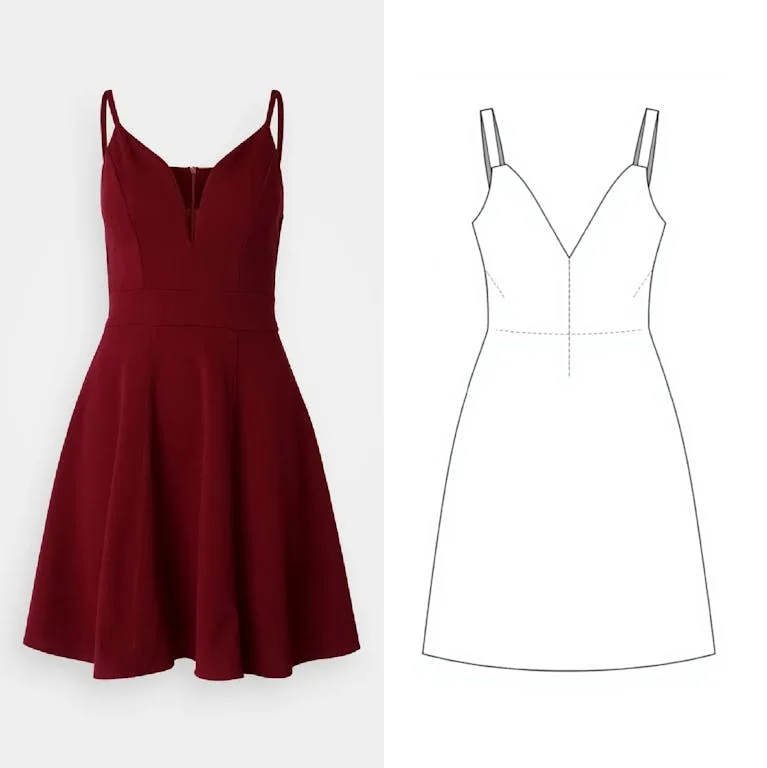
Draw the flat sketch with the AI from a photo of the garment, or upload your own. On any canvas of the pack, « Create a sketch » turns an image into a flat technical sketch in three ways: the sketch alone, the sketch with its measurements, or a close-up detail of one part, a hood, a pocket, a collar. The AI reads the whole tech pack first, so the new measurements stay consistent with the ones already there. Then place the measurement arrows on it: each arrow becomes a line of the size chart, with its code, its name, the value per size and the tolerance. The canvas carries lines, arrows, measurement bars, circles and rectangles for the standard callouts, plus garment icons for sewing, fabric, labels, hangers and care.
Fill the tables, read it back, export
Type or correct the bill of materials and the size chart, rename any label to match how your team works, and add sections of any kind where you need them: a second canvas, a colourway page, a bill of materials per colour. Then ask the AI to read the pack as a factory would; it lists the questions the factory would ask, before the factory asks them. Preview the whole document and export the PDF, the whole pack or a single page, in portrait or landscape.
What a tech pack made here contains
The same sections a factory expects, in the order it reads them: a header with the style name, code, season and designer; a description with the construction details; the flat sketch with lettered callouts; the points of measure with a size run and tolerances; the bill of materials with supplier, composition, colour and consumption per component; colourways; and the finishing and packing notes. Every label is renameable, and the AI fills by field, so renaming never breaks the auto fill. If you are not sure what goes where, the complete guide to tech packs walks through each section.
Free, and where the credits go
Building and exporting is free, with no watermark and nothing to install. Credits are spent only when the AI works for you: one credit to draft a pack from photos, one per flat sketch it draws, two to import an existing pack, two for the factory style review. A free account builds two tech packs by hand; every plan, from Starter, builds as many as you need. A new account opens with free credits, so the first AI draft costs nothing either.
Build your first tech pack
Start from a design you already have, or make one in the AI fashion design generator and send it over. If your starting point is a photo, image to flat sketch draws the flat first. Open the tech pack studio when you are ready, and read the comparison of AI tech pack generators if you are choosing a tool.
Frequently asked questions
Is the tech pack generator free to use?+
Yes. Building the tech pack by hand, adding sections, drawing on the canvas, filling the tables and exporting the PDF are free. Only the AI drafting and the AI review spend credits, and a new account comes with free credits for them.
Can I start a tech pack from my own sketch?+
Yes. In Start with AI, add your front sketch, your back sketch or both, and the AI writes the pack around them: description, construction, trims, sizes and measurements. With the front only, tick « Also draw the back » and it draws the back in the same style.
Can the AI create a tech pack from a photo?+
Yes. Start with AI reads photos of the garment, front and back if you have them, and drafts the flat sketch, the construction description, a first bill of materials and a first set of measurements. The draft is meant to be corrected: you keep what is right and fix the rest.
How do I get my AI designs onto a tech pack?+
Creations made in the design studio come across in one click, and so do logos and moodboards. If your starting point is a garment photo rather than a drawing, turn it into a flat sketch first: that is the drawing the specification is annotated on.
Can I use it as a tech pack template?+
Yes. Save a pack you like as a template and start every new style from it, so the sections, the labels and the layout stay the same across a collection.
How do I hand the tech pack to my factory?+
Export the whole document to PDF in one click, or a single page. Everything on the canvas, from the flat sketch to the measurement arrows and the written specifications, goes into the file the factory works from.
Do I need to install anything?+
No. The tech pack studio runs in the browser, like the rest of The New Black AI. Your packs stay in your account, organised in projects, next to the designs and the product photos of the same garment.
Related features
- Multi-Brand Workspaces for Agencies and GroupsManage several fashion brands from one account: each brand gets its own Shopify store, brand kit and creations, on the same plan and credits. Switch in a click. Enterprise plan.
- AI Fashion Reels: Trending Outfit Transition VideosMake trending AI fashion reels from one photo: outfit transitions as people pass, as your model walks, at a finger snap, after a jump, and more. 10-second 9:16 videos for Reels, TikTok and Shorts.
- AI Fashion Video from Reference ImagesPut your model, your garment and a place into one video: add up to three reference pictures, describe the scene, and get a 5 to 15 second fashion clip in 9:16, 1:1 or 16:9.
- Publish Fashion Posts to Threads from the StudioConnect Threads in Connectors, then post or schedule your fashion images and videos to Threads from the Brand Manager's social agenda, next to Instagram and TikTok.
- AI Voice Over for Fashion VideosAI voice-over for fashion videos: write a text, choose one of 14 voices and get an MP3 to put under a product video or an ad. About half a credit for a 30-second script.
- Remove or Extract the Sound of a VideoRemove the sound of a video, extract it as an MP3 or replace it with your own music, in one Audio button. Remove and extract are instant and free with a plan or a credit pack.
- Fashion Reel Templates & AI Motion DesignEighteen Motion Design templates for fashion reels: drop your photos or clips, edit the words, render a 10-second video in 9:16, 4:5, 1:1 or 16:9. One credit, every plan.
- Google Shopping Free Listings: Impressions, Clicks, Approved ProductsThe Store's Google Shopping view reads a Shopify brand's free listings from Merchant Center: impressions, clicks, click-through rate, approved listings and a product-by-product table.