10 Best AI Tech Pack Generators and Software (2026)
Published 7 September 2026 · Updated 13 November 2026
The best AI tech pack generator in 2026 depends on what you start from and who signs off the pack. For a fashion brand that starts from photos, a sample or a sketch and also needs the flat, the product photos and the listing of the same garment, our pick is The New Black AI (we make it): building and exporting a pack by hand costs nothing, and each AI step is paid in credits, 1 or 2 a step. For a technical design team that wants Pantone references and Excel export, AI Tech Packs. For a spec first editor that grows into a PLM, Techpacker. For a designer who draws every flat in Illustrator, Tech Pack Wizard. For a pay per pack generator with a free watermarked preview, Adstronaut AI.
Updated November 2026.

Quick answer
- Best for a brand that designs, documents and sells the same garment: The New Black AI, a free tech pack builder with AI steps from 1 credit.
- Best for technical designers who need Pantone codes and Excel files: AI Tech Packs.
- Best for a free start that charges only when you download: Clothink.
- Best for one priced pack at a time, from a photo: Adstronaut AI.
- Best for a team growing from tech packs into a PLM: Techpacker, or Onbrand at enterprise scale.
The 10 tools at a glance
Ordered by how much of a fashion brand's path from garment to factory each tool covers on its own self-serve terms, as the method section explains. It is not a quality score.
| Tool | Best for | Starting price (Nov. 2026) | Free option | Export formats |
|---|---|---|---|---|
| The New Black AI (our pick) | Pack, flat, photos and listing in one account | $15 a month, unlimited packs | Two packs built and exported, free credits at signup | PDF, whole pack or one page |
| AI Tech Packs | Technical design teams, Pantone matching | $150 per seat a month (Tech Pack membership) | Free trial, 3 preview images | PDF and Excel |
| Clothink | A free start, pay when you download | £19 a month | Free plan, 3 active packs, £15 to unlock a pack | PDF and Excel |
| Adstronaut AI | One photo in, one priced pack out | $29 a month for 5 packs | First pack as a watermarked preview | PDF, plus SVG and Excel on paid plans |
| Techpacker | A spec first editor growing into a PLM | $35 per user a month, billed yearly | 7 day trial | See their site |
| Tech Pack Wizard | Designers who work inside Illustrator | $29 a month, or $276 a year | 14 day trial | PDF and XLSX |
| The F* Word | Teams that start from trends and a brief | 100 credits for $10; Pro $299 a month | Trial credits on the house | See their site |
| Tchpack | A new brand that also needs a manufacturer | See their site | Free start on the site | See their site |
| Onbrand | Enterprise product teams inside a PLM | By demo | No | Cloud and PDF tech packs |
| Excel and Illustrator | The baseline, one style a year | Your existing software | Yes, if you own it | Whatever you build |
How this comparison was made, and how the order is set
We read each company's own site in November 2026: the pricing page where one exists, the product page of the tech pack tool, and the FAQ. Every price in this article was read on those pages that month and is marked (Nov. 2026). Where a company publishes no price, the table says « see their site » or « by demo » rather than repeating a figure from memory or from another review. We did not buy a plan, generate a pack or send a pack to a factory with any competitor's tool, so this page makes no claim about whose draft is the most accurate. Their site says what each tool does; we report it as theirs.
We make The New Black AI. Its facts come from its own code and plans: the credit cost of each AI step, what is free, what a plan unlocks. It is first because it covers the most steps a fashion brand repeats for one garment: the design, the flat sketch, the tech pack, the product photos and the listing, in one account. On a different job, the order changes, and the « How to choose » section says which tool to start with.
The criteria, the ones a brand asks before it pays:
- 1.What the tool starts from: a photo of the garment, your own flat sketch, a spec you type, an existing pack, a trend brief.
- 2.What the AI drafts: the flat, the construction, the bill of materials, the size chart, or only the layout.
- 3.How you correct it: every field editable, every label renameable, and whether the AI can rewrite one section without touching the rest.
- 4.What comes out: PDF, Excel, SVG, a share link.
- 5.What it costs at one style and at a twelve style collection.
- 6.Who it is built for: a founder with a sample, a technical designer with a spec, or a product team with a calendar.
Accuracy is the criterion no pricing page settles. Take the same garment into two or three of these tools, correct each draft against the sample, and keep the one you corrected least.
The tools, and what each fits best
The New Black AI: our pick for a brand that designs, documents and sells the same garment (we make it)
The tech pack studio is one tool inside a fashion platform that also designs garments, draws flats, generates model photos and publishes to Shopify. The point is the chain: the garment you design or photograph is the garment you document, and the same account then photographs it on a model.
A pack starts four ways. Start new opens a blank pack with the standard sections: header, description and construction, flat sketch, points of measure, bill of materials, notes. Start with AI reads photos of the garment, or your own front and back flats, and drafts the whole pack: the construction description, the trims, a first bill of materials, the size chart and the flats placed on the canvas. With only the front, tick « Also draw the back » and it draws the back in the same style. Import transcribes a pack you already have into the editor. Templates reuse a pack you liked, so every style of a collection reads the same to the factory.
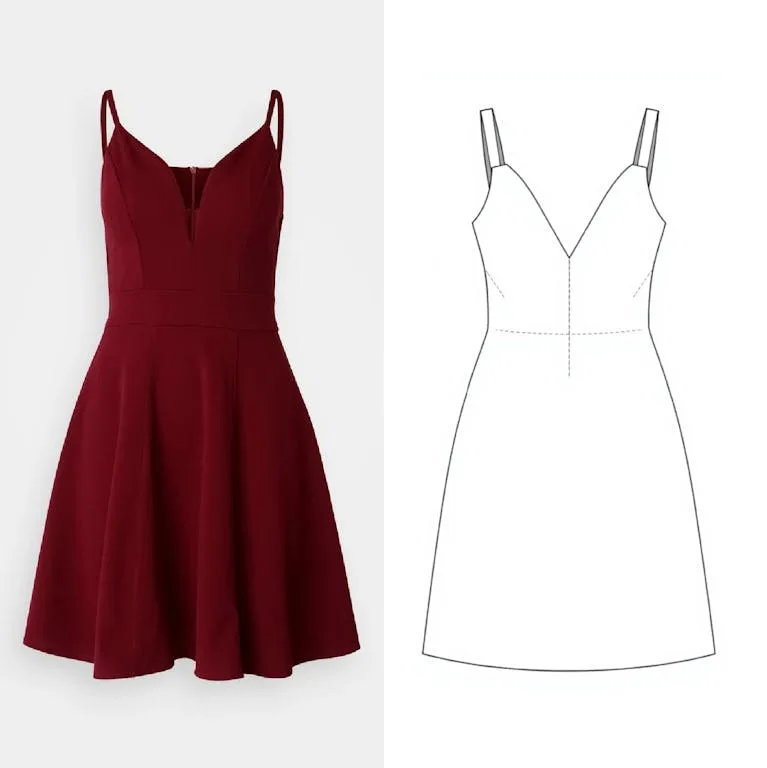
A real output of the tech pack studio: the photo of a dress on the left, the flat sketch the AI drew from it on the right, ready for its callouts.
New since 12 November 2026: an AI window on each section. Description, Size chart, Bill of materials and Notes each have their own AI window. You ask in plain words (« sizes M to 3XL », « convert to inches », « the collar height is 4 cm in M ») and the AI rewrites that section only, showing you the result before anything is kept. The AI size chart generator grades the whole chart with a tolerance on each line and a standard code on each point of measure, and it can read your own sizing and grading sheet (PDF or image) so the chart follows your scale rather than an industry average. If the sheet cannot be read, it says so instead of grading quietly on a standard scale. The bill of materials can be read from your supplier quotes and spec sheets.
On the canvas, « Create a sketch » turns an image into a flat with callouts, and every measurement arrow becomes a line of the size chart. « Import an SVG » places your own vector flat or logo on a page at no credit. The AI review reads the finished pack the way a factory would and lists its questions. Export is PDF, the whole pack or one page, portrait or landscape.
Price (read in its code, Nov. 2026). Building by hand and exporting are free, with no watermark. A free account builds two packs; every plan, from Starter at $15 a month for 200 credits, makes them unlimited. Credits pay only for the AI steps: the draft from photos 1, each flat it draws 1, each section written or corrected by AI 1, the bill of materials read from documents 2, the import of an existing pack 2, the factory style review 2. A new account opens with free credits at signup.
The honest limit: it exports PDF, not Excel, and it is not a PLM. There is no supplier portal, approval chain or production calendar, so a product team that needs those will want Techpacker or Onbrand beside it.
AI Tech Packs: best for technical design teams that need Pantone codes and Excel files
AI Tech Packs is built around the document a production team works from: technical drawings, measurements, a bill of materials, construction notes, artwork and colour references. You start from a garment image, a sketch or a flat and a brief, and edit the specifications in a web editor. Its site says it is an official Pantone licensee, and the Tech Pack membership includes matching from HEX colours to Pantone codes. It exports PDF and Excel, which suits factories that live in spreadsheets, offers an Illustrator connection and factory share links, and runs a done for you agency service that returns packs in 3 to 5 days.
Price (Nov. 2026): memberships are per seat, monthly or yearly with 20% off. Flat Sketch is $75 per seat a month; Tech Pack is $150 per seat a month ($1,440 a year), with unlimited packs under a fair use rule. A student plan is $35 a month. One time credits for occasional styles exist, but their prices did not display when we read the page, so see their site. The home page offers a free trial with 3 preview images.
Who it fits: technical design and development teams with recurring collection work, especially when colour references matter to the supplier conversation.
The honest limit: the price is a professional seat price. A founder with four styles a year pays for a team tool, and the design, the product photos and the listing still live in other software.
Clothink: best for a free start that charges only when you download
Clothink connects sketches and mockups with the tech pack around one product record. Its Auto-Complete assembles a bill of materials, a size chart, construction notes, a measurement guide and sketch callouts from an approved design, and its pricing page lists PDF and Excel export, shared workspaces and white label PDFs on team plans.
Price (Nov. 2026): a Free plan with 10 starter tokens and up to 3 active tech packs; you make and edit for free and unlock one pack for £15 to download it. Paid plans are £19 a month (200 tokens, 5 active packs), £39 (500 tokens, unlimited active packs) and £79 (1,000 tokens), with team plans from £49 a month for two members. Export never uses tokens on paid plans; Auto-Complete is included on paid plans, and on Free the first run is free, then 3 tokens a run.
Who it fits: a designer who wants to build the pack for free and only pay at the moment a factory needs the file.
The honest limit: prices are in pounds, and the free plan's pay per download adds up across a collection: twelve unlocks are £180, where a paid plan becomes cheaper. Product photography for the store is a different job.
Adstronaut AI: best for one photo in, one priced pack out
Adstronaut AI is a set of fashion tools (design, tech pack, fabric and colour swaps, photoshoots, listings), each usable on its own. Its tech pack generator takes a garment photo or a sketch and returns technical flats, graded measurements, a bill of materials and construction notes, which its page says takes 3 to 5 minutes. It covers footwear and bags as well as garments, with points of measure per product class, and it gives away fifteen sample packs and a blank Excel template.
Price (Nov. 2026): a pack uses 25 credits. Plans are $29 a month for 5 packs, $69 for 15 and $149 for 40, which its page puts at about $4 to $6 a pack. Signing up gives 25 credits, enough for one pack, delivered as a watermarked preview with the core sections visible; paid plans unlock the full pack, and SVG and Excel files come with paid tiers.
Who it fits: a brand that wants to know the price of each pack in advance and starts from a photo.
The honest limit: the plans are counted in packs, so a busy month can hit the ceiling, and the free pack is a preview, not a file you can send to a factory. Its page lists a « Threads » view that keeps every file of a style together as « coming soon ».
Techpacker: best for a spec first editor that grows into a PLM
Techpacker comes from the other direction: a tech pack editor built on modular cards, for people who prefer structure to spreadsheets, that grew into a product lifecycle platform connecting product data, teams and manufacturers. It is strong on revisions, a single version of the truth and sharing with a factory.
Price (Nov. 2026): Techpack Builder is $35 per user a month when paid yearly ($420 a year). PLM Professional is $95 and PLM Premium $125 per user a month paid yearly, and two higher tiers at $198 and $240 are yearly only. Its pricing notes a one time professional onboarding fee, from $100 on the entry tier. There is a 7 day trial with no card and a 60 day money back guarantee.
Who it fits: a technical designer or a growing team that writes specs and wants revisions, roles and a factory link, and may move into PLM later.
The honest limit: the price is per user and the discount is for yearly billing, so a small brand pays for a year before its first collection ships. Its pricing page does not present an AI draft from a garment photo, so expect to type the first version from a spec.
Tech Pack Wizard: best for designers who already draw every flat in Illustrator
Tech Pack Wizard is a plugin for Adobe Illustrator. Its pricing page lists linked primary and detail sketches (change the main sketch and the pack follows), a callouts tool, a spec tool with automatic graded specs, dynamic page formatting, preset croquis, preloaded libraries and quick PDF and XLSX exports. It removes the back and forth between Illustrator and Excel rather than drafting a pack from a photo.
Price (Nov. 2026): $29 a month, or $276 a year, for a single user licence, VAT excluded, with a 14 day free trial and a demo on request.
Who it fits: a freelance or in house technical designer whose flats already live in Illustrator and who wants the pack to stay in the same file.
The honest limit: you need Illustrator, which is a separate subscription, and the drawing is still yours to make. It does not read a photo of a sample.
The F* Word: best for teams that start from trends and a brief
The F* Word starts earlier than everyone else: a trend signal, a brief, a sketch or a product reference becomes a design and then an editable tech pack, inside a platform that also carries creative direction, launch content and the handoff to suppliers. Its pricing page describes a « Trend to Tech Pack » workflow that combines a brief, a design and a garment analysis with the pack.
Price (Nov. 2026): an account opens with a credit allowance to try the workflows. Beyond it, 100 credits cost $10, and one Trend to Tech Pack run is 124 credits. Pro shows $299 a month (with $399 struck through) for 3,600 credits a month. Enterprise pilots start at $6,999 a month. Every plan unlocks every workflow, and credits last 12 months. Its page says the free tier is for personal use and paid tiers are commercially licensed.
Who it fits: product teams that carry a collection from trend research to the factory and want one platform for the whole brief.
The honest limit: a single pack is priced inside a bigger workflow, so a founder who only needs the document pays for the trend and design steps too.
Tchpack: best for a new brand that also needs a manufacturer
Tchpack presents itself as an all in one platform for building a clothing brand: mockups and components, research and moodboards, tech packs built with its AI assistant, then matching with vetted manufacturers and placing orders without leaving the platform. Its site says a sketch or a photo can become an editable tech pack.
Price: its site did not show plan prices when we read it (Nov. 2026), so see their site.
Who it fits: a founder who has the idea but not yet the factory, and wants the pack and the sourcing in the same place.
The honest limit: the value is the path to a manufacturer; if you already have one, you pay for a matching service you do not need. Product photos and the store listing are outside it.
Onbrand: best for enterprise product teams inside a PLM
Onbrand is a PLM. Its site centralises styles, tech packs, materials, artwork, colours and specifications, produces cloud and PDF tech packs, and uses templates and cloning to change several packs at once. It cites a customer that cut tech pack creation time by 55%.
Price: sold by demo; we found no public pricing page (Nov. 2026), so see their site.
Who it fits: a brand whose merchandisers, designers and suppliers all need to log into the same system, with approvals and a calendar.
The honest limit: it is a platform with an onboarding to match. For one jacket that must reach the factory this week, it is more than the job needs.
Excel and Illustrator: the baseline everyone replaces
A spreadsheet for the size chart and the bill of materials, Illustrator for the flats, a PDF made by hand. It is flexible and costs nothing extra if you already own the software. It is also where the errors start: the grading is typed line by line, the codes on the sketch and in the table drift apart, and a change to a sleeve length means editing three files. Every tool above exists to replace this. It still makes sense for a brand that sends one or two styles a year and has a technical designer who knows the files.
What one tech pack really costs
A tech pack price on a pricing page rarely means the same thing from one tool to the next. Some charge per seat whatever you make, some per pack, some per AI step, and some only when you download. Three things to check before you compare:
- What is free: building, editing, exporting, or only a preview.
- What is metered: the whole pack, the export, or each AI step.
- Who pays: one seat, every user, or the account.
And one cost no pricing page shows: the hours a person spends correcting the draft against the sample. That is where the real difference between tools sits, and only your own garments can measure it.

A tech pack page made with The New Black AI: the flat with its lettered callouts, and the size chart those callouts point to.
Worked example: a 12 style collection, priced
A small brand sends 12 new styles to its factory this season. For each style it wants a pack with a front and back flat, a graded size chart on its own sizing sheet, a bill of materials read from its supplier quotes, and a factory style review before sending.
On The New Black AI, per style, with every AI step used:
- Draft from photos: 1 credit
- Front flat and back flat drawn by the AI: 1 + 1 = 2 credits
- Size chart rewritten in its AI window on the brand's grading sheet: 1 credit
- Bill of materials read from the supplier quotes: 2 credits
- Factory style review: 2 credits
That is 8 credits a style, so 12 × 8 = 96 credits for the collection. Starter is $15 a month for 200 credits, which covers it with 104 credits left for the product photos of the same styles (an on-model photo is 1 credit on Standard). Building, editing and exporting the 12 PDFs adds nothing, and packs are unlimited on any plan. If the brand types the size chart itself and skips the review, it is 4 credits a style.
The same 12 packs, on each competitor's published prices (Nov. 2026):
- Adstronaut AI: 12 packs fit the $69 plan (15 packs), so $69 for the month.
- Clothink: on Free, 12 unlocks × £15 = £180; on the £39 plan, unlimited active packs and exports included, so £39 for the month.
- The F* Word: if each pack runs its Trend to Tech Pack workflow, 12 × 124 = 1,488 credits. At 100 credits for $10, that is about $149 in credit packs; Pro at $299 a month gives 3,600.
- Tech Pack Wizard: $29 for the month, plus your Illustrator subscription, and the flats are drawn by hand.
- Techpacker: $420 for one user's year of Techpack Builder, plus the onboarding fee where it applies.
- AI Tech Packs: $150 for one seat's month of the Tech Pack membership.
The per seat tools cost more for one month but make sense for a team that works every week. The per pack and per step tools are cheaper for a small brand with a season of a dozen styles. In every case, add the hours your team spends correcting the draft.
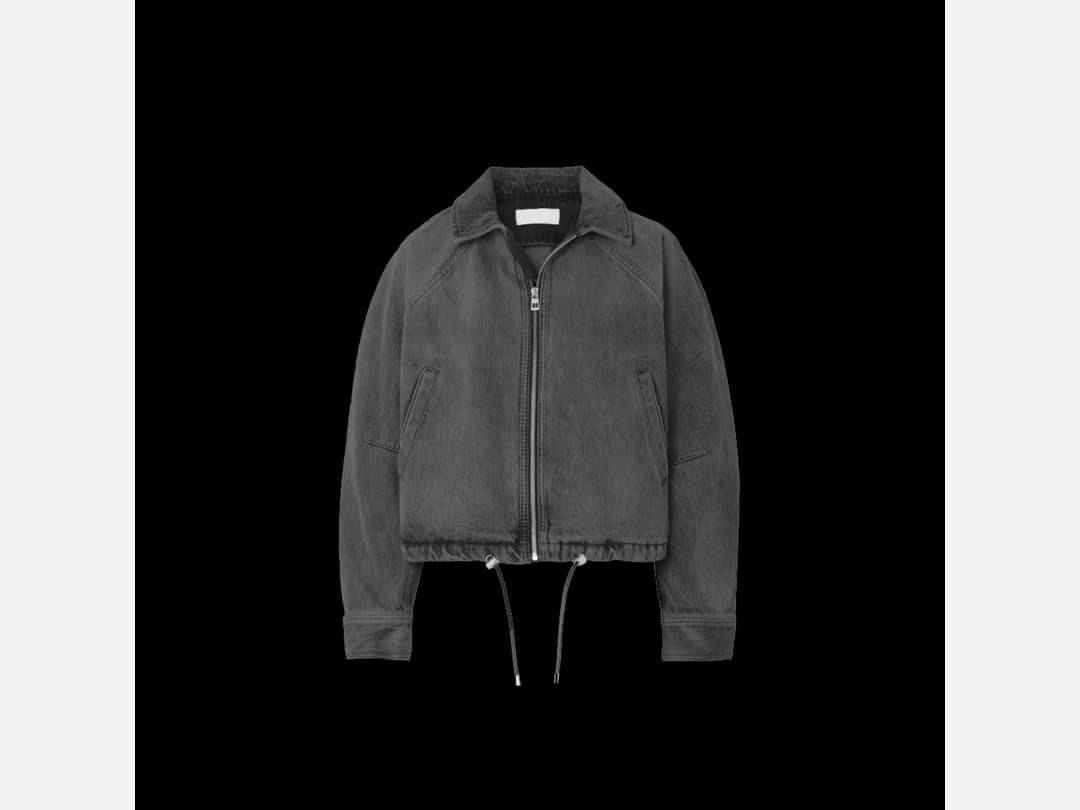
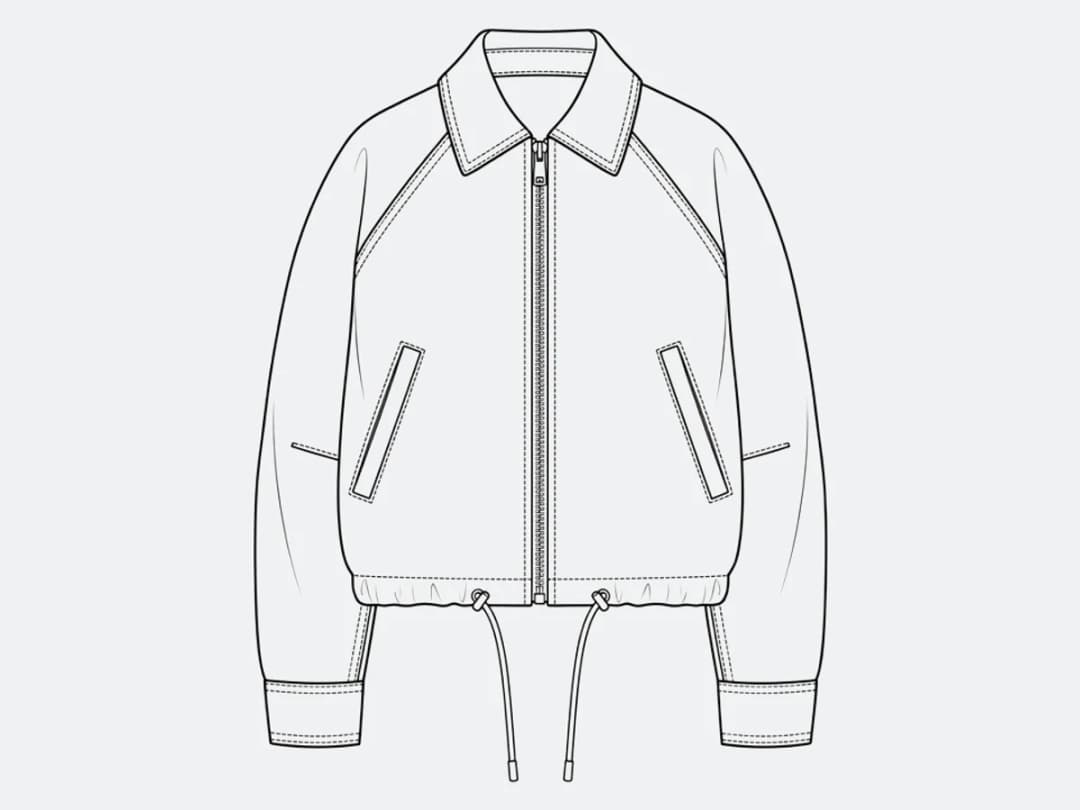
Before and after, made with The New Black AI: a denim jacket photographed flat, then the flat sketch drawn from the photo, the 1 credit step in the example above.
What tech pack software must do
Whatever the brand size, the same seven things. A sheet where every value is a field and every label can be renamed to match how your factory reads. A size chart with one value per size and a tolerance on each line, because grading is the part a spreadsheet gets wrong first. A bill of materials with the supplier and its reference. Flat sketches with callouts that carry the same codes as the size chart. A PDF the factory can open without an account. One current version for the team and the factory. And, since 2026, an AI first draft, because the hours were never in the layout but in the typing.
The draft is never the end. AI can read a photo; it cannot read the stitch density inside a seam or the exact supplier reference of a trim. A good tool says where it guessed and lets you correct one section without rebuilding the rest. Checking the measurements against a fitting sample stays the person's job, whatever the software. For the difference between the document and its shorter cousin, see spec sheet versus tech pack.
Software, generator or template?
A tech pack template is a document to fill: an Excel or a PDF with the sections in place, which is where most small brands start and where the copy and paste errors begin. Tech pack software is an editor: the sections are built in, the tables grade, the export is a click. An AI tech pack generator is software that also writes the first draft from a photo, a sketch or a brief. A tech pack builder or maker usually means the editor, with or without the AI. In The New Black AI, a new pack opens on a template with its sections in place, so the template is already software; Adstronaut AI and AI Tech Packs also give away sample packs and Excel templates for brands that want to read a finished one first.
How to choose
A founder with a sample and a factory waiting
Start with The New Black AI if the same garment also needs its flats, its product photos and its listing: photograph the sample, let the AI draft the pack for 1 credit, correct it, then export the PDF at no cost. If you only need the document and want a price per pack, Adstronaut AI. If you still have no factory, Tchpack adds manufacturer matching.
A designer who works from hand sketches or vector flats
The New Black AI reads your own front and back flats in Start with AI and places them on the canvas, or imports your SVG flat at no credit. If your flats live in Illustrator and you want the pack to stay there, Tech Pack Wizard.
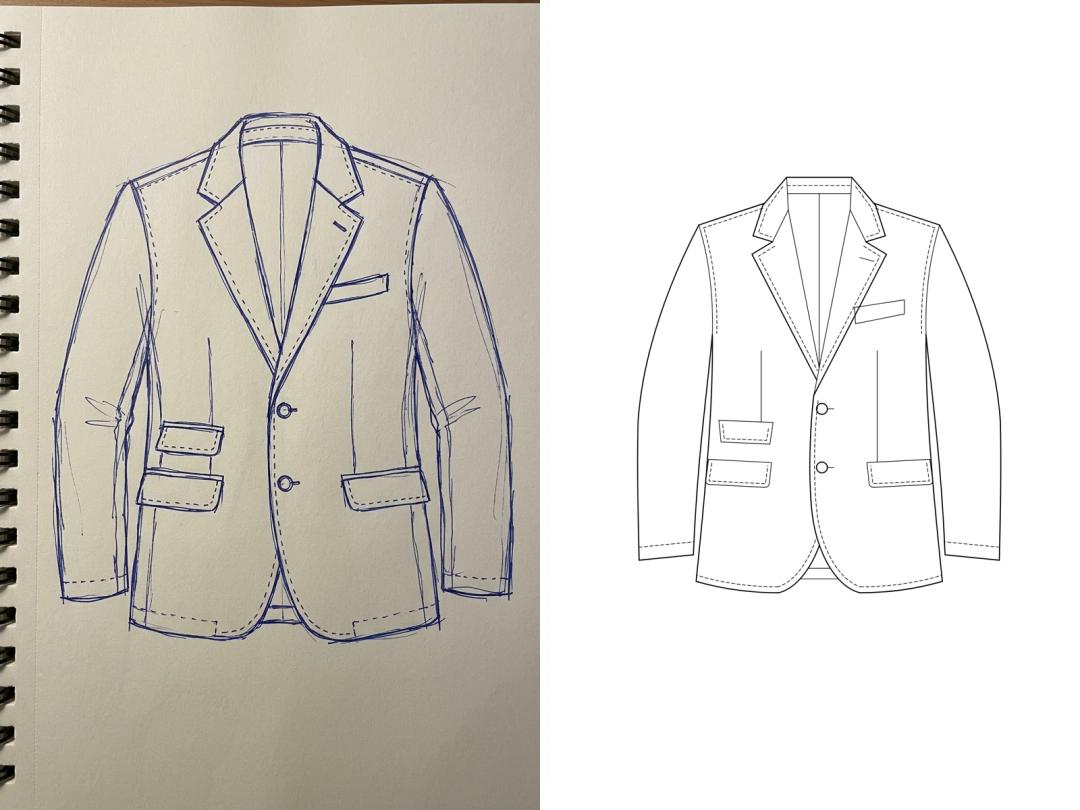
A hand drawn blazer and the clean vector flat The New Black AI redrew from it, ready to be placed in a tech pack.
A brand with its own size scale
Grading on an industry average breaks a range that already sells. In The New Black AI, give the size chart window your sizing and grading sheet and it grades the new garment on your scale and increments, for 1 credit; a measurement you give for one size stays exactly as you wrote it. With the other tools, check that the editor accepts your own points of measure, grade rules and tolerances before you commit.
A technical design team with a factory that wants Excel
AI Tech Packs, for PDF and Excel export, Pantone matching and an Illustrator connection; Clothink and Tech Pack Wizard also export Excel. The New Black AI exports PDF only.
Small brand, tight budget
The New Black AI builds and exports two packs free without a plan and unlimited packs from $15 a month, with AI steps from 1 credit. Clothink lets you build for free and pay £15 when you download one pack. Adstronaut AI starts at $29 a month for 5 packs. Excel and Illustrator cost nothing more if you already own them, and cost you the hours instead.
A product team that needs approvals and a calendar
Techpacker if you want to start with tech packs and grow into its PLM; Onbrand if merchandisers, designers and suppliers all need to work in one system; The F* Word if the work starts from trend research and a brief.
You also need the product photos
Only one tool on this list takes the same garment from its tech pack to on-model photos and a Shopify product page in the same account: The New Black AI. The others document the garment and stop at the factory.
If you are new to the document itself, read what is a tech pack before judging any draft, then how to make a tech pack step by step. For the human alternative, a freelance technical designer versus AI compares the two honestly.
Sources
- The New Black AI, credits of each tech pack AI step and plan prices, read in its own code and plans (checked November 2026).
- The New Black AI, AI size chart generator, https://thenewblack.ai/ai-design-features/ai-size-chart-generator-for-clothing (checked November 2026).
- AI Tech Packs, Flat Sketch and Tech Pack Pricing, their pricing page (checked November 2026).
- AI Tech Packs, home page, their home page (checked November 2026).
- AI Tech Packs, Best AI Tech Pack Software of 2026, their blog (checked November 2026).
- Clothink, pricing, https://www.clothink.ai/pricing (checked November 2026).
- Adstronaut AI, Tech Pack Generator, https://www.adstronaut.net/tech-pack-generator (checked November 2026).
- Adstronaut AI, pricing and FAQ, https://www.adstronaut.net/pricing (checked November 2026).
- Techpacker, pricing, https://techpacker.com/pricing (checked November 2026).
- Tech Pack Wizard, pricing, https://techpackwizard.com/pricing (checked November 2026).
- The F* Word, pricing, their pricing page (checked November 2026).
- Tchpack, home page, https://tchpack.com/ (checked November 2026).
- Onbrand, home page, https://www.onbrandplm.com/ (checked November 2026).
Frequently asked questions
What is the best AI tech pack generator in 2026?+
For a fashion brand that starts from photos, a sample or a sketch and wants the flat, the pack and the product photos in one account, The New Black AI (we make it), free to build and export, with AI steps from 1 credit. For technical design teams that need Pantone codes and Excel, AI Tech Packs; for a priced pack from a photo, Adstronaut AI; for a PLM, Techpacker or Onbrand.
Is there a free tech pack generator?+
Yes, with different meanings of free. The New Black AI builds and exports two full packs to PDF without a plan and gives free credits at signup for the AI steps. Clothink lets you build for free and charges £15 to download a pack, and Adstronaut AI gives one pack as a watermarked preview.
Can AI make a tech pack from a photo of a garment?+
Yes. The New Black AI, AI Tech Packs, Adstronaut AI and Tchpack all describe a draft from a photo: the flat, the construction, the measurements and a first bill of materials. The draft has to be checked against the sample, because a photo cannot show hidden construction or supplier references.
Can AI make a tech pack from a sketch?+
Yes. The New Black AI reads your front and back flats and writes the pack around them, drawing the back if you only have the front; Clothink, AI Tech Packs and Adstronaut AI also start from a sketch.
Which tech pack software exports to Excel?+
AI Tech Packs, Clothink, Tech Pack Wizard (XLSX) and Adstronaut AI on paid plans export spreadsheets. The New Black AI exports PDF, the whole pack or a single page.
How much does an AI tech pack cost?+
On The New Black AI, a draft from photos is 1 credit, each flat it draws 1, each AI section 1, the bill of materials from documents 2 and the review 2, so a full pack is about 4 to 8 credits on a plan from $15 a month. Adstronaut AI puts its packs at about $4 to $6 each on paid plans, and AI Tech Packs sells a $150 a month seat with unlimited packs.
Can AI write a size chart on my own grading?+
Yes, in The New Black AI: the size chart's AI window reads your sizing and grading sheet as a PDF or an image and grades the garment on your scale, for 1 credit. You see the whole chart, with new and changed cells marked, before it replaces anything.
What is the best Techpacker alternative?+
For a brand that starts from a sample or photos, The New Black AI: the AI drafts the pack, two packs are free without a plan, and the same account makes the flats and the product photos, from $15 a month instead of $35 per user billed yearly. For an Illustrator workflow, Tech Pack Wizard at $29 a month; for a PLM, Onbrand.
Related articles
- 8 Best AI Fashion Photoshoot Generators (2026)8 AI fashion photoshoot generators compared, November 2026: model, setting, angles, video, prices read on each site, and a 12-look campaign shoot priced.
- 8 Best CLO3D Alternatives in 2026, Free and Paid8 CLO3D alternatives compared, Nov. 2026: free open source pattern tools, 3D suites, and AI from sketch to tech pack, with prices read on each site.
- 11 Best AI Ad Generators for Clothing Brands (2026)Eleven AI ad generators compared for clothing brands: what each fits, prices read November 2026, a month of ads priced, and which ones run Meta and Google.
- 9 Best AI Fashion Video Generators in 2026 (Compared)Nine AI fashion video generators compared for clothing brands: what each fits, prices read November 2026, the cost of a 10 second clip, length and API.
- 8 Best AI Fashion Model Generators for Brands (2026)8 AI fashion model generators compared for clothing brands, November 2026: who fits what, price per image read on each site, a 300-SKU season priced.
- 9 Best AI Tools for Clothing Brands in 2026 (Compared)9 AI tools for clothing brands compared (Nov. 2026): design, tech packs, on-model photos, video and Shopify, with prices read on each site and a priced capsule.
- 9 Best AI Lookbook Generators and Makers (2026)Nine AI lookbook generators compared: on-model photos, layout and an online book, prices read November 2026, and a 12-look seasonal lookbook priced.
- 11 Best AI Fashion Design Software in 2026 (Compared)11 AI fashion design tools compared, November 2026: sketch, fabric, 3D, patterns and tech packs, with starting prices, free options and a priced capsule.
- 9 Best Flat Lay to Model AI Tools for Brands (2026)9 flat lay to model AI tools compared, November 2026: flat lay, hanger and ghost mannequin input, price per photo read on each site, a 40-piece drop priced.
- 8 Best AI Pattern Making Software in 2026 (Compared)CLO 3D, Browzwear, Lectra, Tukatech, Optitex, Audaces and free tools compared for pattern makers: what the AI really does, prices read Nov. 2026.