AI Fashion Drawing Board: From Sketch to Real Garment
Realtime Design is a drawing board in The New Black AI where you sketch a garment by hand and turn the sketch into a realistic visual in about twenty seconds. You draw over a background (a woman or a man in four poses, one of ten garment bases, or a picture of your own), press Generate, and the garment you drew comes back worn or photographed, in Standard, Pro or Ultra. Every version is kept in a creation tree, and any step can be sent to the Studio or to a tech pack. It works with a mouse, and with a pen on an iPad.
Updated 20 November 2026
- 1Pick a background and draw
- 2Generate the visual
- 3Change the scene, keep the drawing
- 4Branch, compare, export
How it works
Pick a background and draw
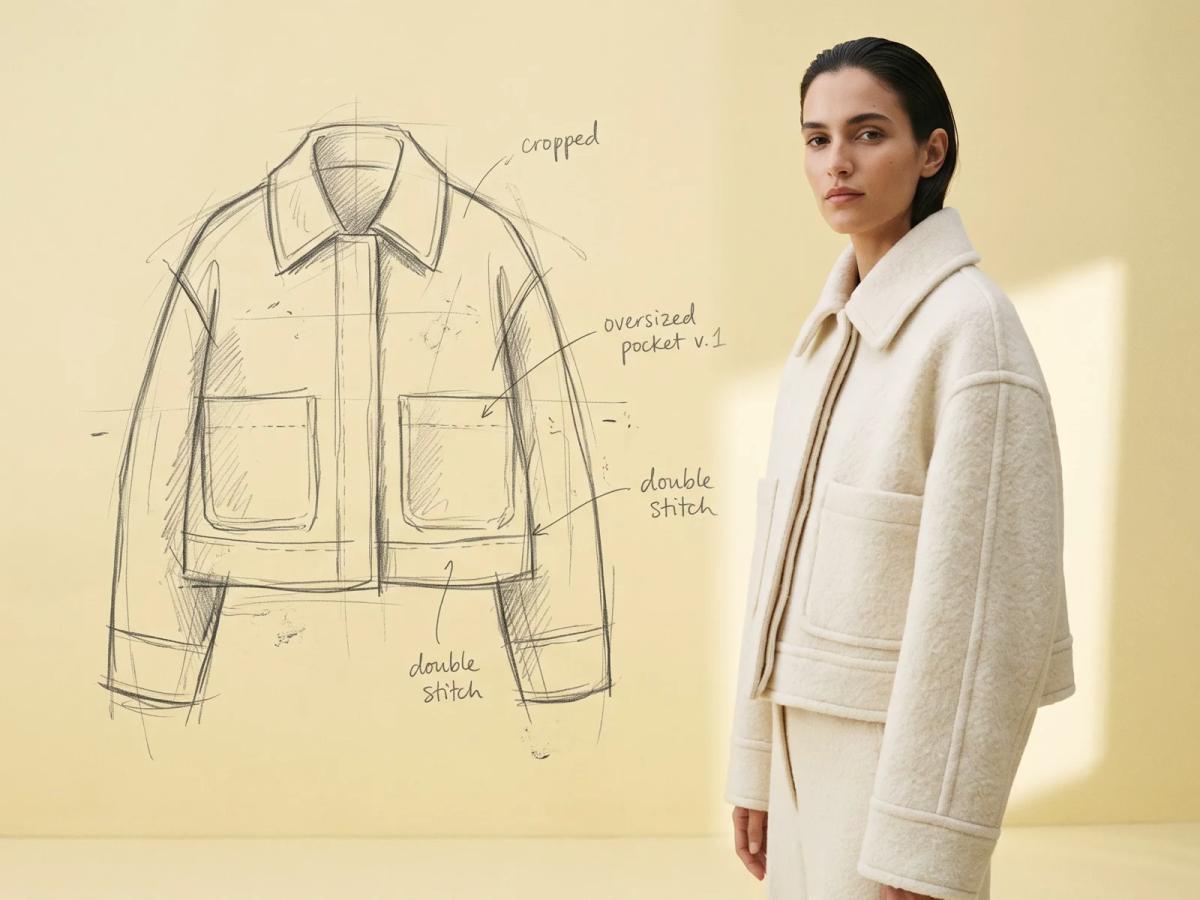
Open Realtime Design, choose what you draw on: a woman or a man in one of four poses, one of ten garment bases, or a picture of your own from My backgrounds. Draw the garment over it with the pen, the eraser, the colours and the line widths of the tool rail; a grid helps with proportions, and undo and redo keep every stroke reversible.
Generate the visual
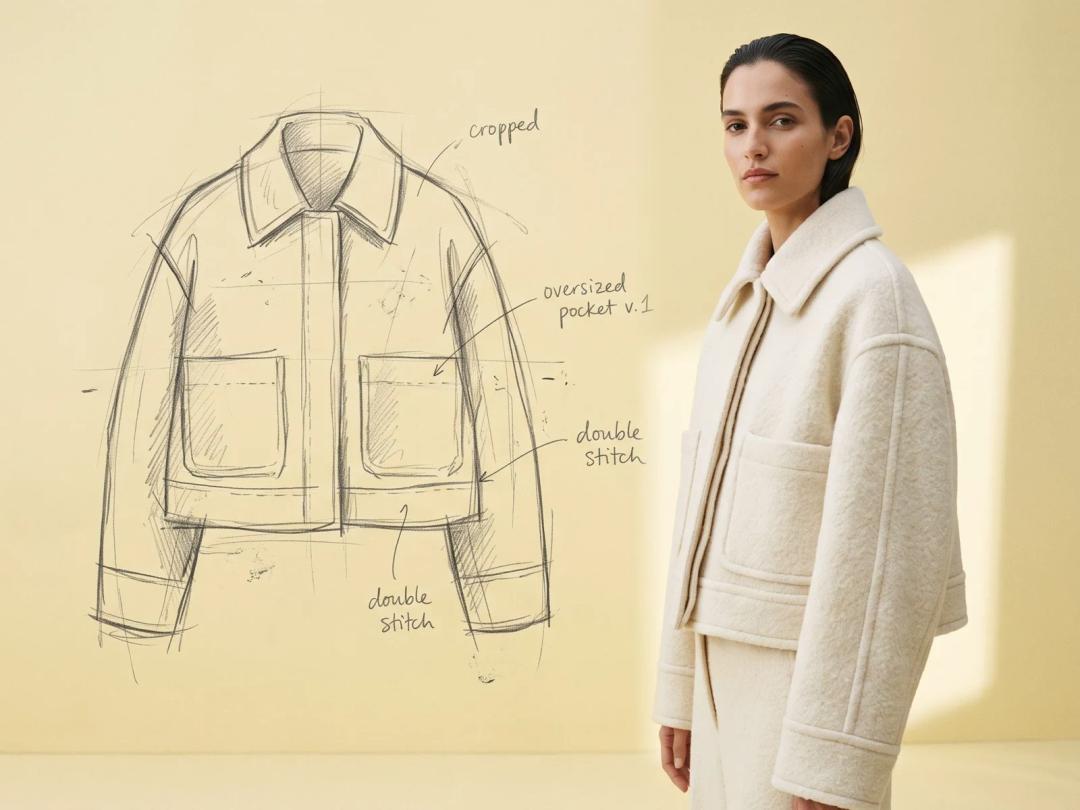
Choose Standard, Pro or Ultra and press Generate. In about twenty seconds on Standard, the sketch becomes a realistic image of the garment: the cut, the pockets, the collar and the seams you drew, in a believable fabric and light. Pro and Ultra take a little longer and render more detail.
Change the scene, keep the drawing
Describe a change in words with Edit background with AI: a different setting or a different light. The background is edited and your drawing stays on top, untouched, ready for the next Generate. The new background also joins My backgrounds, to draw on again later.
Branch, compare, export
Each Generate fixes a step in the creation tree. Click any earlier step and the board goes back to it; draw from there and a new branch opens, so two pocket ideas or two lengths live side by side. When a step is right, export it to the Studio (the visual becomes a creation, the sketch is kept beside it) or to a tech pack, where both land on its drawing area.
What the board gives a designer
- A sketch that stays yours. The visual follows the lines you drew: the volume, the length, the details. Draw a pocket bigger and the next visual has a bigger pocket.
- A tree instead of a pile of files. Every version is a step with its drawing and its visual, so the decision trail of a garment is readable at a glance.
- A bridge to production. A chosen step goes straight into a tech pack, so the sketch, the visual and the specification sit in one place.
- A bridge to marketing. Exported to the Studio, the visual can be put on a model, animated as a video or upscaled to HD with the other workflows.
Credits
| Gesture | Standard | Pro | Ultra |
|---|---|---|---|
| Generate a visual from the sketch | 1 credit | 3 credits | 7 credits |
Edit background with AI costs 1 credit. Drawing, erasing, branching and exporting cost nothing. Free credits at signup are enough to turn a first sketch into a visual.
Who it is for
Designers who think with a pen and want to see the garment before a sample exists; small brands that develop a range without a pattern room on call; students and freelancers who present ideas to a client. For a sketch you already have on paper or in a file, Sketch to Image turns an uploaded drawing into a visual without the board. The full tool page is Realtime Fashion Design.
Frequently asked questions
Do I need to know how to draw?+
No. A few lines over a mannequin are enough for the visual to read the shape: a collar, a hem length, two pockets. The more precise the lines, the closer the visual follows them.
Can I use it on an iPad?+
Yes. Realtime Design is made for a pen on iPad too: once a pen is detected, the palm never draws, and two fingers move and zoom the board.
How long does a visual take?+
About twenty seconds on Standard. Pro and Ultra take a little longer for more detail.
Can I draw on my own photo?+
Yes. Add a picture of your own to My backgrounds and draw over it, or create a new background with Edit background with AI.
What happens to the versions I do not keep?+
They stay in the creation tree of the board. You can go back to any of them, branch from it, or duplicate the whole board to try another direction.
Can the result go into a tech pack?+
Yes. Export a step to a tech pack and both the visual and the sketch land on its drawing area, ready for measurements and callouts.
Try it yourself
Everything on this page was made in the studio. Your first designs are minutes away.
Open the studioRelated features
- AI Size Chart Generator for Clothing Tech PacksWrite a graded size chart for your tech pack with AI: points of measure, tolerances, your sizes in cm or inches, your own grading sheet. 1 credit a chart.
- Chrome Extension to Save Images to Your AI Fashion StudioFree Chrome extension: tick the images on any web page and import them into your AI fashion studio, a project or a Shopify product.
- Prefill AI Fashion Photo Settings from InspirationPick a photo that inspires you and it fills the workflow for you: model, pose, styling, scene, framing, angle. You shoot your own product.
- Import Instagram and Pinterest Posts into an AI Fashion StudioImport your Instagram, Facebook, X, Pinterest and YouTube posts into The New Black AI in a few clicks, and turn them into new product photos and videos.
- AI Photoshoot for Fashion BrandsReplace a fashion photoshoot with AI: your product on an AI model or your own, any setting and angle, ghost mannequin, flat lay, 4K and video.
- Multi-Brand Workspaces for Agencies and GroupsManage several fashion brands from one account: each brand gets its own Shopify store, brand kit and creations, on the same plan. Enterprise plan.
- AI Fashion Reels: Trending Outfit Transition VideosMake trending AI fashion reels from one photo: outfit transitions at a finger snap, on a walk, after a jump. 10-second 9:16 videos for Reels and TikTok.
- AI Fashion Video from Reference ImagesPut your model, your garment and a place into one video: add up to three reference pictures, describe the scene, get a 5 to 15 second fashion clip.