Clothing and Models: View Alternative Angles with AI
Published 25 December 2025
In fashion, how a garment reads from the back or the side matters as much as the front view. AI now lets designers, brands, and stylists produce alternate perspectives of a model wearing a look in seconds. An alternate views feature generates back views, side views, and rotated angles from one photo, with no second photoshoot involved. That shortens the design loop, gives marketing more to work with, and lets everyone see the whole garment rather than half of it.
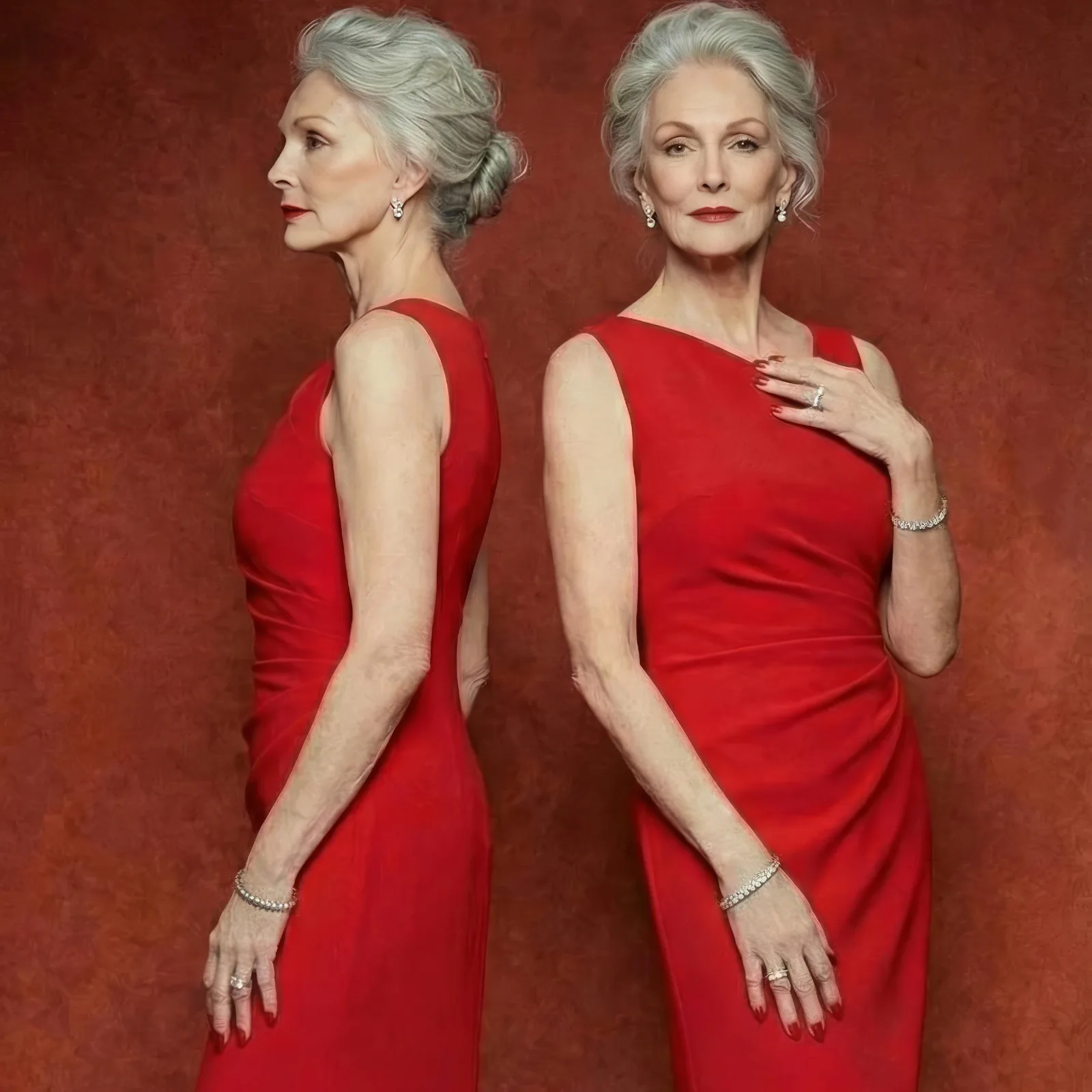
1. What alternate views are
Alternate views show a garment from angles beyond the standard front shot: the back, the profile, the three quarter turn. Generating those angles with AI lets a brand present every side of a design, which makes it far easier for a client or a customer to picture the finished product rather than guess at it.
2. How AI creates alternative angles
The feature reads a single image of a model wearing a garment and produces realistic variations from other viewpoints. Within seconds you get a back view, a side view, or a rotated perspective, with the model's pose, the outfit's details, and the fabric texture carried through. The alternative angle view tool does the turning; the original photo stays as it was.
3. What it changes for designers
A designer can build several angles of one look digitally instead of scheduling more shoots. Fewer sessions, faster iteration on a new collection, and internal reviews that move quicker because the reviewers can see the piece from every side in one sitting. Approvals stop waiting on photography.
4. What it gives brands
Brands can show customers the complete garment. An online shopper who sees the back and the sides in the same detail as the front buys with more confidence. Back views, profile views, and unusual perspectives all become available without adding a line to the photography budget.
5. Marketing and e-commerce use
Marketing teams get versatile visual material quickly. Alternate angles of a look fill out social campaigns, product pages, and lookbooks, and because they come from the same source image, the visuals stay consistent across every platform they land on. Pairing them with AI generated models keeps a whole product page coherent.
6. Room for styling and creativity
Stylists can test garment combinations and poses digitally before anything is shot. Seeing a look from the side or the back helps plan the styling and the photography itself, and it surfaces problems that a front view hides. That is creative room that used to cost a studio day.
7. Getting started
Upload a model image or a clothing photo, choose the angle you want, and let the AI generate the alternative view. In seconds you have several perspectives ready for a design review, a campaign, or a product listing. Generating a full set of angles in seconds is a genuine advantage when the calendar is tight.
See your design from every side
Start with one look you already have photographed. Open the AI models studio and generate the back and side views of it, then decide whether the next shoot needs to happen at all.
Related articles
- Clothing Product Photography with AI: The New Black AIEvery image a clothing product page needs, made from one photo of the garment: packshot, ghost mannequin, on-model, colourways, video; the credits and minutes each costs, what still needs a camera.
- AI Fashion Templates Free for Commercial Use: The New Black AIThe models, garments, fabrics and backgrounds provided in the studio are cleared for commercial use: your campaigns, your product pages, your lookbooks. And what you generate is yours on every plan.
- AI Fashion Video: UGC, Model Walk, Product 360Three guided video workflows from your photos: a UGC clip with a presenter and voice, a runway walk from one model image, a turntable from the front and the back. What each needs, costs and is for.
- Create an AI Clothing Design or Even a Whole CollectionGenerate a single AI clothing design or a full collection from a sketch, a photo, or a text prompt, and prototype without physical samples.
- Introducing Refashion: Rethinking Clothing Design with AIRefashion is our AI feature for reworking a clothing design. Send your design through the improve style option and get an informed alternative back.
- AI Fashion Models, How They Are Made: The New Black AIAI fashion models explained: how a product photo becomes an on-model image, what one image costs in credits, and when a brand should use them instead of a shoot.
- Camera Angle for AI Model and Try-On Shots: The New Black AIAn Angle row under Framing in Product to Model and Virtual Try-On: eye level, slightly above, slightly below, or low from the ground. With a scene image, the scene is re-rendered from that angle.
- Store Figures vs the Previous Period: The New Black AIOne switch on the Store page drives every number: 24 hours, 7 days, 30 days or a custom range up to 60 days back, each figure shown against the period of the same length just before.
- AI Image Upscaler to 2K and 4K: The New Black AIEnhance to HD now has a size choice: 2K for everyone, 4K from the Pro plan, 4096 pixels on the long side, with a new engine that adds no glare to fabrics and stones.
- AI Lookbook Generator, Images and Videos: The New Black AIHow to make a lookbook with AI from the product images of a collection: one model, one setting, one light on every piece, the editorial register in images and ten-second videos, and the cost.