Clothing Product Photography with AI: The New Black AI
Published 8 September 2026 · Updated 17 October 2026
Clothing product photography with AI means making every image a product page needs, the packshot on white, the ghost mannequin, the on-model shot, the colourways, the detail, the video, from one photo of the garment, without a studio day. This guide lists the images a page needs, how each one is made, what it costs in credits and in minutes, what still needs a camera, and how the images reach the store.
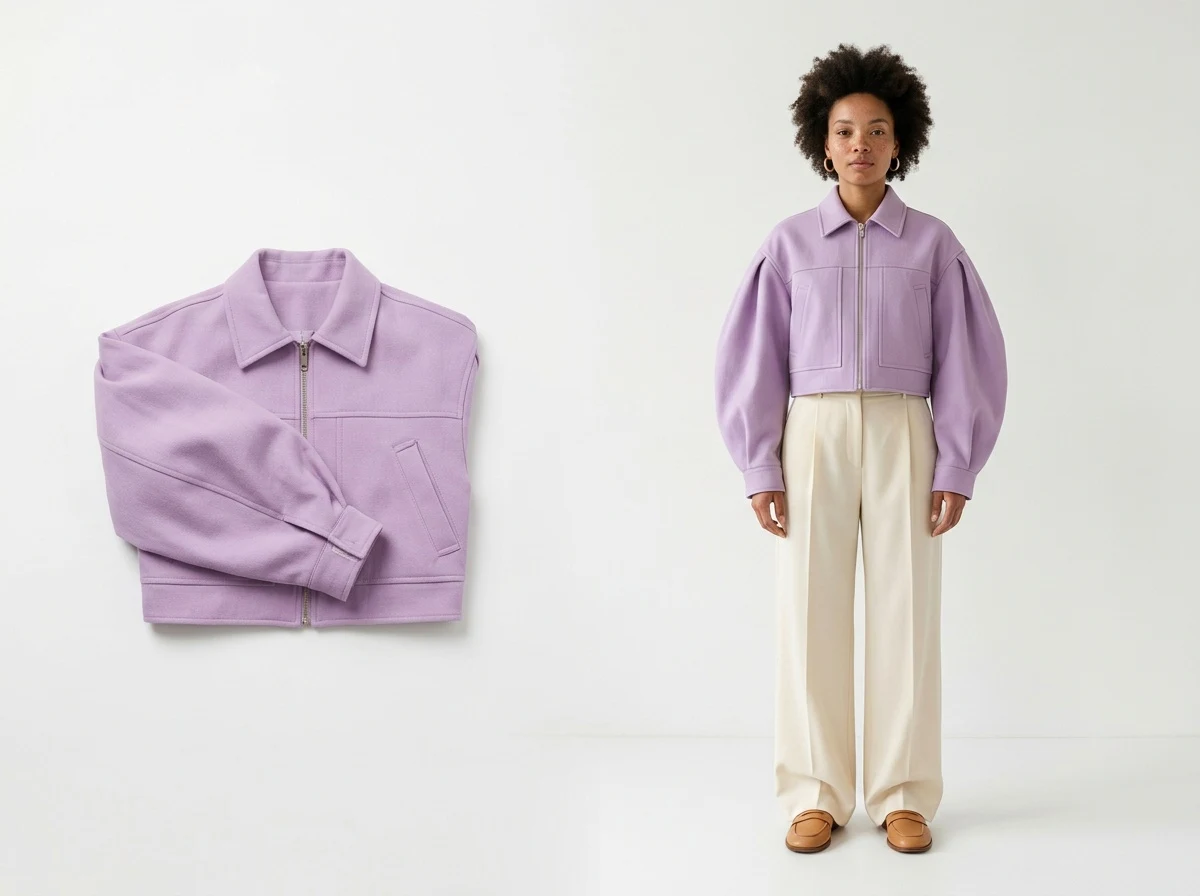
The images a product page needs
Marketplaces and themes agree on the set: a main image on white, a second view, an on-model image, a detail, and increasingly a short video. Add the colourways for each variant and the lifestyle image for ads and social, and one reference needs eight to twelve visuals. A studio makes them in a day per twenty products; the AI makes them in an afternoon per hundred, from one photo each.
Image by image: what to make, with what, for how much
| Image | Made with | Starts from | Credits on Standard AI | Time |
|---|---|---|---|---|
| Main image on white | Remove Background | any photo of the garment | 1 | seconds |
| Ghost mannequin | Image to Ghost Mannequin | a worn, hanger or mannequin photo | 1 | about 15 s |
| Flat lay | Image to Flat Lay | a worn photo | 1 | seconds |
| On-model | Product to Model | the product photo | 1 | about 20 s |
| Second model, other body | Product to Model, another profile | the same photo | 1 | about 20 s |
| Colourways | Change a Color | the generated image | 1 each | seconds |
| Lifestyle scene | Change Background | the on-model image | 1 | seconds |
| Detail close-up | Detail Close-up video, or a crop upscaled | the on-model image | 1 to 22 | seconds to a minute |
| HD for print | Enhance to HD, 2K or 4K | any image | 1 | seconds |
| Product video | Product 360, Model Walk | the product or the model image | 22 for 10 s | about a minute |
The whole set for one reference, main image, ghost mannequin, two models, three colourways, one scene and one video, is about 30 credits on Standard AI, inside the $15 plan for six references a month, and the same set on Pro AI is three times that on the images.
What still needs a camera
One good photo of the garment: flat on white or on a mannequin, evenly lit, the piece at about half the frame. Everything downstream starts from it, and a crumpled or dark input gives a crumpled or dark catalogue. Fine text, small logos and sheer fabrics are the things to check on every generated image. And the hero campaign, the one image the season is remembered by, still benefits from a real face in a real place.
Photoshoot ideas the AI makes possible
Because the model, the setting and the light are described in words, a brand can run the ideas a studio budget refuses: the same jacket on five bodies in one morning; a whole range in one courtyard at the same hour; the winter collection on a rooftop in the sun; the swimwear on a white sand beach in February; every product in the same editorial register for the lookbook. The editorial lookbook guide shows the register; the AI models guide shows how the model is defined.
Keeping the same model on every product
A catalogue reads as one when the person does not change. Define the model once, age, body shape, origin, or keep a reference photo, and reuse it on every product; a Visual style keeps the brand's light and look on top. The guide to a consistent AI model across photoshoots goes into the mechanics.
Publishing to the store
Each image lands in the studio grid next to the product; from the creation window it goes to the Shopify product page, as the product image or as a variant's picture, and to the social agenda. The Store page then reads the product's traffic, add-to-cart and conversion back, so the images are judged on sales, not on looks.
Frequently asked questions
Can AI replace clothing product photography?+
For the catalogue, yes: the main image, the ghost mannequin, the on-model shot, the colourways and the video come from one photo. For the hero campaign, most brands still shoot.
What photo do I need to start?+
One: flat on white or on a mannequin, evenly lit, the garment at about half the frame. A worn photo works for the model workflows.
How do I keep the same model on every product?+
Define the model profile once, or keep a reference photo, and reuse it on each product; the Visual style keeps the brand's look.
What does AI product photography cost?+
About 30 credits for a full set per reference on Standard AI, from 3 free credits at signup and $15 a month for 200; one credit per image, 22 per ten-second video.
Can I publish the images directly to Shopify?+
Yes, from the creation window to the product page, the product image or a variant's picture, and to the social agenda.
Does it work for shoes, bags and jewellery?+
Yes: each has its own product type and framing in Product to Model and in the design generator; jewellery and small products need a photo with margins.
How long does a catalogue of a hundred products take?+
A morning of uploads: each image comes back in fifteen to twenty seconds, and batch generation runs a whole set of products through one workflow at once.
What resolution do I get?+
Web resolution by default, 2K or 4K with Enhance to HD, enough for print.
Related articles
- AI Fashion Video: UGC, Model Walk, Product 360Three guided video workflows from your photos: a UGC clip with a presenter and voice, a runway walk from one model image, a turntable from the front and the back. What each needs, costs and is for.
- Cost to Start a Clothing Brand: The New Black AIWhat it costs to start a clothing brand in 2026: budgets by model, every line from samples to photos, and what the design, tech pack and photo work costs with AI.
- AI Product Photos for Shopify: The New Black AIAI product photos for a Shopify fashion store: the five shots a product page needs, how to make each from one photo, and how to publish them to Shopify without re-uploading.
- Clothing mockup generator with AI: The New Black AIMake clothing mockups with AI: your logo or print set into the fabric, following its folds, then worn by a model, as a ghost mannequin or flat lay. 1 credit a step.
- Ghost Mannequin Photography Guide: The New Black AIGhost mannequin photography three ways: the studio and its equipment, the retouching and its cost, and the AI that makes the hollow shot from one photo in fifteen seconds, with a comparison table.
- Change Clothes Colour in a Photo with AI: The New Black AIHow to change the colour of clothes in a photo with AI: HEX code or a name, one garment and not the rest, the colourway workflow for a product page and its Shopify variants, and what to check.
- How to Design a Dress with AI: The New Black AIDesign a dress with AI step by step: the order of the description, three prompts for three dresses, then colourways, fabrics, a model, a video and the tech pack from the same design, with the credits.
- Best AI Fashion Model Generator in 2026: The New Black AIThe best AI fashion model generators in 2026 compared: The New Black AI, FASHN, Botika and Modelia, with prices per image, video credits, consistency and what happens after the image.
- Camera Angle for AI Model and Try-On Shots: The New Black AIAn Angle row under Framing in Product to Model and Virtual Try-On: eye level, slightly above, slightly below, or low from the ground. With a scene image, the scene is re-rendered from that angle.
- AI Clothing Fashion Video Generator: Turn Any Image or Text into VideoTurn a product photo or a written idea into fashion video. How an AI clothing video generator works and where brands actually use the output.