AI Ghost Mannequin Clothes from an Image
Turn any garment photo into a clean ghost mannequin image in seconds. The AI removes the model or mannequin and recreates the hidden parts of the clothing, giving you a polished, professional result, perfect for e-commerce, catalogs, and lookbooks. Upload a single image and instantly showcase jackets, dresses, or shirts with a premium, 3D-like finish, no photoshoot needed.
Updated 22 October 2026
- 1Upload your original image
- 2Say which garment to recreate
- 3Cover a whole catalog
How it works
Upload your original image
Use an image showing the garment on a model, on a mannequin, or laid flat. The only requirement is that the clothing is clearly visible.
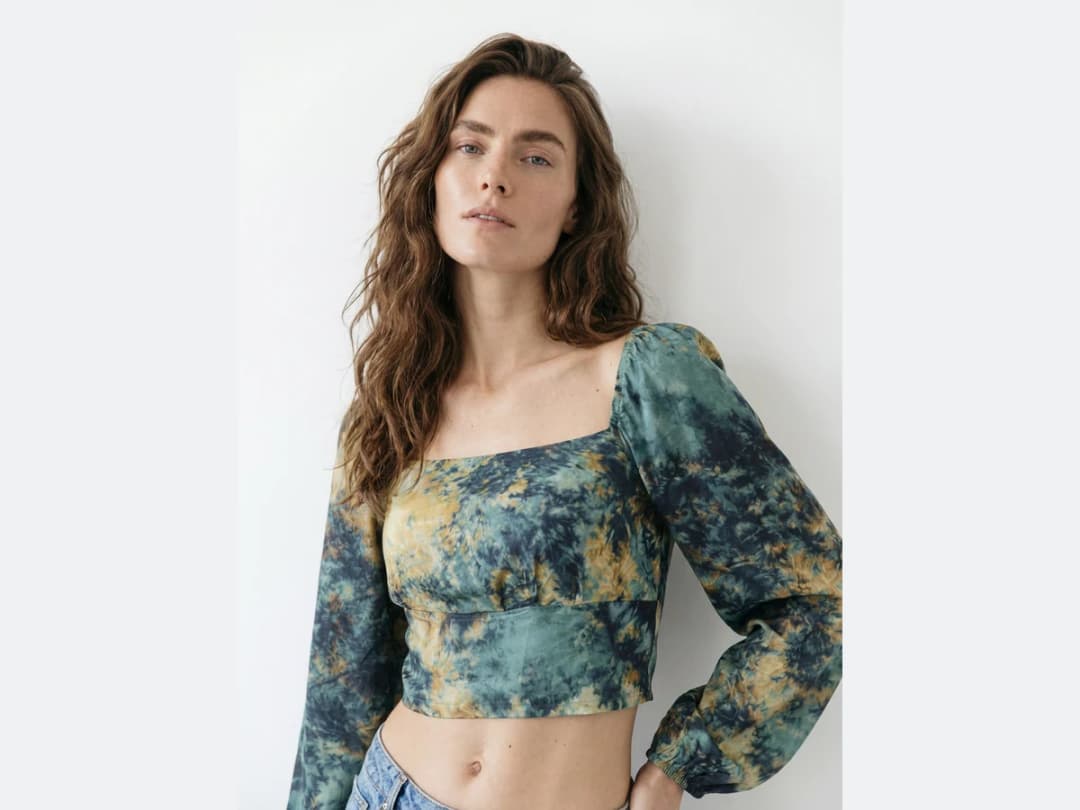
Say which garment to recreate
Specify the type of garment to turn into a ghost mannequin: a dress, a jacket, a shirt. If your image shows several pieces at once, name the one you want, such as the coat, the shirt, or the pants, and the AI recreates that one.
Cover a whole catalog
The same treatment works one garment at a time or across your catalog: run it on each product photo and get a consistent set of ghost mannequin images for your store.
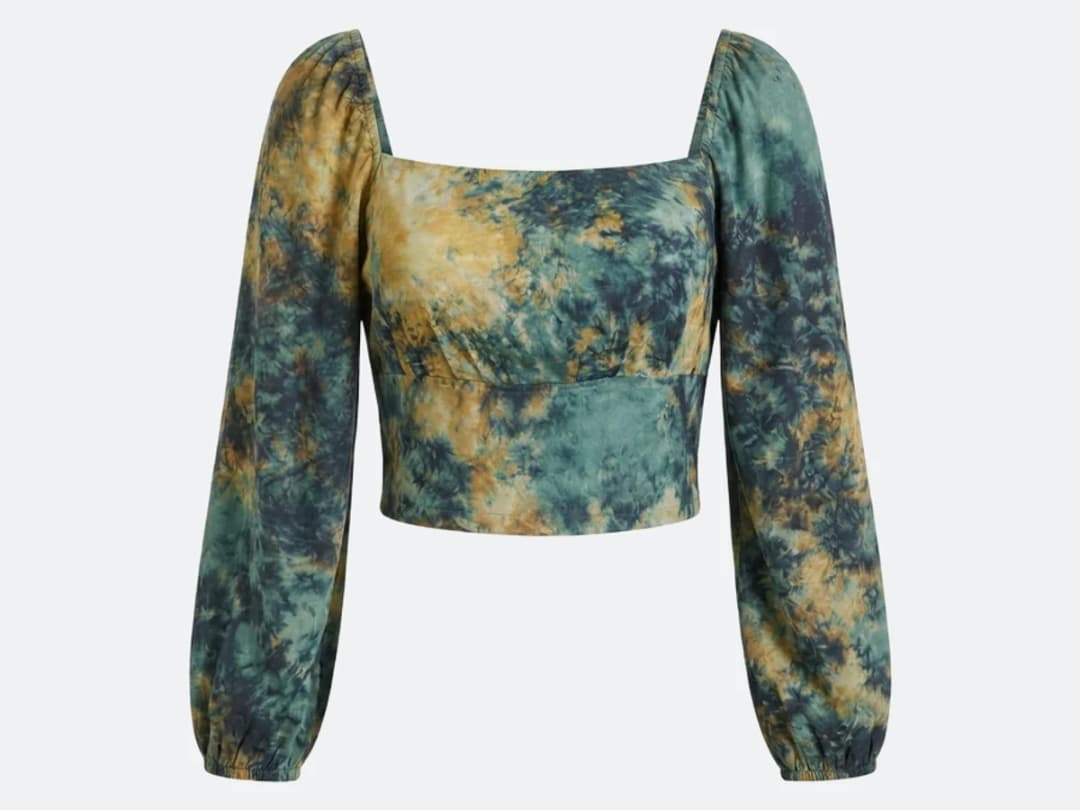
What is ghost mannequin photography?
Ghost mannequin, also called invisible mannequin or hollow man, is the product photograph where a garment holds its worn shape with nobody inside it. The jacket has shoulders, the dress has a waist, the collar sits open the way it would on a person, and yet there is no model and no mannequin in the frame. It is the standard for e-commerce because it shows fit without a body distracting from it, and because a whole catalogue shot this way looks like one catalogue rather than twenty different people.
Traditionally it is not one photograph but a composite. The garment is shot on a mannequin, then a second frame is taken of the inside of the collar or the back neck, usually with the piece turned or the mannequin partly disassembled; a retoucher cuts the mannequin out of the first image and drops the interior of the second into the gap. Done well it is invisible, which is the name. Done at catalogue scale it is a photographer, a studio, a set of mannequins in several sizes, and a retouching bill per product.
Doing it from one photograph instead
What changes here is the number of inputs. There is no second exposure of the neck to take, because the interior that was never photographed is recreated rather than composited. You upload the garment as it was worn or laid flat, say which piece to lift, and the hollow shape comes back.
The cost sits where the retouching used to: one credit on Standard, three on Pro, per attempt. And the pace is what makes a catalogue possible in an afternoon: measured on our own platform in August 2026, an image comes back in about fifteen seconds. A hundred products is then a morning of uploads rather than a fortnight of studio time and a retoucher's queue.
Which garments come back cleanly, and which fight
Structured pieces are the easy case: jackets, coats, shirts, knitwear, anything with a collar and a shoulder line that already suggests the body underneath. These are also the garments the technique was invented for.
Three cases need more care. Sheer and lace garments confuse the boundary between the piece and the background, so the hollow can come back cloudier than the original. Anything with a complex open back, a halterneck or a deep cowl, asks the model to invent an interior it can barely see, and the invention is sometimes prettier than the truth, which for a product page is a fault rather than a favour. And a garment photographed tightly cropped, with the hem or a shoulder outside the frame, cannot be completed convincingly: give it the whole piece.
The plainest way to check a result is to look at the neck opening first. If the inside of the collar reads correctly, the rest almost always does.
Put the ghost mannequin in any format, on a seamless background
A ghost mannequin shot often has to fit several places at once: a square for the marketplace, a 4:5 for the product page, a 9:16 for a story. Open the image, choose Crop / Reframe, then the Reframe side: pick the format and the background colour. By default the background is the picture's own, so a garment on white stays on a seamless white whatever the format; you can also type any HEX colour, and your last five colours stay at hand. Size the garment by its corners, crop it by its sides and place it with the centre guides. It is free and instant, the garment keeps its full resolution, and each format is saved as a new version of the picture.
From the ghost mannequin to the turntable: Product 360
A ghost mannequin image is the best starting point for a 360 product video, because the garment already holds its worn shape with nobody inside. Make the front and the back of the piece here, one credit each on Standard, then hand the pair to Product 360: the product turns, 5 to 30 seconds, in the setting of your two images, showing the front and the back exactly as you made them. The clip goes to your Shopify product gallery from the Product section of its window, or across the catalogue with Bulk generation. Both workflows sit next to each other in the studio, under Workflows.
{{video:https://cloud.thenewblack.ai/storage/v1/object/public/assets/features/product-360-video/clip-e1089180.mp4|A ghost mannequin front and back turned into a turntable clip with Product 360}}
Try it on your own products
Ghost mannequin lives inside the design studio, next to everything else your product photos can become, from AI fashion models to virtual try-on. Open the studio and upload a garment to start.
Frequently asked questions
What kind of image do I need?+
An image showing the garment on a model, on a mannequin, or laid flat. The only requirement is that the clothing is clearly visible; the AI removes the person or the mannequin and rebuilds the hidden parts itself.
My photo shows several pieces. Which one gets recreated?+
The one you name. Specify the garment to turn into a ghost mannequin, such as the coat, the shirt, or the pants, and the AI recreates that piece alone.
Can I do my whole catalog?+
Yes. The same treatment works one garment at a time or across the catalog: run it on each product photo and you get a consistent set of ghost mannequin images for your store.
What can I do with the result?+
Each ghost mannequin image lands in your studio grid, organised in projects, and stays reusable: put the garment on an AI model, run a virtual try on, or upscale it to HD for the product page. The studio runs in the browser, with free credits at signup.
Can I use the images on my store?+
Yes. Every image you create on The New Black AI is yours, with a full licence to use it as you wish within the law: product pages, marketplaces, catalogues, ads. If your store runs on Shopify, the image goes straight to the product from its window, see publish to Shopify.
Do I need a mannequin in the original photo at all?+
No, that is the point. The source can be a worn shot, a flat lay or a mannequin photo: the workflow rebuilds the garment as if it stood on an invisible form, so the "ghost" effect no longer depends on how the original was photographed.
What about the inner collar and the areas a body normally hides?+
The reconstruction draws them, the inner neckline is precisely what ghost-mannequin photography fakes with pins and tape. Judge each garment on its result: complex linings deserve a look before publishing, and a retry costs one attempt rather than a reshoot.
Can I put the ghost mannequin image in a square or vertical format?+
Yes, for free. In the image's Crop / Reframe tool, choose the format and keep the picture's own background, so a white ghost mannequin stays on seamless white in 1:1, 4:5 or 9:16. The garment keeps its full resolution.
Can I turn the ghost mannequin image into a video?+
Yes. Make the front and the back of the garment as ghost mannequin images, then give the pair to Product 360: it makes the turntable clip, 5 to 30 seconds, in the setting of your images, with both sides exactly as you made them. For a model wearing the piece, Model Walk animates a model image instead.
Try it yourself
Everything on this page was made in the studio. Your first designs are minutes away.
Open the studioRelated features
- AI Virtual Try On Necklace (Jewelry)Preview any necklace on a model with AI: upload a model photo and the necklace design, and see it sit on the neckline at the right chain length.
- AI Virtual Try On Bracelet (Jewelry)Preview bracelet designs on a real wrist with AI: upload a wrist photo and your bracelet, and get a lifelike worn shot with accurate scale.
- AI Virtual Try On BagsSee any bag on a model in seconds: upload a photo and a handbag or purse image, and the AI matches lighting, proportions, and perspective.
- Create Kid Fashion Clothing Models with AIUpload a kids clothing photo and get a child AI model wearing it in about 30 seconds: no casting, no studio, visuals ready for your store.
- Virtual Try On Head Accessories with AISee any hat, cap, or beanie worn before buying: AI fits the headwear to the face, the hairstyle, and the perspective of your photo.
- Create an AI Fashion Model for SocksUpload a sock photo, describe the model and the scene, and get visuals framed so the socks stay the point: no shoes, no photoshoot.
- Reimagine Your Model in New ScenesCreate a back view, a side view or a close up of a fashion photo with AI: upload the original model and describe the angle you want to see.
- AI Virtual Try On ShoesSwap shoes on any photo with AI: upload a model and a new pair, and the original shoes are replaced with realistic proportions and lighting.
- AI Virtual Try On JewelryTry jewelry on any photo with AI: upload a model and a ring, bracelet, necklace or earrings, and see the piece worn with realistic scale and light.
- AI Fashion Models for Beauty and Cosmetic ProductsTurn a cosmetic product photo into an AI model visual: editorial beauty images without a photoshoot, with a model whose age and country you choose.