How to Design a Dress with AI: The New Black AI
Published 25 September 2026 · Updated 1 October 2026
To design a dress with AI, you describe it, the type, the occasion, the cut, the fabric, the colours, the details, and the generator draws it in seconds, product only or on a model, front and back if you ask. This guide gives the order that works, three example prompts, and what to do with the dress once it exists: variations, a model, a video, a tech pack.
The order that works
1. The type of dress: slip, shirt dress, column, wrap, mini, midi, maxi. The first noun anchors everything. 2. The occasion: a wedding guest, an office, a beach, an evening; it sets the register. 3. The cut: the neckline (funnel, square, halter), the sleeves, the waist, the length, the back. 4. The fabric and its surface: silk charmeuse, crinkled cotton, heavy satin, organza, ribbed knit. 5. The colours, two or three, and where they go. 6. The details: a gold chain at the waist, a cape from the collar, bonded panels, covered buttons. 7. How it is shown: product only on white for the tech pack, on a model full length for the page, front and back for the factory.
Three prompts, three dresses
In Create a Product, type Garment, one credit on Standard AI:
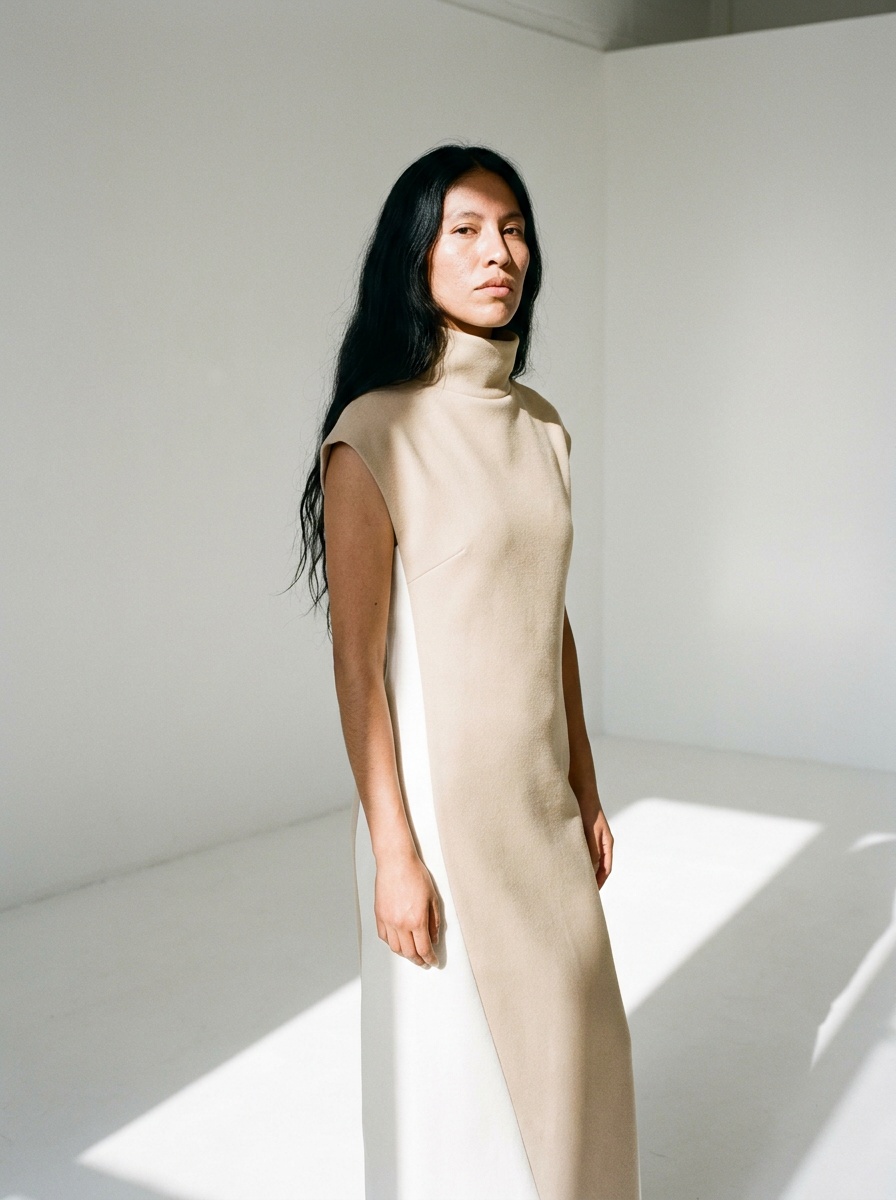
- A funnel-neck column dress in sand and white, one bonded piece from collar to hem, product only, front and back, on a clean white background
- A white flared shirt dress with a pointed collar, three-quarter sleeves and a gold chain at the waist, on a model, full length, white studio, morning sun
- A pleated sunray midi dress in peach with one cape falling straight from the collar, on a model, from behind, a white courtyard
More words control more; fewer words let the generator invent. Decide which you want before typing, and read the prompt guide for the words that change the result most.
From one dress to a collection
Once the dress exists, the work that used to take weeks takes minutes:
| Next step | Workflow | Cost on Standard AI |
|---|---|---|
| Three colourways | Change a Color | 1 credit each |
| The same dress in silk, then in crêpe | Swap Fabrics | 1 credit each |
| Ten variations of the cut | Create Design Variations | 1 credit each |
| The dress on a model of your choice | Product to Model | 1 credit |
| A ten-second video of the model | Create video from image | 22 credits |
| The flat sketch for the factory | Image to Sketch | 1 credit |
| The tech pack | Tech pack studio, from the photos | 1 credit for the draft |
From a sketch or a reference instead of words
If the dress already exists as a drawing, Sketch to Image renders it; if it exists as a photo you like, give it as a reference image and describe what changes. The Visual DNA keeps your brand's look across every dress you design afterwards.
Frequently asked questions
Can AI design a dress from a description?+
Yes: one or two sentences with the type, the cut, the fabric and the colours, and the dress is drawn in seconds, product only or on a model.
Can I get the front and the back?+
Yes: Garment type, Front and Back, and both views come from the same description as one piece.
How do I make the dress in several colours?+
Change a Color on the generated image, one credit per colour, the cut and the fabric unchanged.
Can I see the dress on a model?+
Product to Model puts it on a model you describe, age, body shape and origin, or on a reference photo you keep.
Can the AI make the tech pack of the dress?+
The tech pack studio drafts it from the photos: the flat sketch, the construction, the bill of materials and a first set of measurements, to correct against the sample.
What does designing a dress with AI cost?+
One credit per image on Standard AI, three on Pro; a new account opens with three free credits, and the $15 plan gives 200 a month.
Who owns the design?+
You do: everything you generate is yours to sell, print and publish, on any plan.
What kinds of dresses can I design?+
Any silhouette you can name: slip, sheath, A-line, wrap, shirt dress, cocktail, evening, wedding, sundress. Any length, any neckline, any fabric. The generator follows the words; the more construction you name, the more precisely the dress comes back.
Can a dress designed here be manufactured?+
The image is the design reference, not the pattern. It is what you show a buyer, a client or a workshop to decide. The factory needs a flat sketch, a size chart and a bill of materials: the tech pack generator builds them from this image.
How do I get the fabric right?+
Name it. Silk satin, crepe, poplin, jersey, tulle, linen, velvet each fall differently, and the generator renders the fall with the name. Add the finish when it matters: matte, glossy, washed, pleated.
Can I use the designs commercially?+
Yes, on any plan: everything you generate is yours to sell, print and publish. Your creations stay in your studio grid, organised in projects, ready for the other workflows.
Related articles
- Clothing Product Photography with AI: The New Black AIEvery image a clothing product page needs, made from one photo of the garment: packshot, ghost mannequin, on-model, colourways, video; the credits and minutes each costs, what still needs a camera.
- Clothing Design Software: The New Black AIClothing design software explained: the five kinds of fashion design software, what each one does, how to choose, and where AI design tools fit from concept to tech pack.
- Clothing mockup generator with AI: The New Black AIMake clothing mockups with AI: your logo or print set into the fabric, following its folds, then worn by a model, as a ghost mannequin or flat lay. 1 credit a step.
- Consistent AI Model Across Photoshoots: The New Black AIHow to keep the same AI model on every product of a collection: a profile reused, a reference photo, a Visual DNA, the framings that hold the identity, what still drifts, and the workflow in order.
- Best AI Fashion Model Generator in 2026: The New Black AIThe best AI fashion model generators in 2026 compared: The New Black AI, FASHN, Botika and Modelia, with prices per image, video credits, consistency and what happens after the image.
- AI Video Editor from One Sentence: The New Black AIUpload a clip, write what should change: make it night, add snow, put the model on a beach: and get the same video with that one change. Priced by the second.
- AI Model Walk Video from One Photo: The New Black AIOne photo of your model, one sentence about the movement, and the look walks. From 5 to 30 seconds, so a whole line can move instead of three pieces.
- How to Make a Tech Pack: The New Black AIHow to make a tech pack in eight steps: header, flat sketch with callouts, construction, points of measure, bill of materials with quantities and prices, colourways, finish, and the factory read-back.
- Design Smarter: How to Create AI Fashion Models for Your DressesCreate AI fashion models for your dresses: preview fabrics, folds, and fits on a virtual model, pick the pose and age, and publish without a photoshoot.
- Tech pack designer vs AI: The New Black AIHire a tech pack designer or make your tech pack with AI? What each delivers, what it costs, how long it takes, and how small fashion brands combine the two.