How to Convert a Fashion Sketch to SVG: 3 Methods Compared
Published 25 May 2024 · Updated 12 November 2026
There are three ways to convert a fashion sketch to SVG: trace it automatically, redraw it by hand with the pen tool, or have AI redraw it. They do not give the same file. A trace copies the pixels of your drawing, a redraw gives clean lines you can edit one by one. This guide compares the three, says what each costs in time, and shows which one a tech pack needs.
What a factory expects from an SVG flat
A vector flat is not just a sketch saved in another format. A technical designer or a factory opens it to change it: move a pocket, lengthen a hem, add a callout, measure a seam. That only works when each line of the garment is one path, when the stitching is separate from the construction lines, and when the left side mirrors the right. A file that looks right at full size and falls apart when you click on it is the most common problem with converted sketches.
So before choosing a method, ask one question: will someone edit this file, or only look at it?
Method 1: automatic tracing
Vector software such as Adobe Illustrator and Inkscape includes a trace function, and many online converters do the same thing. You import a photo or a scan of the sketch, the software follows the dark pixels and turns them into shapes.
It is fast and often free. It is also literal. The trace reproduces the wobble of the pen, the line you went over twice, the grain of the paper and the shadow of the page. A single seam often comes back as an outlined shape or as dozens of small fragments rather than one line, so editing it means cleaning it first.
Tracing is a good choice for a logo, a print or an illustration, where the picture is the point. For those, the studio has its own tool, Vectorize Prints & Logos. It is a poor choice for a flat that somebody has to edit.
Method 2: redrawing with the pen tool
This is how flats have always been made. You place the sketch on a locked layer and draw over it, anchor point by anchor point, with a symmetry axis for the two sides.
The result is exactly what a factory wants, because a person decided where each line starts and ends. The cost is time and skill: around an hour for a simple piece, more for anything with structure, and a learning curve of weeks before the pen tool feels natural.
Method 3: AI redraw
The third way keeps the result of method 2 and removes most of its cost. Instead of following pixels, the AI reads the sketch as a garment and draws it again the way a technical designer would.
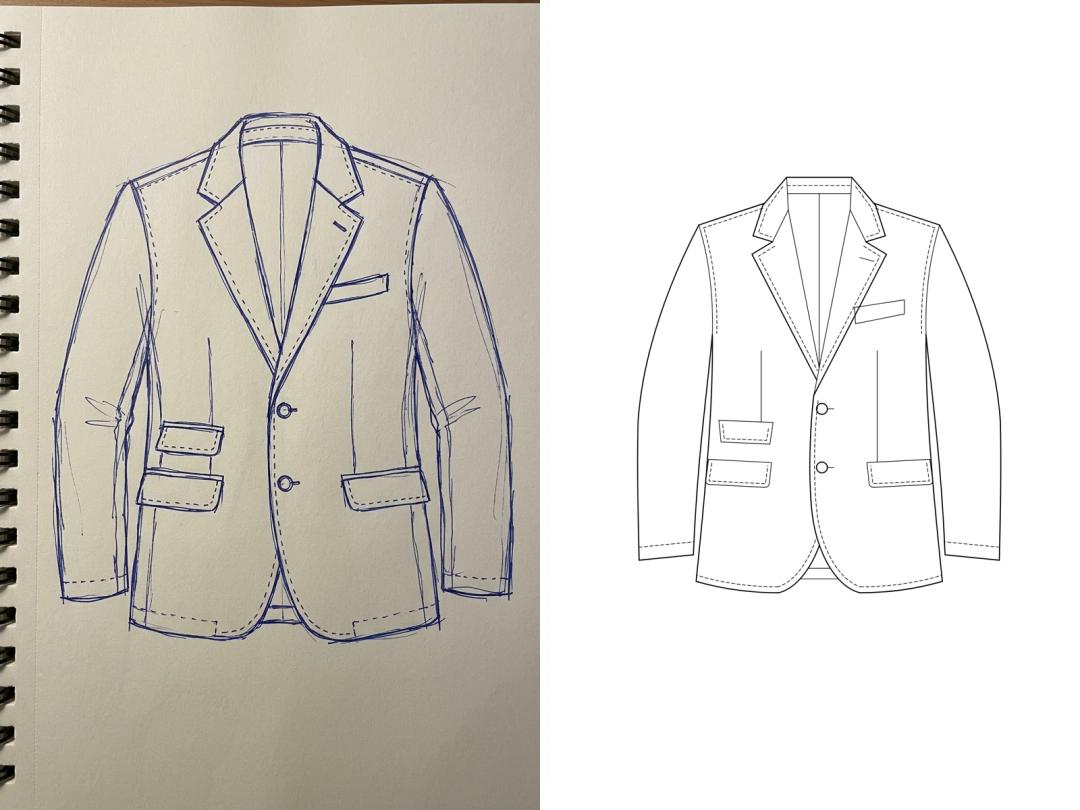
In The New Black AI this is Sketch to SVG. You upload a technical flat or a drawing made by hand, even a pen drawing photographed on a notebook page, and you get the garment back as an SVG: straight lines, smooth curves, one path per line, stitch lines as dashed paths, buttons as circles, everything sorted into named groups. It costs 10 credits and takes one to four minutes.
It is built for the sketch of one garment, front or front and back. A fashion illustration with a figure, or a watercolour, is not what it is for.
Step by step: from a paper sketch to an SVG flat
- 1.Photograph the drawing. One garment, the whole garment in the frame, the phone straight above the page, even light. No scanner needed.
- 2.Convert it with the method you chose. With an AI redraw, this is one upload and a wait of a few minutes.
- 3.Open the SVG and click on a seam. If one click selects the whole line, the file is editable. If it selects a thin outlined shape or a fragment, it was traced, and it needs cleaning.
- 4.Check the garment, not only the file. Compare pockets, closures and stitching with your drawing: a detail that was only suggested on paper may have been read differently.
- 5.Place the flat in the tech pack and add callouts and measurements on top.
The three methods side by side
| Automatic tracing | Pen tool by hand | AI redraw | |
|---|---|---|---|
| Time per sketch | Seconds | About an hour | One to four minutes |
| Skill needed | None | Vector drawing | None |
| Follows | The pixels | Your decisions | The garment |
| One path per line | No | Yes | Yes |
| Pen wobble and paper grain | Kept | Removed | Removed |
| Best for | Logos, prints, illustrations | Final production flats | Flats from a rough sketch |
Which one to choose
- A logo or a print to scale up: trace it.
- A flat you will edit and send in a tech pack, starting from a rough drawing: AI redraw, then adjust the details in your vector software.
- A final flat with a house drawing standard to respect: start from the AI redraw and finish by hand, or draw it by hand from the start.
No sketch yet? You can draw the flat from a photo of the garment or from a description, then convert it. When the flat is ready, it goes on the sketch page of the tech pack.
Frequently asked questions
How do I convert a hand-drawn fashion sketch to SVG?+
Photograph or scan the drawing, then either trace it in vector software, redraw it with the pen tool, or upload it to an AI redraw tool such as Sketch to SVG. Only the last two give one editable path per line.
What is the best tool to turn a fashion sketch into an SVG?+
It depends on what happens to the file. For a flat somebody will edit, choose a tool that redraws the garment rather than one that traces the photo. For a logo or a print, a tracer is enough.
Why does my traced SVG have hundreds of paths?+
Because a tracer converts every dark area of the image into a shape, including paper grain, shadows and doubled pen strokes. Cleaning the scan first helps; redrawing avoids the problem.
Can I open the SVG in Adobe Illustrator?+
Yes. SVG opens in Illustrator, Figma, Inkscape and Affinity Designer. A redrawn flat keeps its groups, so stitching, seams and hardware can be selected separately.
Do I need a clean sketch to start?+
Not with a redraw. A rough pen drawing with shaky lines is enough, as long as it shows one garment clearly. With a tracer, the cleaner the drawing, the cleaner the file.
Is SVG better than PNG for a tech pack?+
For the flat, yes. A vector stays sharp when printed or zoomed, and a change of detail means moving a line instead of making the drawing again.
Related articles
- 10 Best AI Fashion Design Software in 2026 (Compared)The 10 best AI fashion design software compared, updated November 2026: sketch, fabric, 3D, patterns and tech packs, starting price and free option.
- 8 Best CLO3D Alternatives in 2026 (Compared)8 best CLO3D alternatives, updated November 2026: AI sketch to image and tech pack, 3D tools and free pattern software, with starting prices.
- 10 Best AI Fashion Studios for Brands in 2026 (Compared)10 AI fashion studios for brands compared, updated November 2026: what each makes, Shopify, video, tech packs, first plan prices and which one fits which brand.
- Fashion PLM SoftwareFashion PLM software keeps one record per style, from sketch to bulk order. What it holds, who needs one and when, and the lighter route for small brands.
- Fashion Supply ChainThe fashion supply chain stage by stage for a small brand: what happens, which document travels, and where time and money are lost.
- Tech pack designer vs AIHire a tech pack designer or make your tech pack with AI? What each delivers, what it costs, how long it takes, and how small fashion brands combine the two.
- How to Design a Dress with AIDesign a dress with AI step by step: how to order the description, three prompts for three dresses, then colourways, fabrics, a model and the tech pack.
- YouTube Analytics for Fashion BrandsYour channel in the Social Media tool: views, watch time, subscribers and traffic sources against the period before, next to your other networks.
- AI Fashion Video: UGC, Model Walk, Product 360Three guided AI video workflows from your photos: a UGC clip with a presenter and voice, a model walk, a product turntable. What each needs and costs.
- How to Make a Tech PackHow to make a tech pack in eight steps: header, flat sketch with callouts, construction, points of measure, bill of materials, colourways and finish.