Change Clothes Colour in a Photo with AI: The New Black AI
Published 25 September 2026
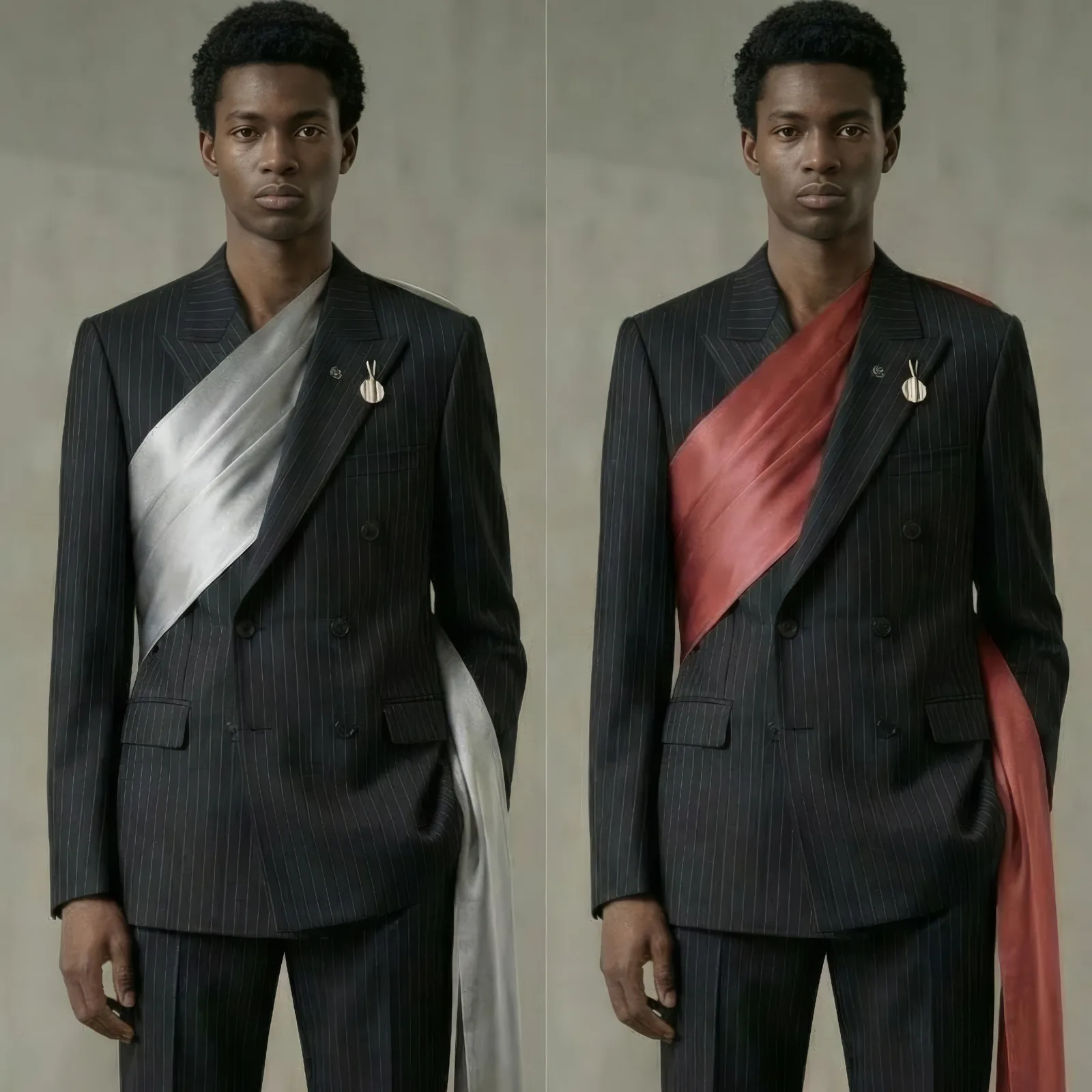
To change the colour of clothes in a photo with AI, you point at the garment, give the colour, a name or a HEX code, and the generator recolours it while keeping the fabric's texture, the folds, the light and everything else in the picture. On The New Black AI this is Change a Color, one credit on Standard AI. This guide covers how to specify the colour, how to recolour one piece and not the rest, the colourway workflow for a product page, and what still needs a check.
What AI colour changing does, and does not
It changes the colour of a garment in an existing image, a shirt, a dress, a pair of trousers, a bag, and keeps the weave, the shine, the shadows and the surroundings. It does not change the print's drawing (a stripe stays a stripe, in the new colour), the cut, or the model. For a new colour on a new design, generate the design in that colour; for a colour on a photo you already have, recolour.
How to specify the colour
| You want | Give |
|---|---|
| A brand colour, exact | the HEX code: #C8A2C8 |
| A named colour | the name and its tone: "sage green", "bottle green", "powder blue" |
| A material feel with the colour | "lacquered black", "frosted mint", "crinkled pistachio" |
| Two-tone | which part gets which: "collar chalk white, body sky blue" |
| Only one garment in a look | name it: "the jacket only, the trousers unchanged" |
A HEX code is the surest route for a brand: the swatch on the page and the swatch on the product match.
Recolour one piece and leave the rest alone
Say which garment: "change the shirt to sage green, keep the trousers and the background exactly as they are". When the generator still touches too much, use Retouch a Zone: paint the garment, describe the colour, and only the painted zone changes.
The colourway workflow for a product page
1. One on-model image of the reference, generated with Product to Model or shot. 2. One recolour per variant, HEX code from the brand palette, one credit each. 3. Each image on its variant: from the creation window, Use for a variant puts the sage image on the sage variant of the Shopify product, so the shopper who picks sage sees sage. 4. The video, if there is one, recoloured the same way with Edit Outfit in Video.
Five colourways of one reference cost five credits and take a minute; the studio day it replaces is the one where the same model changed shirts five times under the same light.
What still needs a check
Very dark to very light changes on shiny fabrics, prints with several colours (say which one changes), and skin next to the garment on a close-up. Look at the result against the swatch; regenerate the one that is off.
Frequently asked questions
Can I ask for an exact colour rather than a name?+
Yes: a HEX code, and the garment takes that value; the swatch on the product page and the image then match.
Does the fabric keep its texture?+
Yes: the weave, the shine and the folds stay; only the colour changes.
Can I recolour one garment and leave the rest alone?+
Yes: name the garment in the sentence, or paint it with Retouch a Zone so that only that zone changes.
Does it work on a print or a stripe?+
The drawing stays and the colour changes; for a print with several colours, say which one. To change the print itself, use Swap Fabrics.
Can I recolour a video?+
Yes, with Edit Outfit in Video: "make the jacket red", and the person and the movement stay.
What does it cost, and can I sell with the result?+
One credit per image on Standard AI, three on Pro; everything you generate is yours to sell, print and publish.
Can I put each colour on its Shopify variant?+
Yes: Use for a variant, from the creation's tile, attaches the recoloured image to the variant it belongs to.
Is there a free way to try it?+
Three credits at signup; the $15 plan gives 200 a month.
Related articles
- AI Product Photos for Shopify: The New Black AIAI product photos for a Shopify fashion store: the five shots a product page needs, how to make each from one photo, and how to publish them to Shopify without re-uploading.
- Rewrite Shopify pages with AI: The New Black AIRewrite a page or a blog article already on your Shopify store with AI: say what to change, the rest is kept, your studio images are placed, and you read it before it is saved.
- Shopify Variant Images per Color: The New Black AIThe New Black AI adds a Variants tab to the Shopify product window: every variant with its price, SKU and picture, set from your creations, a file, or a creation's tile with Use for a variant.
- Clothing Product Photography with AI: The New Black AIEvery image a clothing product page needs, made from one photo of the garment: packshot, ghost mannequin, on-model, colourways, video; the credits and minutes each costs, what still needs a camera.
- Rewrite Shopify theme text with AI: The New Black AISee your Shopify store page by page, every section with its pictures and texts, and rewrite any text with AI: saved straight for pages and articles, or opened on its block in the theme editor.
- Online fashion lookbook maker: The New Black AIBuild an online fashion lookbook from your AI studio pictures: editorial page templates, your paper, typeface and logo, product links, published at its own address or your domain.
- Consistent AI Model Across Photoshoots: The New Black AIHow to keep the same AI model on every product of a collection: a profile reused, a reference photo, a Visual DNA, the framings that hold the identity, what still drifts, and the workflow in order.
- Google Shopping Free Listings for Shopify: The New Black AIThe New Black AI reads your free Google Shopping listings on the Store page: impressions, clicks, approved products and a product-by-product table from Merchant Center, beside Search Console.
- Fix Missing Google Shopping Attributes: The New Black AIMissing color, age group or gender in Merchant Center: The New Black AI's Store page proposes the value, you confirm, and it is written on your Shopify product for Google to re-read within hours.
- Shopify Product Traffic and Conversion Rate: The New Black AIA small pixel you enable in one click on Shopify feeds your Store page: traffic, add-to-cart rate and conversion rate per product, combined with sales into one performance score.