8 Best Photoroom Alternatives in 2026 (Compared)
Published 3 November 2026 · Updated 13 November 2026
The best Photoroom alternative for a fashion brand is a tool built around garments rather than a general editor. Our pick is The New Black AI (we make it): product to model, try-on on your own model, ghost mannequin and flat lay shots, background edits, video up to 30 seconds and publishing to Shopify, in one account from $15 a month. If you want an API and a broad product photo suite, Claid is the closest swap; if you want 4K stills on a monthly fashion plan, WearView; if you only remove backgrounds and want the lowest price, Pixelcut. Developers who want try-on endpoints with no subscription should look at FASHN.
Updated November 2026.

Why fashion brands look for a Photoroom alternative
Photoroom is one of the best known product photo editors: background removal, AI backgrounds, shadows, batch editing of up to 250 images, templates for every marketplace, and an AI Fashion Models tool that puts a flat lay or ghost mannequin shot on a generated model. For a shop selling candles, sneakers and cosmetics, it is a strong all rounder. Reading its pricing page and its AI Fashion Models page in November 2026, clothing brands have four recurring reasons to compare it with others:
- High resolution fashion images sit on the upper plans. Photoroom's table gives the most AI Fashion Models generations a plan allows if every credit goes to that one feature: on Pro ($12.99 a month), up to 1,600 at 1K and none at 2K or 4K; on Max ($34.99), up to 185 at 2K; on Ultra ($99), up to 555 at 2K and 310 at 4K. A product page usually ships at 2K, so the working entry plan for fashion is Max, not Pro.
- One pool of credits for every AI tool. The same AI credits pay for backgrounds, retouching, video and fashion models. A month of heavy background work leaves fewer fashion images, and the reverse.
- It is an editor, not a fashion production line. Photoroom saves your own models in Brand Kit and batches edits, but the fashion steps after the photo (other angles of the same model, longer video, a tech pack, a lookbook) are not what it is built for.
- The API for model images is priced apart. Photoroom sells its API separately from the app, with a Plus plan priced at $0.10 an image for its Image Editing API and an Enterprise plan for the rest, so a brand that wanted one subscription for the app and the API pays twice.
If you sell clothes and the photo is only one step of your week, that is where the eight tools below come in.
Quick answer
- Best Photoroom alternative for a fashion brand: The New Black AI, with garment work from photo to product page in one account.
- Best for an API and a broad product photo suite: Claid.
- Best for 4K fashion stills on a monthly plan: WearView.
- Best for cheap background removal and upscaling: Pixelcut.
- Best for developers adding try-on: FASHN.
Photoroom and the 8 alternatives at a glance
Ordered by how much of a clothing brand's work, from garment photo to product page, each tool covers on its self-serve terms, as the method section explains. It is not a quality score. Prices were read on each company's own pricing page in November 2026, in US dollars.
| Tool | Best for | Starting price (Nov. 2026) | Free option | Fashion models at 2K or 4K |
|---|---|---|---|---|
| Photoroom (the tool you are leaving) | General product editing in every category | $12.99 a month (Pro), $89.99 a year | Free trial | 2K from Max ($34.99), 4K on Ultra ($99) |
| The New Black AI (our pick) | Model photos, try-on, video, tech packs and Shopify in one account | $15 a month, 200 monthly credits | Free credits at signup | 2K upscaling on every plan, 4K from Pro ($35) |
| Claid | On-model photos and product edits, web or API | See their site | Trial with a small allowance | See their site |
| Botika | On-model photos from a large model library | $20 a month billed yearly ($240 a year) | 7 day trial | 2K on every plan, 4K High and Max |
| WearView | 4K fashion stills on a monthly plan | $29 a month, or $24 billed yearly | Free sample shoots, 14 day refund | HD, 2K and 4K on every plan |
| FASHN | Try-on and model photos through an API | $19 a month; API $0.075 a credit | A small allowance on a new account | Up to 4K on every plan |
| Pixelcut | Cheap background removal and upscaling | $10 a month, or $8 billed yearly | Free plan | Not a fashion model tool |
| Pebblely | Styled product scenes for accessories | $9 a month for 30 images | See their site | Not a fashion model tool |
| Picsart | An all purpose editor for social content | $15 a month, or $10.50 billed yearly | See their site | Not a fashion model tool |
How this comparison was made, and how the order is set
We read each company's own pricing page and the product page of its fashion tool, in November 2026. We did not buy a plan or run garments through the other tools, so this page makes no claim about which one renders a garment best. Where a page did not show a number, we say so and send you to their site.
The criteria are what a clothing brand leaving Photoroom asks: does the garment stay as photographed, at what plan do 2K and 4K fashion images start, can the same model come back across a collection, is there try-on and video, is there an API at your plan, and what happens after the image (product page, social, tech pack).
The order follows one job: a clothing brand producing its product photos and the content around them. We make The New Black AI and put it first because, on its published terms, it covers the most steps of that job in one account. Claid comes next as the closest suite to Photoroom with deeper fashion features and an API. Botika and WearView are fashion first on-model tools. FASHN is the developer's pick. Pixelcut, Pebblely and Picsart are general editors that replace Photoroom's editing core but not its fashion models. On a different job the order changes, and the how to choose section says where to start.
The tools, and what each fits best
The New Black AI: our pick for a fashion brand whose photo is only one step (we make it)
The New Black AI is a fashion platform, not a general photo editor. From a flat lay, a ghost mannequin shot or a hanger photo, the AI Fashion Models studio puts the garment on an AI model while it keeps the cut, the colour and the print: 1 credit with the Standard AI, 3 with the Pro AI and 7 with Ultra, our best image AI, which outputs 4K from the Pro plan. Virtual Try-On dresses a model you photographed yourself, at the same price.
The edits a Photoroom user expects are there, each priced in credits:
- Remove Background for 0.5 credit, and Change Background for 1 credit with the Standard AI.
- Enhance to HD: 2K on every plan for 1 credit, 4K (4096 pixels on the long side) from Pro for 3.
- Ghost mannequin and flat lay views from a photo you already have, 1 credit each with the Standard AI.
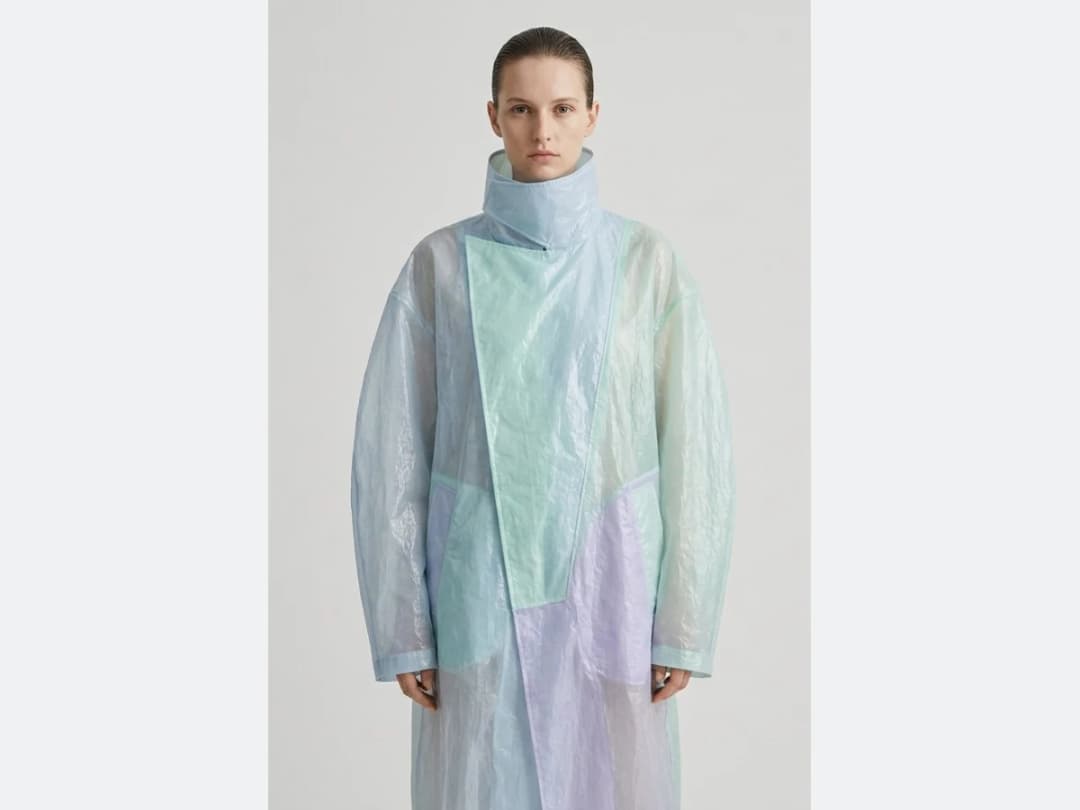
The input: a model in an iridescent coat against a plain studio wall.
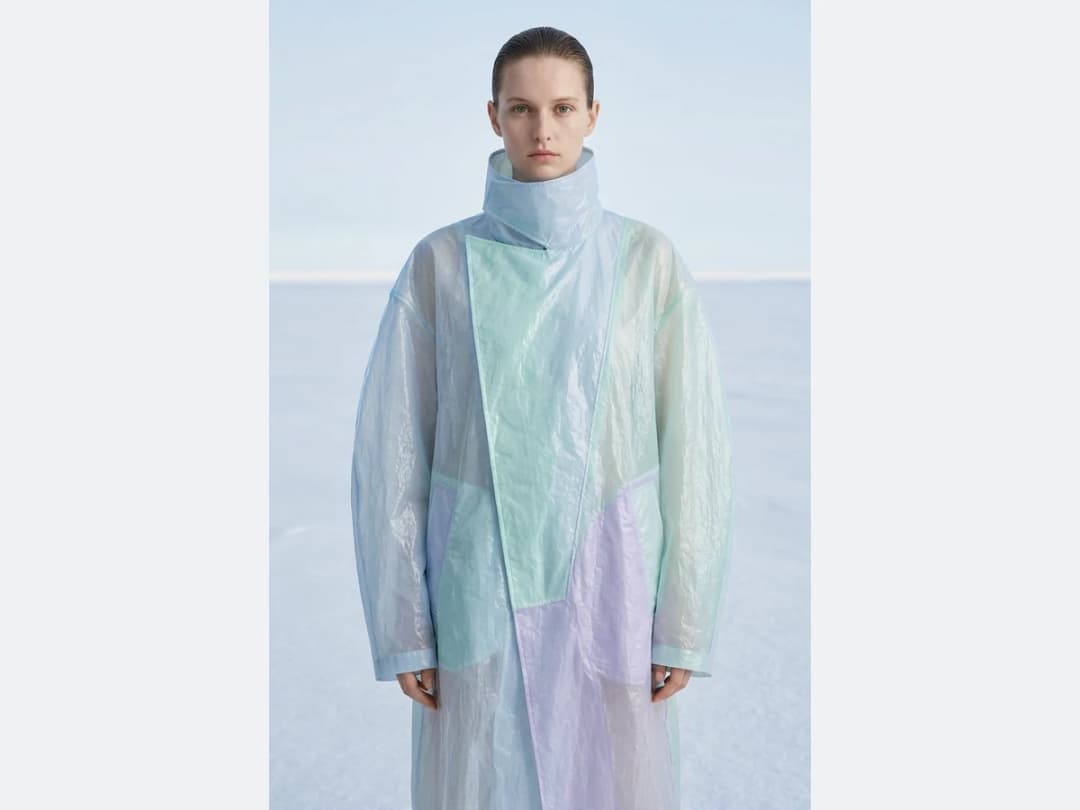
The same model, coat and pose moved to a salt flat with Change Background on The New Black AI, for 1 credit.
What a photo editor does not do is the rest of a brand's week. A trained person keeps the same face across a collection. A still becomes a model video of 5 to 30 seconds, at 2.2 credits a second with the Standard AI. The same garment can get its tech pack and a lookbook. Images and videos go to the Shopify product page through our Shopify app on every plan, and to social accounts from Pro. Mila, the AI agent included in every account, can run these steps for you, and the API works with a key on a free account.
Plans are monthly: Starter $15 for 200 credits, Pro $35 for 500, Business $65 for 1,000, with yearly options. Every workflow is open on every plan.
Limit: it is built for fashion, so a shop that sells candles and furniture as much as clothes will find Photoroom's general templates broader, and there is no one tap mobile editor.
Claid: best for on-model photos and product edits, on the web or through an API
Claid is the closest to Photoroom in spirit, a broad AI product photo suite, with more fashion inside: upscaling, background removal, AI photoshoots, AI fashion models, AI edits, outpainting, shadows and short video. Read in November 2026: an AI Fashion generation costs 4 web credits, five seconds of AI video 60; Essentials covers up to 125 AI Fashion generations or 8 videos a month, Pro up to 500 or 33 videos, and Business is custom. Pro downloads go up to 128 megapixels. On the API, an AI fashion image is 2 credits, sold in one time packs, and every account gets a starter allowance of API credits.
The dollar amounts of Essentials, Pro and the API packs did not display on its pricing pages when we read them, so see their site.
Who it fits: a team that runs images through a pipeline, sells several product types and wants fashion models as one operation, with export to Shopify products.
Limit: fashion is one category among many; the steps after the image (longer video, a tech pack, social publishing) are not part of it.
Botika: best for on-model photos from a large model library
Botika is fashion only: a flat lay, hanger or ghost mannequin shot becomes an on-model photo, an editorial shot or a short video, with more than 150 AI models, and a professional flat lay is made for every product. Read in November 2026, plans are billed yearly and paid upfront: Personal $20 a month ($240 a year, 10,080 credits), Pro $48 ($576, 26,400 credits), Max $80 ($960, 48,000 credits). A Standard 2K photo is 30 credits, High 4K 40, Max 4K 80, a five second video 130, and automatic retouching 10 credits on request.
Who it fits: a retailer that shoots on-model photos all year and wants a large library of models, poses and backgrounds.
Limit: a year paid upfront, API access only on Enterprise, and its Shopify App Store listing said the app is not currently available when we checked.
WearView: best for 4K fashion stills on a monthly plan
WearView turns flat lays, hanger shots and photos of a person into on-model images in HD, 2K and 4K on every plan, with virtual try-on and ghost mannequin views. Read in November 2026: Lite $29 a month ($24 billed yearly) for 50 credits, Pro $49 ($40) for 200, Advanced $99 ($82) for 500. An HD photo is 2 credits, 2K 3, 4K 5, an on-model photo 3; a video is 20 credits in 1080p and 40 in 4K, from Pro. Failed images are refunded, and the first plan has a 14 day refund.
Who it fits: a clothing brand that wants 4K stills on a monthly plan, where Photoroom puts 4K fashion on Ultra.
Limit: no videos and no own AI model on Lite, API access « on request », and images reach a store by download and upload.
FASHN: best for developers who want try-on and model photos through an API
FASHN offers virtual try-on, model swap, product to model, background edits, upscaling and video on its own fashion models, in a web app, a mobile app and an API. Read in November 2026: Basic is $19 a month ($16 billed yearly) for 200 credits, images up to 4K, 720p video, credits rolling over up to 600; Pro $49 for 750 credits plus 50 a day, 1080p video. The API has no subscription: $0.075 a credit, from $7.50, credits valid 12 months, failed requests never charged.
Who it fits: a developer adding try-on to a shop or an app, where Photoroom would mean a separate API plan.
Limit: no background suite on the scale of Photoroom's, no Shopify app, and app and API credits are separate.
Pixelcut: best for cheap background removal and upscaling
Pixelcut is the cheapest close substitute for Photoroom's editing core. Read in November 2026: a free plan with exports without watermark and limited upscaling; Pro at $10 a month ($8 billed yearly) with 600 AI credits, unlimited upscaling, 1,000 batch exports and a three person team; Business at $30 a month ($24 yearly) with 3,600 credits and 2,000 batch exports.
Who it fits: a small shop that mostly removes backgrounds and resizes.
Limit: it does not keep a garment on a consistent model across a collection, and nothing happens after the export.
Pebblely: best for styled product scenes for accessories
Pebblely places a product photo in an AI scene, from themes or your own prompt. Read in November 2026: $9 a month for 30 images, $19 for 200 and $39 for 500, with two or more months free on yearly plans.
Who it fits: a brand selling bags, shoes or jewellery shot as still life.
Limit: it makes scenes around an object, not a garment worn by a model, so it fits accessories better than clothing.
Picsart: best for an all purpose editor for social content
Picsart is a broad photo and video editor with many AI tools for everyday content. Read in November 2026: Pro is $15 a month or $10.50 billed yearly, Ultra $75 a month or $60 billed yearly, with more credits on Ultra.
Who it fits: a creator or a social team making content of every kind.
Limit: there is no fashion specific step such as product to model with the garment kept exact, a tech pack or a product page flow.
What one fashion image really costs
Photoroom's per image price depends on how you spend its credit pool, so the fair comparison is the plan you would really buy divided by the images it allows at the resolution you publish.
| Tool and plan (Nov. 2026) | How it is counted | One on-model image |
|---|---|---|
| Photoroom Max, monthly ($34.99) | up to 185 2K fashion images if every credit goes to fashion | about $0.19 at 2K |
| Photoroom Ultra, monthly ($99) | up to 555 at 2K, or 310 at 4K | about $0.18 at 2K, $0.32 at 4K |
| The New Black AI, Pro plan ($35 for 500 credits) | 1 credit Standard, 3 Pro AI, 7 Ultra in 4K; 2K upscale 1 credit | $0.07 Standard, $0.21 Pro AI, $0.49 Ultra 4K |
| Botika Personal ($240 a year for 10,080 credits) | 30 credits at 2K, 40 at 4K | about $0.71 at 2K, $0.95 at 4K |
| WearView Pro, monthly ($49 for 200 credits) | 3 credits on-model, 5 at 4K | about $0.74, $1.23 at 4K |
| FASHN API ($0.075 a credit) | most tools from 1 credit, more at higher resolutions | from $0.075, see their credit table |
Photoroom's figures assume every credit of the month goes to fashion, with no background removal or other AI edit from the same pool. No published price includes retakes, and a retake is paid again.
Worked example: a 60-piece season at 2K, priced
A brand launches 60 pieces and wants four on-model photos of each at 2K (front, back, side and a detail), plus a clean background version of every front shot. That is 240 on-model images and 60 background edits.
On Photoroom: Max allows up to 185 2K fashion images a month, so 240 images do not fit one month of Max; they fit one month of Ultra ($99, up to 555 at 2K), or two months of Max ($69.98), and the 60 background edits come out of the same credits.
On The New Black AI, with the Pro AI for the photos and an upscale to 2K:
- 240 images × 3 credits (Pro AI) = 720 credits.
- 240 upscales to 2K × 1 credit = 240 credits.
- 60 background removals × 0.5 credit = 30 credits.
- Total: 990 credits, inside one month of the Business plan (1,000 credits, $65).
- With the Standard AI for the photos instead: 240 + 240 + 30 = 510 credits, about one month of Pro ($35 for 500) plus a few credits.
- In 4K with Ultra, from Pro: 240 × 7 = 1,680 credits, about $118 at the Pro plan's $0.07 a credit, where Photoroom's Ultra stops at 310 4K images a month.
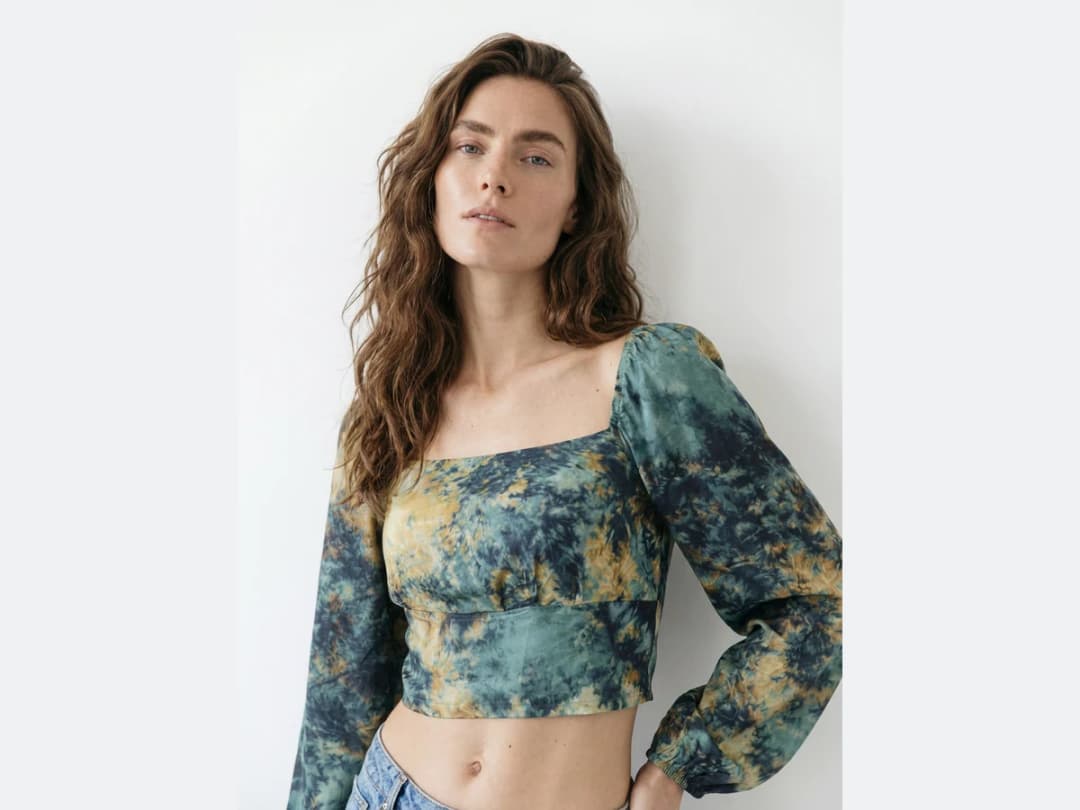
One worn photo of a tie dye top, the only input for the next shot.
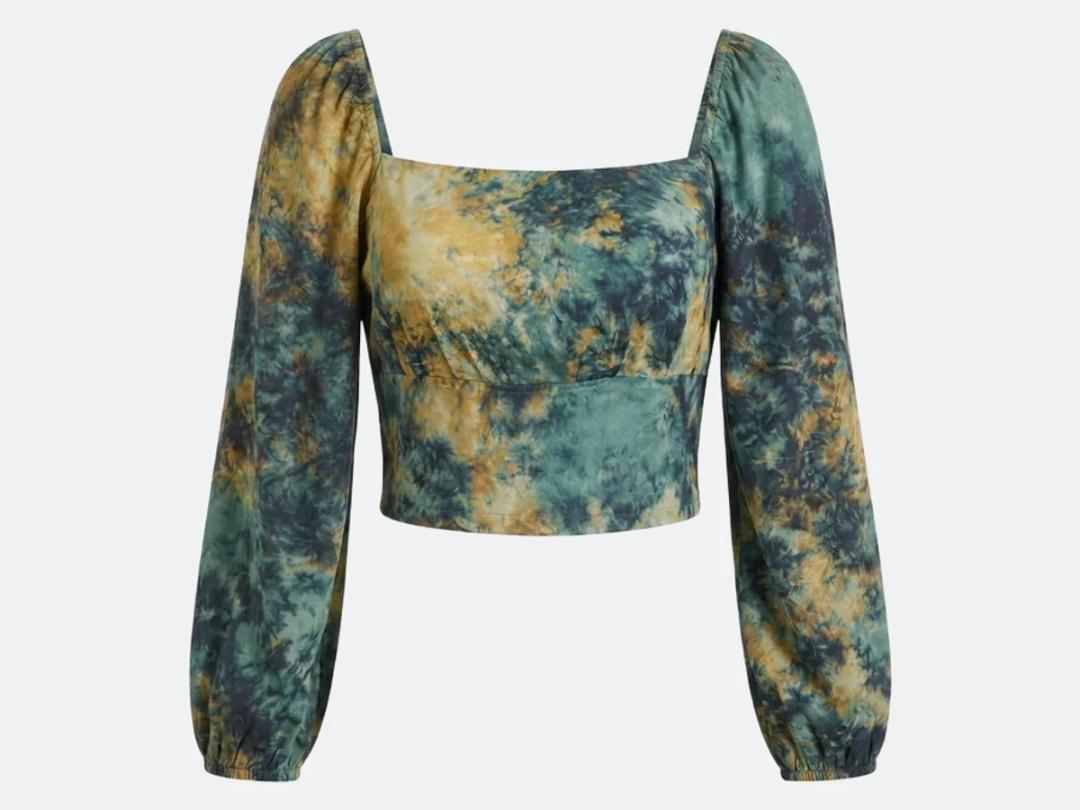
The same top as a clean ghost mannequin product image, made on The New Black AI for 1 credit with the Standard AI: the kind of extra view a season like this one adds per piece.
The order of magnitude is close; the difference is what else the credits can buy that month (video, try-on, other angles) and whether the plan caps the resolution you need. Count your pieces, your photos per piece and your resolution, and price that.
What to check before you leave Photoroom
Switching tools costs a week of a team's time, so run a short test first. Five checks settle most decisions:
- Garment fidelity. Take twenty garments that are hard to render: a print, a knit, a sheer layer, a structured jacket, a logo. Put each one through two or three tools at the resolution you publish, and count the images you would actually use. A cheaper image that needs two retakes is not cheaper.
- The same person across the set. Generate the whole set on one model and lay the images side by side. If the face, the hair or the body changes from one garment to the next, the collection page will look like ten different shoots.
- Resolution at your plan. Check the plan you would really buy, not the top one. On Photoroom, 2K fashion starts on Max; on The New Black AI, 2K upscaling is open on every plan and 4K starts on Pro.
- What the credits share. If one pool pays for backgrounds, retouching, video and fashion images, price a real month with all of them, not only the fashion images.
- Where the image goes next. Count the steps between a finished image and a live product page or a post. A download and an upload per image is fine for ten pieces and a chore for three hundred.
Keep the old tool for a month while the new one runs, so nothing on the store waits on the switch.
How to choose
A clothing brand whose photo is only one step
The New Black AI: on-model photos, try-on on your own model, other angles, video, tech packs and the Shopify product page in one account, on a monthly plan.
A store that sells many categories, not only clothes
Stay with Photoroom, or look at Claid: both are general suites with fashion models inside, and both batch. A fashion studio replaces the clothing work but not the candles.
You need 2K or 4K fashion images without a top plan
The New Black AI upscales to 2K on every plan and makes 4K from Pro ($35). WearView gives 4K on every plan from $29 a month, and FASHN up to 4K on Basic. On Photoroom, 2K fashion starts on Max and 4K on Ultra.
You want the same model across a collection
The New Black AI keeps one trained person across shoots and dresses a model you photographed with Virtual Try-On. WearView lets you build your own model from Pro. Photoroom saves custom models in Brand Kit.
A developer building try-on into a product
FASHN sells API credits at $0.075 with no subscription. The New Black AI exposes every workflow through its API, with a key on a free account. Claid sells API credit packs.
Small shop, tight budget, mostly backgrounds
Pixelcut's free plan or its Pro plan at $10 a month. For accessories shot as still life, Pebblely from $9.
You need video too
The New Black AI makes model videos of 5 to 30 seconds and a try-on video of a moving person. WearView makes videos from Pro, FASHN at 720p on Basic, Botika five second clips. See our ranking of AI fashion video generators.
For the wider field, see our ranking of the best AI fashion model generators and of the best AI ghost mannequin tools.
Sources
- The New Black AI, credits of each workflow and plan prices, read in its own catalogue and plans (checked November 2026).
- Photoroom, pricing, https://www.photoroom.com/pricing (checked November 2026).
- Photoroom, AI Fashion Models, https://www.photoroom.com/tools/ai-fashion-models (checked November 2026).
- Photoroom, Batch, https://www.photoroom.com/batch (checked November 2026).
- Photoroom, API pricing, https://www.photoroom.com/api/pricing (checked November 2026).
- Claid, pricing, https://claid.ai/pricing (checked November 2026).
- Claid, API pricing, https://claid.ai/api-pricing (checked November 2026).
- Botika, pricing, https://botika.com/pricing (checked November 2026).
- Shopify App Store, Botika listing, https://apps.shopify.com/botika (checked November 2026).
- WearView, pricing, https://wearview.co/pricing (checked November 2026).
- FASHN, pricing and API pricing, https://fashn.ai/pricing (checked November 2026).
- Pixelcut, pricing, https://www.pixelcut.ai/pricing (checked November 2026).
- Pebblely, pricing, https://pebblely.com/pricing/ (checked November 2026).
- Picsart, pricing, https://picsart.com/pricing (checked November 2026).
Frequently asked questions
What is the best Photoroom alternative for a fashion brand?+
The New Black AI: it keeps the garment exact on an AI model, adds try-on on your own model, ghost mannequin, video up to 30 seconds, tech packs and Shopify publishing, from $15 a month. For a general suite with an API, Claid; for cheap background removal, Pixelcut.
Is there a free Photoroom alternative?+
Pixelcut has a free plan for basic edits. The New Black AI opens every account with free credits at signup, enough to try product to model and try-on. FASHN and Claid give a small allowance to new accounts, and WearView offers free sample shoots.
Which Photoroom plan includes AI fashion models at 2K?+
Max and Ultra. Read in November 2026, Pro includes AI Fashion Models at 1K only, Max up to 185 generations at 2K a month and Ultra up to 555 at 2K or 310 at 4K, if every credit goes to fashion.
What does one AI on-model image cost?+
About $0.19 at 2K on Photoroom Max, $0.07 to $0.21 on The New Black AI's Pro plan depending on the AI (plus 1 credit for a 2K upscale), about $0.71 on Botika Personal at 2K and about $0.74 on WearView Pro (Nov. 2026). None of these include retakes.
Which Photoroom alternative has an API?+
FASHN sells API credits at $0.075 with no subscription, The New Black AI exposes every workflow with a key on a free account, and Claid sells API credit packs. Photoroom sells its own API apart from the app.
Can I remove backgrounds without Photoroom?+
Yes. The New Black AI removes a background for 0.5 credit and changes it for 1 credit with the Standard AI, and Pixelcut, Picsart and Claid all remove backgrounds too.
Which Photoroom alternative works with Shopify?+
The New Black AI publishes images and videos to the Shopify product page through its Shopify app, on every plan. Claid lists export to Shopify products; WearView and FASHN deliver files you upload yourself.
Can I keep the same model across a collection?+
Yes. The New Black AI keeps one trained person across shoots and can dress a model you photographed with Virtual Try-On. WearView offers your own model from Pro, and Photoroom saves custom models in Brand Kit.
Related articles
- 9 Best Claid Alternatives for Fashion Brands (2026)9 Claid alternatives for clothing brands, November 2026: who each fits, cost per on-model image, API, ghost mannequin, video and Shopify, a catalogue priced.
- 8 Best Botika Alternatives in 2026 (Compared)8 Botika alternatives compared, November 2026: who each fits, price per image, monthly or yearly plans, API, Shopify app and video, with a 40-piece drop priced.
- 10 Best AI Ad Generators for Clothing Brands (2026)Ten AI ad generators compared for clothing brands: what each fits, prices read November 2026, a month of fashion ads priced, and which ones run Meta and Google.
- 9 Best WearView Alternatives in 2026 (Compared)9 WearView alternatives compared, November 2026: who each fits, real 4K price per image, video on the entry plan, free start and Shopify, a month priced.
- 10 Best AI Fashion Studios for Brands in 2026 (Compared)10 AI fashion studios compared (Nov. 2026): what each holds (design, photos, video, tech packs, Shopify), team seats, prices, and a 20-piece month priced.
- 8 Best AI Product Photo Tools for Clothing Brands (2026)Eight AI product photo tools for clothing brands compared: what each fits, the price of one 2K photo, and a 40-piece drop priced. Updated November 2026.
- 8 Best FASHN Alternatives in 2026 (Compared)8 FASHN alternatives compared, Nov. 2026: API, Shopify publishing, video length, 2K price per image and a 40-piece drop priced in each tool.
- 9 Best AI Virtual Try-On Tools for Fashion Brands (2026)9 AI virtual try-on tools for fashion brands compared, Nov. 2026: price per image, free option, video, API and Shopify, with a 40-piece drop priced.
- 9 Best AI Tools for Clothing Brands in 2026 (Compared)9 AI tools for clothing brands compared (Nov. 2026): design, tech packs, on-model photos, video and Shopify, with prices read on each site and a priced capsule.
- 9 Best AI Moodboard Tools for Fashion Designers (2026)9 AI moodboard tools for fashion designers compared in November 2026: what each fits, prices checked, free options, and a 12 look capsule priced.