10 Best AI Tools for Fashion Ecommerce in 2026 (Compared)
Published 3 November 2026 · Updated 13 November 2026
For an online fashion store that needs every image a product page sells with (on-model photos, ghost mannequin and flat lay packshots, new backgrounds, try-on and product video), our pick is The New Black AI (we make it), because it makes all of them in one account and sends them to the Shopify product page. If you only need on-model catalogue photos, Botika and WearView are focused photo studios; if your team already edits thousands of product photos, Photoroom and Claid put AI fashion models inside a general product photo editor; for styled scenes of accessories on a small budget, Pebblely. Below, ten tools compared on the images a fashion product page needs, what one image really costs, and a 300-SKU season priced.
Updated November 2026.
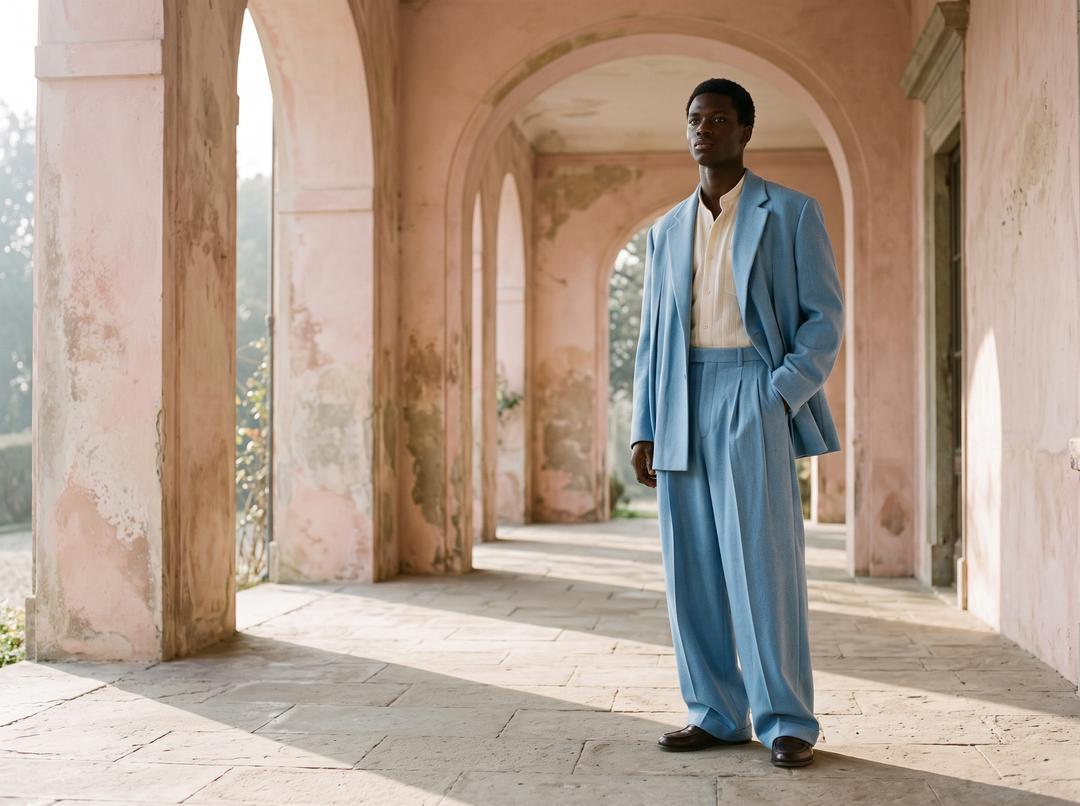
*An on-model image made in The New Black AI, the kind of picture that opens a fashion product page.*
Quick answer
- Best for every product image and video in one account, published to Shopify: The New Black AI.
- Best for on-model catalogue photos paid once a year: Botika.
- Best for 4K product-to-model stills and ghost mannequin on a monthly budget: WearView.
- Best for a team that already edits product photos at volume: Photoroom, or Claid for an editor with an API.
- Best for styled product scenes of accessories, from $9 a month: Pebblely.
The 10 tools at a glance
Prices were read on each company's pricing page in November 2026 (Nov. 2026). Several companies only show yearly prices, or none; the table says so.
| Tool | Best for | Starting price (Nov. 2026) | Free option | 4K output |
|---|---|---|---|---|
| The New Black AI | Every product image and video, sent to Shopify | Starter $15 a month | Free credits at signup | Yes, Ultra tier from Pro |
| Botika | On-model photos, yearly budget | $20 a month billed yearly ($240) | 7-day trial | Yes, High 4K (40 credits) |
| WearView | 4K stills, ghost mannequin, flat lay | $29 a month, $24 billed yearly | Free sample shoots | Yes, every plan |
| Photoroom | Editing at volume, AI models on top | Not shown, see their site | Trial on Pro and Max | Ultra only |
| Claid | A product photo editor with an API | Not shown, see their site | Free plan | See their site |
| Pebblely | Styled scenes for objects | $9 a month for 30 images | See their site | See their site |
| SellerPic | Social videos from one photo | $29 a month | Free plan | UHD downloads on paid plans |
| Modelia | A free watermarked start | Creator $30 a month | Free plan, watermarked | Yes, from Creator |
| FASHN | Try-on and model photos by API | $19 a month; API $0.075 a credit | 10 trial credits | Yes, up to 4K |
| Uwear | Pay per photo, no subscription | $0.10 a credit, from $7 | Free preview of three products | See their site |
How this comparison was made, and how the order is set
We read each company's own pricing page and product pages in November 2026, listed in the sources with that month. We did not buy a plan from any competitor and did not run our garments through their tools, so this page makes no claim about which one renders a given garment best. When a price is not published, or was not shown to us, we write "see their site" rather than repeat an older number.
We compared the tools on what a fashion store needs from its product images:
- 1.Which inputs it accepts: a flat lay, a hanger shot, a ghost mannequin photo, a photo of the piece worn.
- 2.Which images come out: on-model photos, packshots (ghost mannequin, flat lay), new backgrounds, try-on on your own model, video.
- 3.Whether the same model and look stay across a catalogue.
- 4.What one finished image costs at the published plan price, and what a season costs.
- 5.Whether the image reaches the product page without a download and upload.
The order follows one job: an online fashion store producing all the images of a season's product pages. Tools that make more of those image types and get them to the product page on their published self-serve terms come first. We make The New Black AI and put it first because it covers the most of that job in one account, and we say so. For a narrower job, the "How to choose" section points to the right tool.
The tools, and what each fits best
The New Black AI: our pick for a fashion store that wants every product image in one account (we make it)
The New Black AI makes each image a product page needs as its own workflow, from the photos a store already has:
- On-model photos. Product to Model puts a flat lay, a hanger shot or a ghost mannequin photo on an AI model you choose; Swap Model changes the person and keeps the clothes.
- Packshots. A ghost mannequin image or a clean flat lay from one photo of the piece worn.
- Backgrounds. The background changes in a sentence, the model and the garment kept.
- Try-on. Virtual try-on dresses your own model in your pieces.
- Video. A product video from one photo, a Product 360 or a model walk.
- The product page. The Shopify app publishes images and videos to the product page, on every plan; from Pro, the same images go to Instagram, TikTok, Pinterest, Threads and YouTube.
A consistent model and a Visual style keep the same face and look across a catalogue, and bulk generation runs up to 30 products with one brief on Pro.
Price (Nov. 2026). A photo costs 1 credit on Standard AI, 3 on Pro AI and 7 on Ultra in 4K, whether it is on-model, ghost mannequin, flat lay or try-on; removing a background costs half a credit; video costs 2.2 credits a second on Standard. Starter is $15 a month for 200 credits, Pro $35 for 500, Business $65 for 1,000, Enterprise $195 for 3,000. Every workflow is open on every plan; 4K, bulk and social publishing start on Pro.
Limit. The Shopify connection is the one built today: a store on another platform downloads its images and uploads them itself.
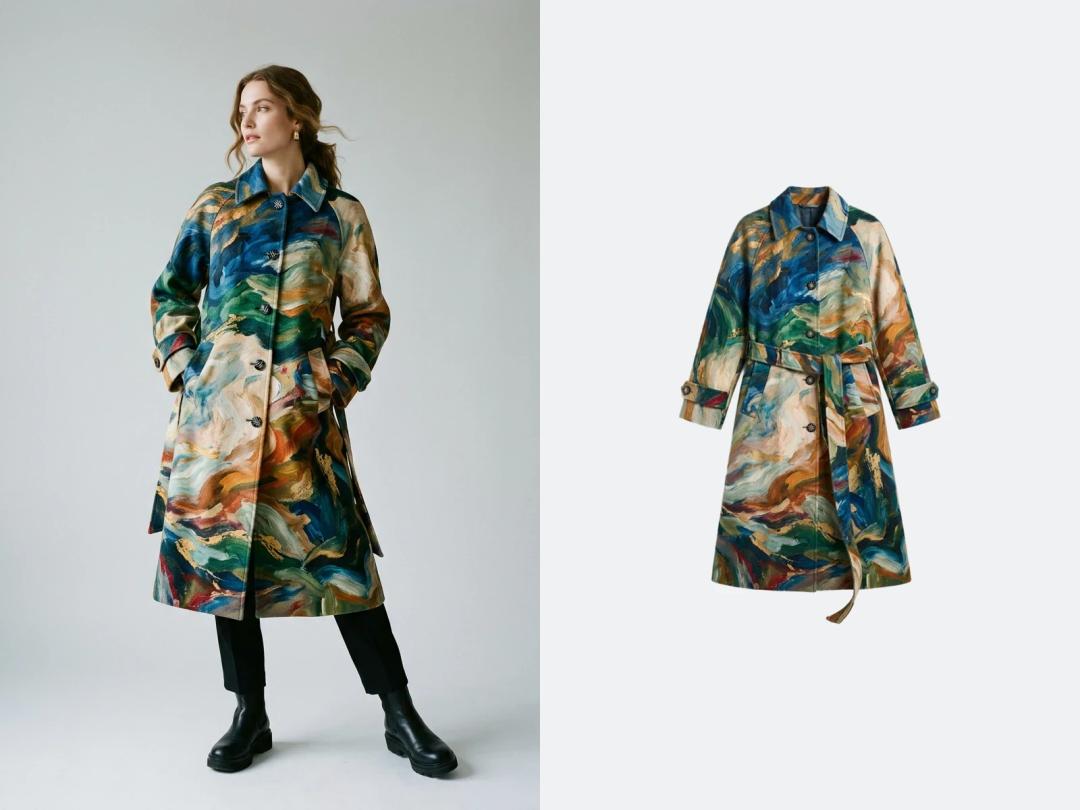
*One photo of a coat worn, and the flat lay packshot made from it with Image to Flat Lay.*
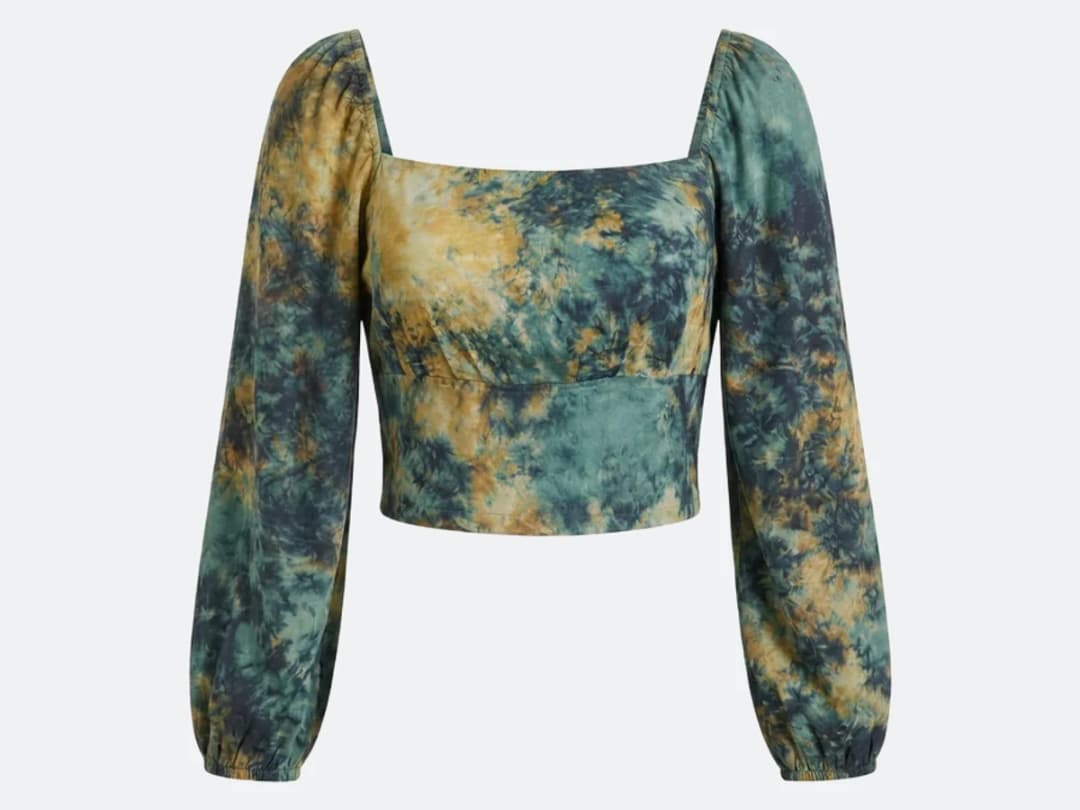
*The ghost mannequin version of a top, lifted from a photo of the piece worn.*
Botika: best for on-model catalogue photos on a yearly budget
Botika turns flat lays, ghost mannequin shots and existing model photos into on-model photos, editorial shots and 5-second videos, from a library of models, poses and backgrounds. Its pricing page says every plan creates a professional flat lay for every product, with a preview at no cost and 10 credits to download the high resolution file, and that retouching is requested image by image for 10 credits.
Price (Nov. 2026). Three plans, billed yearly with all credits upfront: Personal $20 a month ($240, about 350 Standard 2K photos a year), Pro $48 ($576, about 900), Max $80 ($960, about 1,600). A Standard 2K photo is 30 credits, High 4K 40, Max 4K 80, a video 130. Pro rolls unused credits over for 3 months, Max for 6. A 7-day trial comes with 300 credits.
Who it fits. A store that photographs its catalogue season by season and can commit a year upfront.
Limit. The yearly upfront payment is a commitment for a store testing AI for the first time. Its Shopify app showed as not currently available on the Shopify App Store in November 2026.
WearView: best for 4K product-to-model stills and ghost mannequin on a monthly budget
WearView lists seven photo studios, up to 4K on every plan, including ghost mannequin and a Pro Flat Lay, with runs of up to 50 garments, and short videos from Pro.
Price (Nov. 2026). Lite $29 a month ($24 billed yearly) for 50 credits, about 16 images at 2K; Pro $49 ($40) for 200 credits, about 66 at 2K or 40 at 4K, with five teammates; Advanced $99 ($82) for 500 credits, about 166 at 2K, credits that roll over. A money-back guarantee, free sample shoots, and failed images refunded automatically.
Who it fits. A store that wants sharp stills and ghost mannequin packshots on a monthly plan.
Limit. The pricing page does not mention Shopify publishing, so images are downloaded and uploaded by hand; Lite's 50 credits is a small month.
Photoroom: best for teams already editing product photos at volume
Photoroom is a product photo editor (background removal, AI backgrounds, batch editing) with AI Fashion Models included in its plans.
Price (Nov. 2026). Its pricing page lists Pro, Max and Ultra "per month, billed yearly" without showing the amount to us; prices depend on your region, so see their site. The fashion limits are published: Pro allows up to 1,600 AI fashion model generations at 1K and none at 2K; Max 5,000 at 1K and 185 at 2K; Ultra 15,000 at 1K, 555 at 2K and 310 at 4K. The Shopify integration is on Max and Ultra. Its API has separate plans; the Plus image editing API is $0.10 an image.
Who it fits. A team that edits thousands of product photos across categories and wants a model option in the same tool.
Limit. Product page images are mostly 2K, and 2K fashion images start on Max, capped at 185 a month. It is a general product photo tool; ghost mannequin from a worn photo or try-on on your own model are not its focus.
Claid: best for a product photo editor with an API
Claid offers upscaling, background removal, AI photoshoots, AI Fashion and video on the web and through an API.
Price (Nov. 2026). Its pricing page shows a $0 plan with 50 trial credits on the web and 50 for the API, then Essentials, Pro and a custom Business plan; the amounts were not shown to us, so see their site. An AI Fashion generation is 4 credits, which the page counts as 125 a month on Essentials and 500 on Pro; a 5-second video is 60 credits.
Who it fits. A store or a marketplace with developers who want one API for many product photo operations, fashion included.
Limit. A general product photo suite: fashion steps such as try-on on your own model, ghost mannequin from a worn photo or a tech pack are not its focus, and we could not read its plan prices.
Pebblely: best for styled product scenes on a small budget
Pebblely places a product photo into a styled scene, from themes or a prompt.
Price (Nov. 2026). $9 a month for 30 images, $19 for 200, $39 for 500, with more than two months free on yearly plans.
Who it fits. A store selling bags, shoes, jewellery or beauty products that wants lifestyle scenes for objects.
Limit. It is built for objects on a set, not for clothing on a person: it does not put a garment on a model.
SellerPic: best for social videos from one product photo
SellerPic makes model shots, model swaps in existing photos and videos up to 10 seconds, with templates, lip-sync and scheduled posts, plus a Shopify app.
Price (Nov. 2026). A $0 plan with 20 trial credits. Starter $29 a month for 200 credits ($14.50 a month on the yearly plan, shown at 50% off), Growth $79 for 600, Advanced $99 for 3,000.
Who it fits. A store whose bottleneck is TikTok, Reels and short ads.
Limit. Its pricing page does not say how many credits one image or video takes, so a month's output is hard to compute in advance.
Modelia: best for a free watermarked start
Modelia makes model photos from flat lays and mannequin shots, pose changes, outfits and fashion video, with model casting slots.
Price (Nov. 2026). Free: 50 welcome credits, then 20 a month, up to 2K with a watermark. Creator $30 a month for 150 credits, 4K, API. Atelier $109 and Brand $385 include all studio generations under fair use. A standard image is 3 credits at 2K or 4K. Its Shopify app is billed differently: Basic $35 a month, Pro $85.
Who it fits. A small store that wants to see its pieces on a model before paying.
Limit. On Creator, 150 credits is about 50 images a month; a whole catalogue means Atelier or above.
FASHN: best for try-on and model photos through an API
FASHN offers try-on, model creation, model swap, product to model, background edits and video in a web app, a mobile app and an API.
Price (Nov. 2026). Basic $19 a month for 200 credits ($16 yearly), Pro $49 for 750 plus 50 a day, Agency $99 for 1,500 plus 100 a day; most tools from 1 credit an image, up to 4K. API credits $0.075 each from a $7.50 minimum; failed requests are not charged. New accounts get 10 credits to try.
Who it fits. A store with developers building try-on or a product image pipeline.
Limit. No Shopify app to publish to a product page; a developer connects it.
Uwear: best for paying per photo, no subscription
Uwear generates on-model photos, shop-the-look images and video from clothing photos, with a studio, an agent, an API and an MCP server.
Price (Nov. 2026). $0.10 a credit, credits never expire, from 70 credits ($7); a photo from 2 credits depending on the image model. No free plan; a free preview of three of your products from your store link.
Who it fits. A store with uneven volume that wants to pay only when it shoots.
Limit. It covers on-model photos and video; packshots, backgrounds and publishing to the product page are left to other tools.
What one product image really costs
Start from the number of images a product page needs, not from the plan. A fashion product page usually carries four to six pictures: a full-body front on a model, a back view, a close detail of the fabric or a closure, a side or movement shot, and one packshot (ghost mannequin or flat lay) that shows the cut without a body. Many stores add a short video on their best sellers. Multiply by the products of a season and by the colours you photograph separately, and the volume decides the tool more than the entry price does: a plan of 50 images a month suits a boutique adding ten products, not a store launching three hundred.
Three things to know before comparing:
- Credits differ in size. Botika counts 30 credits a Standard photo, Modelia 3, WearView about 3 at 2K, FASHN from 1, The New Black AI 1 to 7 by quality.
- Caps hide in the plan. Photoroom Max stops at 185 fashion images at 2K a month; WearView Lite at about 16.
- Retakes cost the same as keepers, except where a failed generation is refunded (WearView, FASHN's API).
Price of one on-model product photo at published prices, November 2026:
| Tool | Plan and quality | Calculation | One photo |
|---|---|---|---|
| The New Black AI | Starter, Standard AI | $15 ÷ 200 × 1 credit | about $0.08 |
| The New Black AI | Pro, Pro AI | $35 ÷ 500 × 3 credits | about $0.21 |
| The New Black AI | Enterprise, Pro AI | $195 ÷ 3,000 × 3 credits | about $0.20 |
| Botika | Max, Standard 2K, yearly | $960 ÷ about 1,600 | $0.60 |
| WearView | Advanced monthly, 2K | $99 ÷ about 166 | about $0.60 |
| FASHN | Agency, 1-credit tool | $99 ÷ 1,500 × 1 | about $0.07 |
| Modelia | Creator | $30 ÷ 150 × 3 | $0.60 |
| Uwear | Cheapest model | $0.10 × 2 | $0.20 |
| Pebblely | Pro, object scene | $39 ÷ 500 | about $0.08 |
Photoroom and Claid are left out because their plan prices were not shown to us. Different engines and resolutions sit behind these numbers; the fair test is the same twenty garments through two or three shortlisted tools.
Worked example: a 300-SKU season, priced
A store launches 300 new products for the season and wants, for each: four on-model photos (front full body, back, detail, side) and one ghost mannequin packshot. That is 1,200 on-model photos and 300 packshots, 1,500 images. It also wants a 10-second video for 30 hero products.
On The New Black AI, at Pro AI quality (3 credits a photo):
- 1,500 images × 3 credits = 4,500 credits
- 30 videos × 10 seconds × 2.2 credits = 660 credits
- Total 5,160 credits. Two months of Enterprise ($195 for 3,000 credits) give 6,000 credits for $390, which leaves 840 credits for retakes (about 280 photos redone once).
At Standard AI (1 credit a photo) the images are 1,500 credits and, with the videos, 2,160 credits: one Enterprise month (3,000 credits for $195) covers both, with room for retakes. Either way, the images go to each Shopify product page from the window they were made in, on every plan.
For the photos alone, at the published estimates we read: Botika Max (about 1,600 Standard 2K photos a year, $960 paid upfront) covers the 1,500 images in one yearly plan; WearView Advanced (about 166 2K images a month) needs about nine months, $891 at $99 a month; Uwear at its cheapest model is 1,500 × $0.20 = $300 before videos and retakes. Photoroom Max would need more than eight months at 185 fashion images at 2K a month. None of these totals includes packshots made in a second tool, or the time spent downloading and uploading 1,500 files.
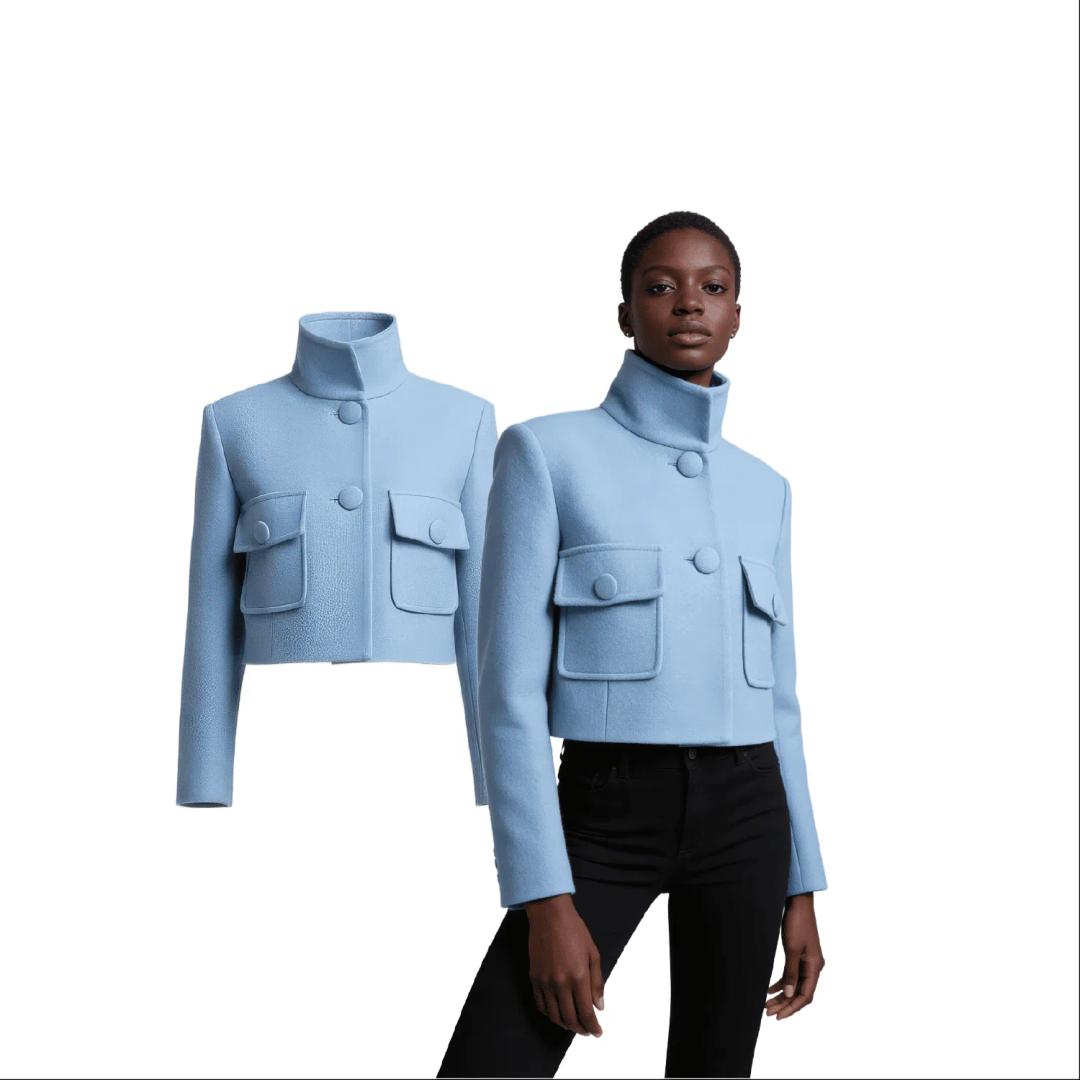
*One product of the season: the jacket's packshot, and the same jacket on a model with Product to Model.*
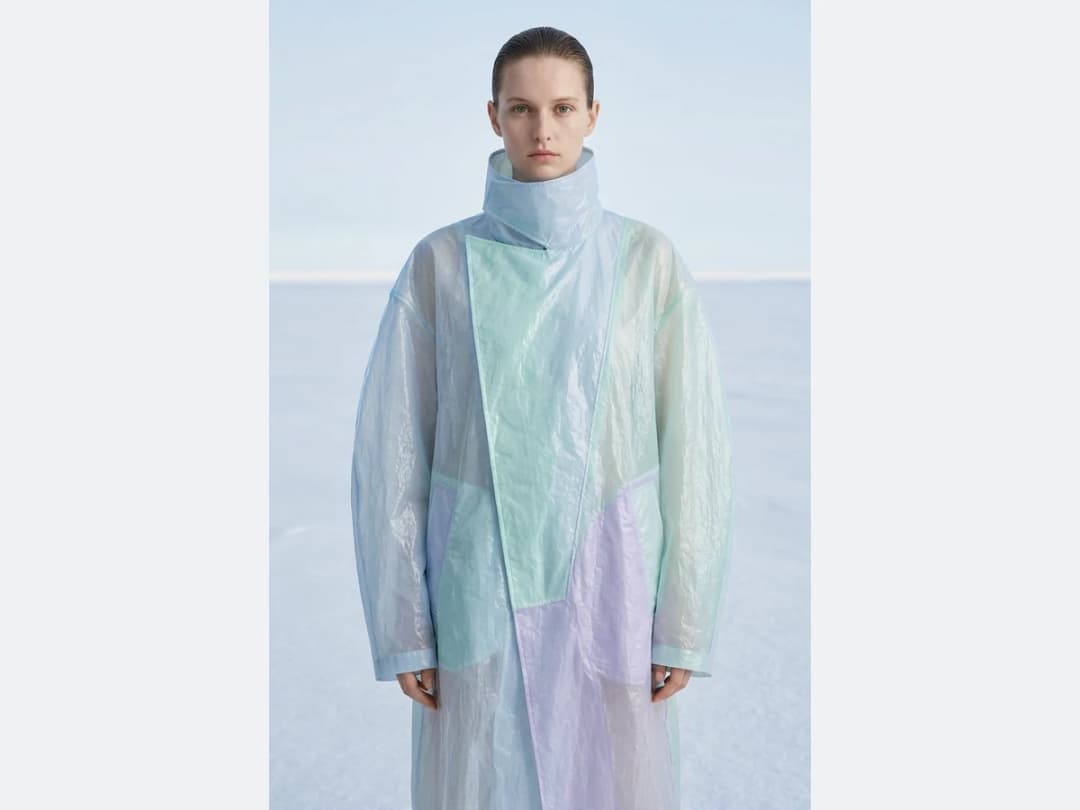
*A studio photo moved to a salt flat with Change Background, the model and the coat kept, for a campaign tile on the collection page.*
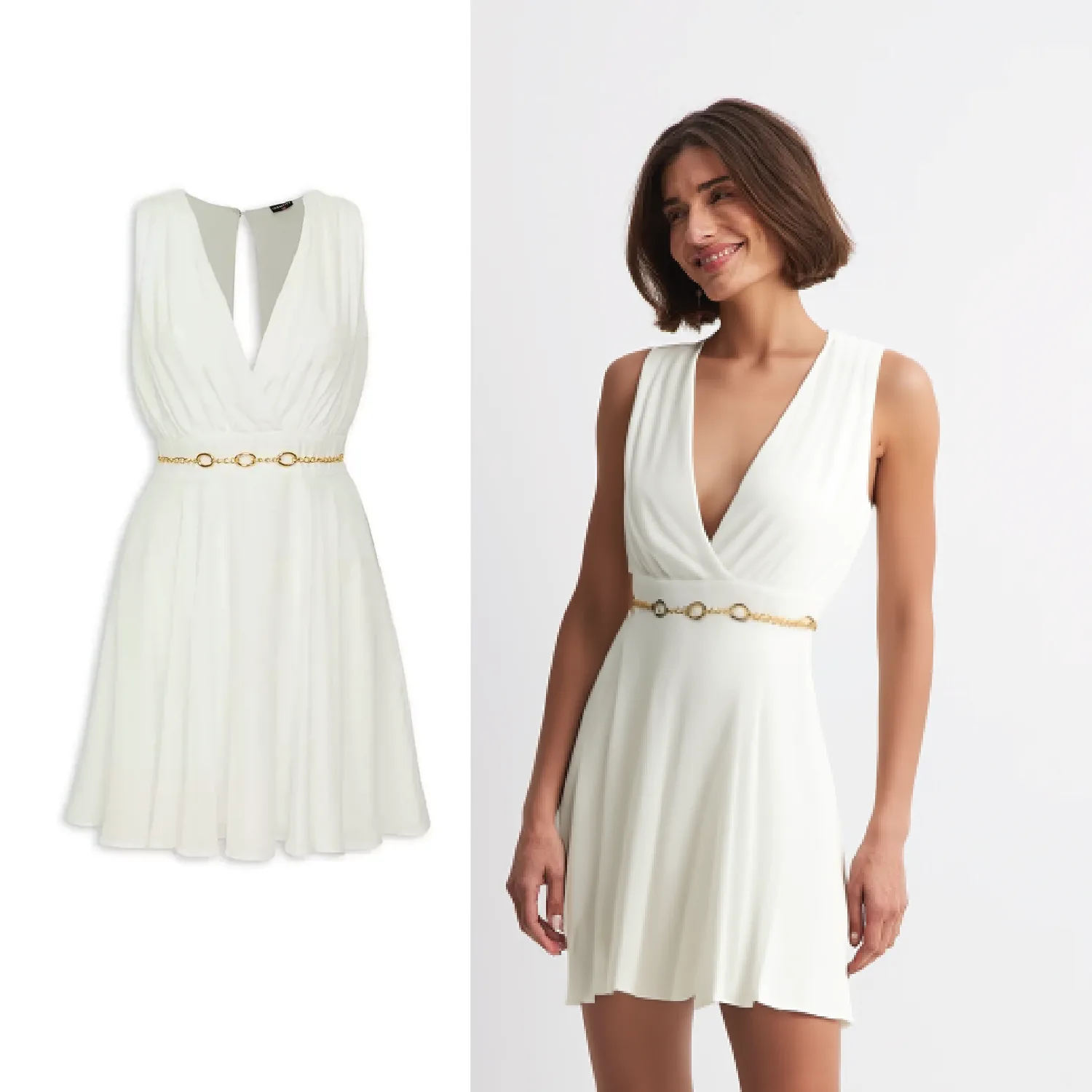
*A dress shown flat, then worn: the pair a shopper compares before adding to cart.*
How to choose
A Shopify fashion store that wants every image type in one place
Start with The New Black AI: on-model photos, ghost mannequin and flat lay packshots, backgrounds, try-on and video come from one account and go to the product page through the Shopify app. Pro adds 4K, bulk runs of 30 products and social publishing.
A store that shoots its whole catalogue once a season
Botika's yearly plans pay all credits upfront and suit a catalogue photographed season by season; WearView Advanced suits the same job on a monthly plan with ghost mannequin included. On The New Black AI, an Enterprise month gives 3,000 credits for $195.
A boutique or multi-brand store working from supplier photos
You need packshots and on-model photos from inconsistent supplier images. The New Black AI and WearView both make ghost mannequin images; The New Black AI also makes flat lays and moves photos to a common background so the grid looks like one store.
A dropshipping clothing store on a tight budget
Test before you commit: free credits at signup on The New Black AI, Modelia's watermarked free plan, FASHN's 10 trial credits, Uwear's free preview. At the cheapest quality, The New Black AI Starter gives about 200 photos for $15.
A team that already edits thousands of product photos
Photoroom if your editing is mostly background removal and batch work across categories; Claid if you want the same operations through an API. Check Photoroom's 2K fashion cap (185 a month on Max) against your catalogue.
A developer building try-on or an image pipeline
FASHN's API is priced per credit with failed requests free; The New Black AI's API and MCP server are open to any account and reach every workflow; Claid and Uwear also have APIs.
You sell accessories and objects more than clothing
Pebblely places objects in styled scenes from $9 a month. For a bag or a shoe worn by a model, The New Black AI's try-on and Product to Model work on accessories too.
Related comparisons
For one image type in depth: AI fashion model generators, virtual try-on tools, fashion video generators and the ghost mannequin photography guide. For the store itself beyond the images, see AI tools for Shopify clothing stores.
Sources
All pages read in November 2026.
- The New Black AI, Pricing, https://thenewblack.ai/pricing (checked November 2026)
- Botika, Pricing, https://botika.com/pricing (checked November 2026)
- Shopify App Store, Botika listing, https://apps.shopify.com/botika (checked November 2026)
- WearView, AI Fashion Model Pricing Plans and Credits, https://www.wearview.co/pricing (checked November 2026)
- Photoroom, Pricing, https://www.photoroom.com/pricing (checked November 2026)
- Photoroom, API pricing, https://www.photoroom.com/api/pricing (checked November 2026)
- Claid, Pricing, https://claid.ai/pricing (checked November 2026)
- Pebblely, Pricing, https://pebblely.com/pricing (checked November 2026)
- SellerPic, Compare Free, Starter, Advanced Plans, https://www.sellerpic.ai/pricing (checked November 2026)
- Modelia, Pricing, https://modelia.ai/pricing (checked November 2026)
- Shopify App Store, Modelia listing, https://apps.shopify.com/modelia (checked November 2026)
- FASHN, Pricing, https://fashn.ai/pricing (checked November 2026)
- Uwear, Pricing, https://uwear.ai/pricing (checked November 2026)
Frequently asked questions
What is the best AI tool for fashion ecommerce in 2026?+
Our pick is The New Black AI (we make it), for a store that wants on-model photos, packshots, backgrounds, try-on and video in one account and published to Shopify. For on-model photos alone, Botika or WearView; for editing at volume, Photoroom or Claid; for object scenes, Pebblely.
What does one AI on-model product photo cost?+
At published prices in November 2026: about $0.08 (Standard AI) to $0.21 (Pro AI) on The New Black AI, about $0.07 for a 1-credit tool on FASHN Agency, $0.20 on Uwear's cheapest model, about $0.60 on Botika Max, WearView Advanced or Modelia Creator. Photoroom and Claid did not show their plan prices.
Can AI make ghost mannequin images for a fashion store?+
Yes. The New Black AI makes a ghost mannequin or flat lay packshot from one photo of the piece worn, at 1 credit on Standard; WearView lists a ghost mannequin studio on every plan; Botika makes a flat lay for every product.
Is there a free AI product photo tool for clothing?+
Free to try, not free to run a catalogue: The New Black AI gives free credits at signup, Modelia has a watermarked free plan, Claid and SellerPic have free plans with a few credits, FASHN gives 10 trial credits, Botika a 7-day trial and Uwear a free preview.
Photoroom or Botika for a clothing store?+
Photoroom is a general product photo editor with AI fashion models included, capped at 185 fashion images at 2K a month on Max; Botika is a fashion photo studio paid yearly, about 1,600 Standard 2K photos a year on Max. A clothing store that only needs on-model photos leans to Botika; one editing many categories leans to Photoroom.
Can I keep the same AI model across my whole catalogue?+
Yes, on tools that save a model: The New Black AI keeps a consistent model and a Visual style across a catalogue, WearView lets Pro users create their own model, Modelia gives casting slots by plan, Botika builds exclusive models on Enterprise.
Which AI product photo tools publish straight to Shopify?+
The New Black AI publishes images and videos to the product page through its Shopify app, on every plan. Photoroom lists a Shopify integration on Max and Ultra, and SellerPic and Modelia have Shopify apps. WearView's pricing page does not mention Shopify.
Do AI model photos sell as well as a real photoshoot?+
No independent study we know of settles it for every category. The practical test is your own: put AI on-model photos on part of the catalogue, keep the rest, and compare conversion on the product pages over a few weeks.
Related articles
- 8 Best AI Ghost Mannequin Tools in 2026 (Compared)8 AI ghost mannequin tools compared, Nov. 2026: what each starts from, cost per image, free options, API and a 300-SKU season priced.
- 9 Best Claid Alternatives for Fashion Brands (2026)9 Claid alternatives for clothing brands, November 2026: who each fits, cost per on-model image, API, ghost mannequin, video and Shopify, a catalogue priced.
- 9 Best AI Tools for Clothing Brands in 2026 (Compared)9 AI tools for clothing brands compared (Nov. 2026): design, tech packs, on-model photos, video and Shopify, with prices read on each site and a priced capsule.
- 9 Best WearView Alternatives in 2026 (Compared)9 WearView alternatives compared, November 2026: who each fits, real 4K price per image, video on the entry plan, free start and Shopify, a month priced.
- 9 Best Flat Lay to Model AI Tools for Brands (2026)9 flat lay to model AI tools compared, November 2026: flat lay, hanger and ghost mannequin input, price per photo read on each site, a 40-piece drop priced.
- 8 Best FASHN Alternatives in 2026 (Compared)8 FASHN alternatives compared, Nov. 2026: API, Shopify publishing, video length, 2K price per image and a 40-piece drop priced in each tool.
- 10 Best AI Fashion Studios for Brands in 2026 (Compared)10 AI fashion studios compared (Nov. 2026): what each holds (design, photos, video, tech packs, Shopify), team seats, prices, and a 20-piece month priced.
- 9 Best AI Jewelry Design and Photography Tools (2026)9 AI jewelry design and photography tools compared, Nov. 2026: CAD files, worn shots, video, Shopify, prices checked and a 40-piece drop priced.
- 8 Best Botika Alternatives in 2026 (Compared)8 Botika alternatives compared, November 2026: who each fits, price per image, monthly or yearly plans, API, Shopify app and video, with a 40-piece drop priced.
- 8 Best Photoroom Alternatives in 2026 (Compared)8 Photoroom alternatives for clothing brands, November 2026: who each fits, 2K and 4K fashion prices, API, Shopify and video, with a 60-piece season priced.